cancel
Showing results for 
Search instead for 
Did you mean: 

The Power BI Data Visualization World Championships is back! Get ahead of the game and start preparing now! Learn more

Reply
Interact
Regular Visitor

ISFILTERED - a way to differentiate filter by selection in a chart and drill down

Hello there.


This may be a tricky problem to explain, but I will try my best.


I have a table with a hierarchical structure of indicators of multiple levels (level1, level2, level3... all the way to 10). I've created a column chart to display this hierarchy:


Column chart.PNGColumn chart 2.PNG


Each indicator has a "goal" and "result" value, which displays fine in the chart. When this column chart displays the first hierarchical level (level1), this other gauge chart that I have needs to sum the "result" and "goal" of all indicators from the first level (the same to all other levels). I managed to accomplish this using this measure:


result_with_filters = 
IF (
    ISFILTERED ( vw_indicator_hierarchies_template[level1] );
    IF (
        ISFILTERED ( vw_indicator_hierarchies_template[level2] );
        IF (
            ISFILTERED ( vw_indicator_hierarchies_template[level3] );
            ...
        );
        CALCULATE (
            [sum_result];
            vw_indicator_hierarchies_template[hierarchy_depth] = 2
        );
    );
    CALCULATE (
        [sum_result];
        vw_indicator_hierarchies_template[hierarchy_depth] = 1
    )
)


(basically if leve1 is not being filtered, it sums all indicators of level1. Then if it is filtering level1 and not level2, sums all indicators of level2 and so forth);


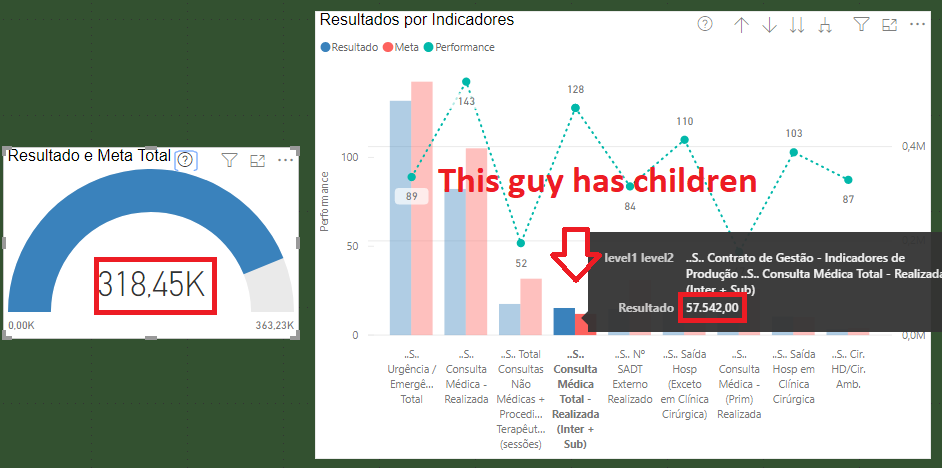
The ONLY issue is when I select in the column chart an indicator which has children indicators. Let's say the user drilled down to the second level, then selects one of the indicators and this particular indicator has children... because I'm using the function 

ISFILTERED, it calculates the result and goal totals of the third level... Is there any way to differentiate in a measure between the user selecting something in the chart and the user doing a drill down? 
 

Column chart 3.PNG


Sorry for the long post, but I have been recking my brains over this for days and no amount of google searches hava found me the answer.

1 ACCEPTED SOLUTION
parry2k
Super User
Super User

@Interact check ISINSCOPE function, well explained here


I would  Kudos if my solution helped. 👉 If you can spend time posting the question, you can also make efforts to give Kudos whoever helped to solve your problem. It is a token of appreciation!


Subscribe to the @PowerBIHowTo YT channel for an upcoming video on List and Record functions in Power Query!!

Learn Power BI and Fabric - subscribe to our YT channel - Click here: @PowerBIHowTo

If my solution proved useful, I'd be delighted to receive Kudos. When you put effort into asking a question, it's equally thoughtful to acknowledge and give Kudos to the individual who helped you solve the problem. It's a small gesture that shows appreciation and encouragement! ❤


Did I answer your question? Mark my post as a solution. Proud to be a Super User! Appreciate your Kudos 🙂
Feel free to email me with any of your BI needs.

View solution in original post

1 REPLY 1
parry2k
Super User
Super User

@Interact check ISINSCOPE function, well explained here


I would  Kudos if my solution helped. 👉 If you can spend time posting the question, you can also make efforts to give Kudos whoever helped to solve your problem. It is a token of appreciation!


Subscribe to the @PowerBIHowTo YT channel for an upcoming video on List and Record functions in Power Query!!

Learn Power BI and Fabric - subscribe to our YT channel - Click here: @PowerBIHowTo

If my solution proved useful, I'd be delighted to receive Kudos. When you put effort into asking a question, it's equally thoughtful to acknowledge and give Kudos to the individual who helped you solve the problem. It's a small gesture that shows appreciation and encouragement! ❤


Did I answer your question? Mark my post as a solution. Proud to be a Super User! Appreciate your Kudos 🙂
Feel free to email me with any of your BI needs.

Helpful resources

Announcements
Power BI DataViz World Championships

Power BI Dataviz World Championships

The Power BI Data Visualization World Championships is back! Get ahead of the game and start preparing now!

November Power BI Update Carousel

Power BI Monthly Update - November 2025

Check out the November 2025 Power BI update to learn about new features.

FabCon Atlanta 2026 carousel

FabCon Atlanta 2026

Join us at FabCon Atlanta, March 16-20, for the ultimate Fabric, Power BI, AI and SQL community-led event. Save $200 with code FABCOMM.