Join us at FabCon Atlanta from March 16 - 20, 2026, for the ultimate Fabric, Power BI, AI and SQL community-led event. Save $200 with code FABCOMM.
Register now!The Power BI Data Visualization World Championships is back! Get ahead of the game and start preparing now! Learn more
Solved! Go to Solution.
Hi @v-jiascu-msft thanks you so much for your support so far.
i have solved this by grouping all Material code together and use distinct count.
and it works good 🙂
thx you nah.
Hi @Chanleakna123 ,
Could you please mark the proper answers as solutions?
Best Regards,
Hi @v-jiascu-msft thanks you so much for your support so far.
i have solved this by grouping all Material code together and use distinct count.
and it works good 🙂
thx you nah.
Hi @Chanleakna123 ,
Can you share a dummy sample in a mode that we can copy from?
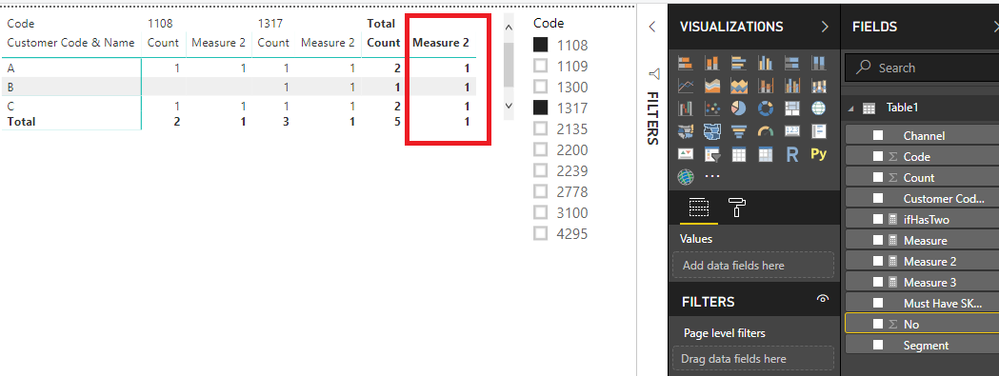
If all the [Count] is 1 or 0, there is a trick that can solve your issue. Please download the demo from the attachment that also contains some other ideas.
Measure 2 = PRODUCTX('Table1', [Count])
Best Regards,
The Power BI Data Visualization World Championships is back! Get ahead of the game and start preparing now!
| User | Count |
|---|---|
| 40 | |
| 38 | |
| 36 | |
| 29 | |
| 28 |
| User | Count |
|---|---|
| 127 | |
| 88 | |
| 78 | |
| 66 | |
| 65 |