cancel
Showing results for 
Search instead for 
Did you mean: 

The Power BI Data Visualization World Championships is back! Get ahead of the game and start preparing now! Learn more

Reply
Amir851
Helper I
Helper I

Pass Python Variable as a query parameter in Advance Editor

Hi All,


I am trying to create a query parameter for a variable named as start present in my Python script into Advance Editor in Power BI Desktop.

Basically, my script is trying to extract data from the server using Python web API concept. (Script run without any issue)

I have followed the procedure mention in the below two links :


https://community.powerbi.com/t5/Power-Query/How-to-pass-query-parameter-to-Data-Query-R-integration...


https://social.technet.microsoft.com/Forums/en-US/790ee8c0-297a-43b8-a8c9-08804218d555/question-abou....


But I am encountering an error while applying those procedures.


Can you please help me with this & let me know how I can pass a string variable as a parameter into an Advance editor of Power BI.


Below is the code :


let
Source = Python.Execute("import requests#(lf)session = requests.Session()#(lf)....remaining code....start = ""2019/05/17 06:29"" #(lf)end = ""2019/07/17 06:29""),
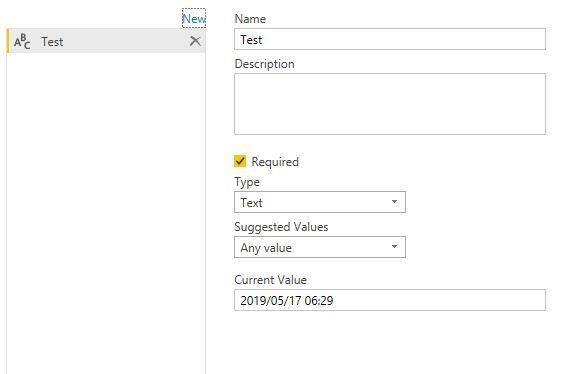
Parameter Required Here
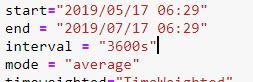
Parameter passed in script
start="2019/05/17 06:29" string format
end = "2019/07/17 06:29"

1 ACCEPTED SOLUTION

My mistake, we lost the quitation marks. Try:

Source = Python.Execute( "import requests.. other code.... """ & MyVariable & """ .. other code.... "),


If this works I'll update the original answer.


Did I answer your question? Mark my post as a solution! Proud to be a Super User!


Connect with me!
Stay up to date on  
Read my blogs on  


View solution in original post

6 REPLIES 6
SteveCampbell
Memorable Member
Memorable Member

You need end the string with " and append the parameter with the &


for example:


Source = Python.Execute( "import requests.. other code.... " & MyVariable & " .. other code.... "),


Power query will build eveything out as a string, and pass that to python. so the " & MyVariable & " .

It reall breaks it down into three strings ...

"import requests.. other code.... " & MyVariable & " .. other code.... "

First string, your variable string, and the end string. The & is a concatenate and concatenates the strings, which it then passes as one big string to python.


Did I answer your question? Mark my post as a solution! Proud to be a Super User!


Connect with me!
Stay up to date on  
Read my blogs on  


Dear @SteveCampbell ,


First of all, Thank you for your reply.


 I followed the same procedure as you mentioned.


But encountering below error :


DataSource.Error: ADO.NET: Python script error.
File "PythonScriptWrapper.PY", line 91
start=2019/05/17 06:29
^
SyntaxError: invalid token

Details:
DataSourceKind=Python
DataSourcePath=Python
Message=Python script error.


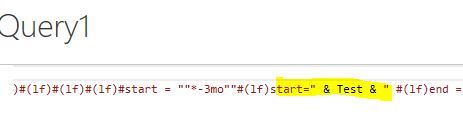
Screenshot for your reference : Python_Query_parameter.JPG


Python_Query_parameter.JPG

Interval.JPG

This is a python error, in that you should not have leading 0s in your date.

2019/05/17 06:29


Maybe you should use the datetime library:

datetime.datetime(2019, 5, 17, 6, 29)


Did I answer your question? Mark my post as a solution! Proud to be a Super User!


Connect with me!
Stay up to date on  
Read my blogs on  


Hi @SteveCampbell ,


Cant we pass it as a string like "2019/05/17 06:29" as a parameter instead of Datetime. 


Because I run the same script in Jupyter notebook. It was working fine there without any issue.


Thanks

Amir

My mistake, we lost the quitation marks. Try:

Source = Python.Execute( "import requests.. other code.... """ & MyVariable & """ .. other code.... "),


If this works I'll update the original answer.


Did I answer your question? Mark my post as a solution! Proud to be a Super User!


Connect with me!
Stay up to date on  
Read my blogs on  


Hi @SteveCampbell,


 Thank you.


It works like a charm.

Helpful resources

Announcements
Power BI DataViz World Championships

Power BI Dataviz World Championships

The Power BI Data Visualization World Championships is back! Get ahead of the game and start preparing now!

December 2025 Power BI Update Carousel

Power BI Monthly Update - December 2025

Check out the December 2025 Power BI Holiday Recap!

FabCon Atlanta 2026 carousel

FabCon Atlanta 2026

Join us at FabCon Atlanta, March 16-20, for the ultimate Fabric, Power BI, AI and SQL community-led event. Save $200 with code FABCOMM.