Don't miss your chance to take the Fabric Data Engineer (DP-700) exam on us!
Learn moreNext up in the FabCon + SQLCon recap series: The roadmap for Microsoft SQL and Maximizing Developer experiences in Fabric. All sessions are available on-demand after the live show. Register now
I created an incremental refresh and used a partition to upload (13 months) of the data refresh happening for one day. Then I realized I need to add a new column to the dataset. Using the AML tool kit schema was created. But then when I refreshed it refreshed for a day as it is how incremental refresh policy is set up. The data for the newly created column is blank so wondering if I need to reload all the partitions again?
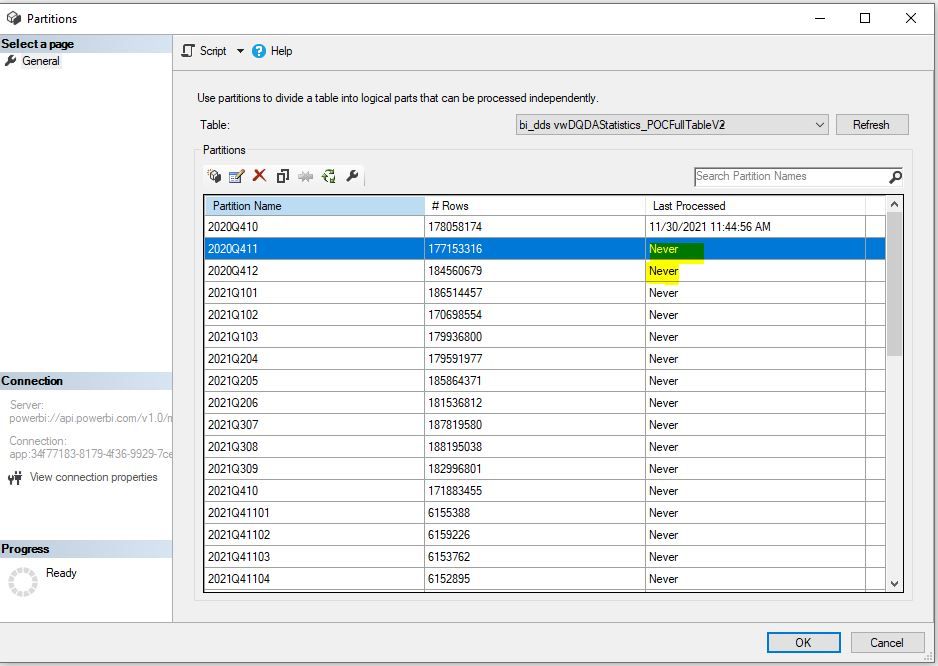
Below is the picture, the last process is displayed Never not sure why that is?
Hi @Nepal101 ,
I have some questions.
Are we talking about the incremental refresh in Power BI?
How do you use the partition to create the incremental refresh? As far as I know the incremental refresh in Power BI is based on the RangeStart and RangeEnd parameters.
How do you create the column with AML tool?
Best Regards,
Jay
Due to the huge data, we cannot use an incremental refresh as it times out on us. The process of creating the policy for the incremental refresh is the same using the Range but then we can use the analysis service for partition. I just updated the changes using the AML tool kit but then I saw Never in the Last process not sure why and what I did that triggered.
If you have recently started exploring Fabric, we'd love to hear how it's going. Your feedback can help with product improvements.
A new Power BI DataViz World Championship is coming this June! Don't miss out on submitting your entry.
Share feedback directly with Fabric product managers, participate in targeted research studies and influence the Fabric roadmap.
| User | Count |
|---|---|
| 47 | |
| 44 | |
| 40 | |
| 18 | |
| 18 |
| User | Count |
|---|---|
| 71 | |
| 66 | |
| 33 | |
| 32 | |
| 32 |