Hi @Yaa_D ,
After you load the data, you need to open query editor. Here is my test data which is close to you.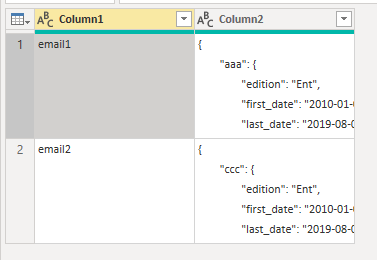
Then create a custom column “new”. Click Custom Column icon to open a sub window. Input the following codes.
=Json.Document([Column2])
Click “OK”.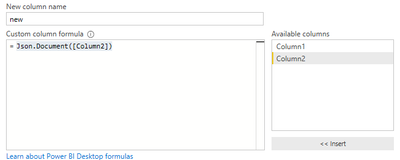
Then you can remove “column 2” and get a table like the following image.
Expand the “new” column and unpivot these expanded columns by clicking Unpivot Columns option.
Expand the “Value” column and remove extra fields in the “Attribute” column by using replace values function. At last, rename the column names. Don’t forget to click Close & Apply after you finish it.
At the same time, I also provide the overall code that you can edit in the Advanced Editor.
let
    Source = Csv.Document(File.Contents("YOUR CSV FILE PATH"),[Delimiter=",", Columns=2, Encoding=1252, QuoteStyle=QuoteStyle.Csv]),
    #"Changed Type" = Table.TransformColumnTypes(Source,{{"Column1", type text}, {"Column2", type text}}),
    #"Added Custom" = Table.AddColumn(#"Changed Type", "new", each Json.Document([Column2])),
    #"Removed Columns" = Table.RemoveColumns(#"Added Custom",{"Column2"}),
    #"Expanded new" = Table.ExpandRecordColumn(#"Removed Columns", "new", {"aaa", "bbb", "ccc"}, {"new.aaa", "new.bbb", "new.ccc"}),
    #"Unpivoted Columns" = Table.UnpivotOtherColumns(#"Expanded new", {"Column1"}, "Attribute", "Value"),
    #"Expanded Value" = Table.ExpandRecordColumn(#"Unpivoted Columns", "Value", {"edition", "first_date", "last_date", "usage_data"}, {"Value.edition", "Value.first_date", "Value.last_date", "Value.usage_data"}),
    #"Replaced Value" = Table.ReplaceValue(#"Expanded Value","new.","",Replacer.ReplaceText,{"Attribute"}),
    #"Renamed Columns" = Table.RenameColumns(#"Replaced Value",{{"Column1", "email"}, {"Attribute", "id"}, {"Value.edition", "edition"}, {"Value.first_date", "first_date"}, {"Value.last_date", "last_date"}, {"Value.usage_data", "usage_data"}})
in
    #"Renamed Columns"
Best Regards,
Eads
If this post helps, then please consider Accept it as the solution to help the other members find it more quickly.
Community Support Team _ Eads
If this post helps, then please consider Accept it as the solution to help the other members find it.