Join us at FabCon Atlanta from March 16 - 20, 2026, for the ultimate Fabric, Power BI, AI and SQL community-led event. Save $200 with code FABCOMM.
Register now!Vote for your favorite vizzies from the Power BI Dataviz World Championship submissions. Vote now!
Hi,
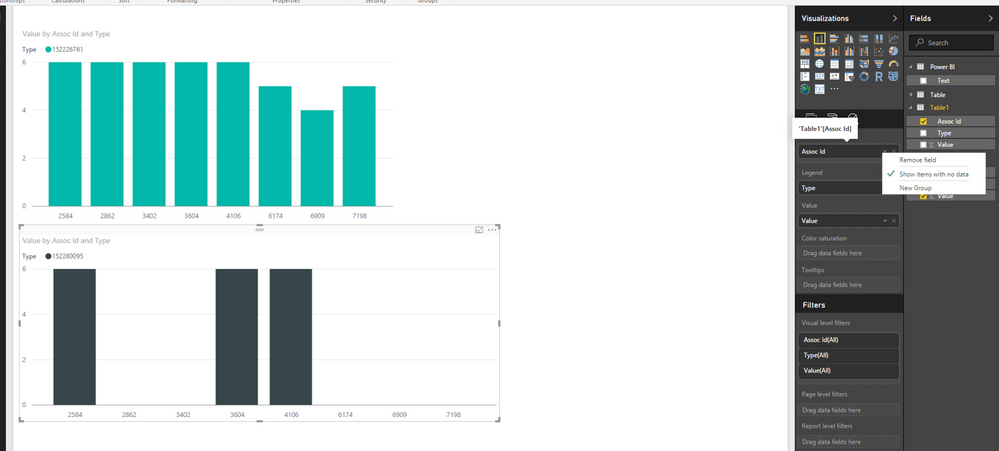
I have two charts the first chart contains values for all the associates, but the second chart has values for only few associates.
How can I show the corresponding associate from the first chart in the second even if it dosent has any value.
Solved! Go to Solution.
Thanks a lot Lydia and Phil, I have fixed the issue now.
regards,
Ravi
Hi @Anonymous,
Do you create the two charts using fields from different tables? If so, do you create relationship between the two tables using id field? When relationship exists, you can create the second chart by putting id field of first table in Axis, and make sure you select “Show items with no data” for Axis.
However, if above step doesn’t help, please help to post table structure in your scenario .
Thanks,
Lydia Zhang
Thanks a lot Lydia and Phil, I have fixed the issue now.
regards,
Ravi
Hi @Anonymous,
Glad to hear the issue is solved. You can accept helpful replies as answer, that way, other community members would easily find the answer when they get same issues.
Thanks,
Lydia Zhang
Hi @Anonymous
Just make sure the Measure you are using in your chart returns a 0 value for the item. If it returns a BLANK() it won't go on the axis.
Vote for your favorite vizzies from the Power BI World Championship submissions!
If you love stickers, then you will definitely want to check out our Community Sticker Challenge!
Check out the January 2026 Power BI update to learn about new features.
| User | Count |
|---|---|
| 58 | |
| 53 | |
| 43 | |
| 17 | |
| 16 |
| User | Count |
|---|---|
| 123 | |
| 108 | |
| 44 | |
| 32 | |
| 24 |