cancel
Showing results for 
Search instead for 
Did you mean: 

The Power BI Data Visualization World Championships is back! Get ahead of the game and start preparing now! Learn more

Reply
KG1
Resolver I
Resolver I

Paginated Report Data Labels

Hi 


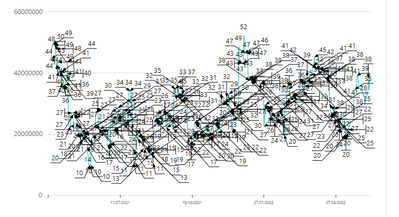
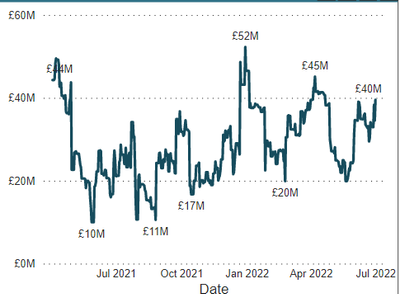
I am new to Paginated reports and I can't find anywhere how to set the interval for data labels

It looks like this

KG1_0-1656693445858.png

I need it to look like this

KG1_1-1656693484742.png

Please help and thank you in advance

1 REPLY 1
Anonymous
Not applicable

Hi @KG1 ,

Please have a try.

To change the position of point labels in an Area, Column, Line or Scatter chart

  1. Create an Area, Column, Line or Scatter chart.
  2. On the design surface, right-click the chart and select Show Data Labels.
  3. Open the Properties pane. On the View tab, click Properties
  4. On the design surface, click the series. The properties for the series are displayed in the Properties pane.
  5. In the Data section, expand the DataPoint node, then expand the Label node.
  6. Select a value for the Position property.

More details: Position labels in a paginated report chart (Report Builder) 

Sensitivity label support for paginated reports 


If I have misunderstood your meaning, please provide more details.

Best Regards
Community Support Team _ Polly

If this post helps, then please consider Accept it as the solution to help the other members find it more quickly.

Helpful resources

Announcements
Power BI DataViz World Championships

Power BI Dataviz World Championships

The Power BI Data Visualization World Championships is back! Get ahead of the game and start preparing now!

December 2025 Power BI Update Carousel

Power BI Monthly Update - December 2025

Check out the December 2025 Power BI Holiday Recap!

FabCon Atlanta 2026 carousel

FabCon Atlanta 2026

Join us at FabCon Atlanta, March 16-20, for the ultimate Fabric, Power BI, AI and SQL community-led event. Save $200 with code FABCOMM.