- Power BI forums
- Get Help with Power BI
- Desktop
- Service
- Report Server
- Power Query
- Mobile Apps
- Developer
- DAX Commands and Tips
- Custom Visuals Development Discussion
- Health and Life Sciences
- Power BI Spanish forums
- Translated Spanish Desktop
- Training and Consulting
- Instructor Led Training
- Dashboard in a Day for Women, by Women
- Galleries
- Data Stories Gallery
- Themes Gallery
- Contests Gallery
- QuickViz Gallery
- Quick Measures Gallery
- Visual Calculations Gallery
- Notebook Gallery
- Translytical Task Flow Gallery
- TMDL Gallery
- R Script Showcase
- Webinars and Video Gallery
- Ideas
- Custom Visuals Ideas (read-only)
- Issues
- Issues
- Events
- Upcoming Events
We've captured the moments from FabCon & SQLCon that everyone is talking about, and we are bringing them to the community, live and on-demand. Starts on April 14th. Register now
- Power BI forums
- Forums
- Get Help with Power BI
- Desktop
- Re: Paginated Report Data Inconsistency Issue Usin...
- Subscribe to RSS Feed
- Mark Topic as New
- Mark Topic as Read
- Float this Topic for Current User
- Bookmark
- Subscribe
- Printer Friendly Page

- Mark as New
- Bookmark
- Subscribe
- Mute
- Subscribe to RSS Feed
- Permalink
- Report Inappropriate Content
Paginated Report Data Inconsistency Issue Using Parameters
I've spent my day threating to throw my computer through a window because of my frustration with this issue - so it's time to call in the wonderful community for help!
I'm developing a paginated report using a Power BI dataset. I've connected to the Power BI datasource and created a dataset in Report Builder. The query in the dataset is DAX copied from a Power BI desktop report (in order to maintain the relationships I've built in the model) with some modifications to support a few parameters. Two of these parameters are dates - From Date and To Date for a date range.
There are inconsistencies with the data when comparing the data in Power BI Desktop to the paginated output from Report Builder. But it is only inconsistent when the date range is 7 days. If the date range is 1 - 6 days, the data matches. When I add in the 7th day, the data doesn't match for one of the days (ironically, not that 7th day).
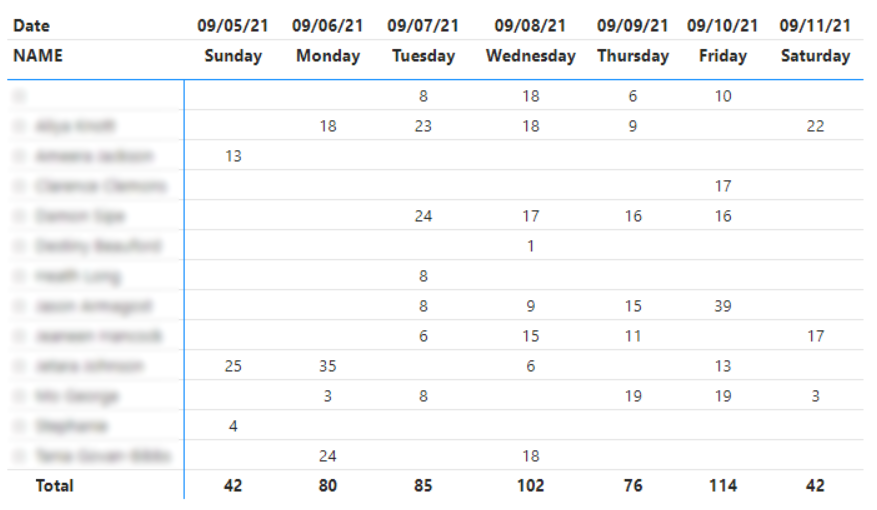
Here's the data from Desktop. The date range is 9/5/21 - 9/11/21. Notice that there's a total of 42 for Saturday.
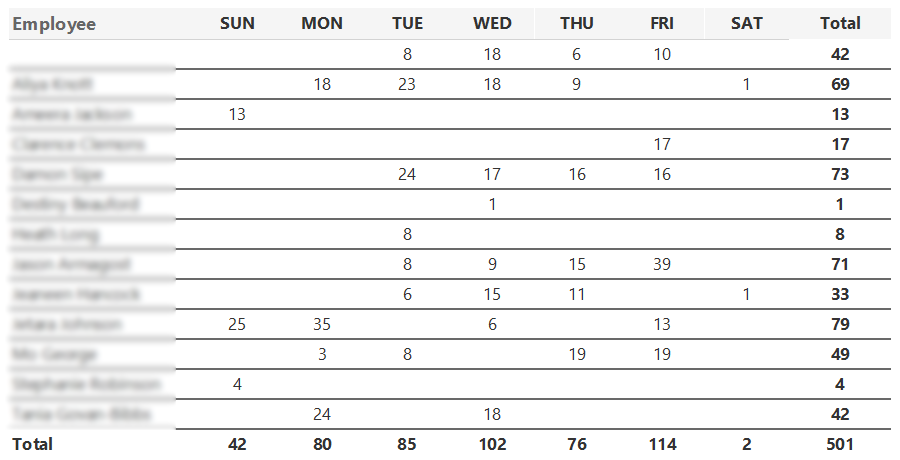
Here's the data from Report Builder using the same date range. Notice that the data for Saturday is now only 2.
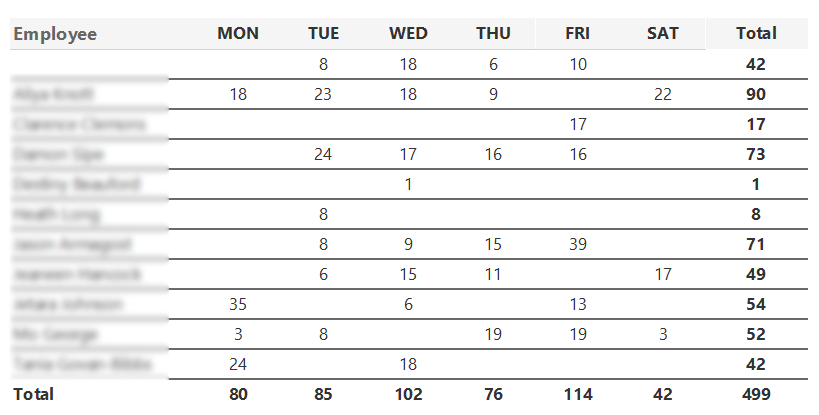
I thought it was a problem with the DAX query in Report Builder. But I modified the date range to 9/6/21 - 9/11/21 (omitting Sunday). The data output from Report Builder has the correct total of 42 for Saturday.
After hours of troubleshooting, I can't figure out what is causing this hiccup in the data. I tried changing the date range parameter to "week ending on" and using a single date which still gives me incorrect seven day data.
Below is my DAX query in the Report Builder dataset.
// DAX Query
DEFINE

VAR dateParameter = FILTER(VALUES('CALENDAR'[Date]), (DATEVALUE('CALENDAR'[Date]) >= DATEVALUE(@FromCALENDARDate)) && DATEVALUE('CALENDAR'[Date]) <= DATEVALUE(@ToCALENDARDate))

  VAR __DS0Core =
    SUMMARIZECOLUMNS(
      'BUSINESSUNIT'[DESCRIPTION],
      'CALENDAR'[Date],
      'PACKINGNOTE'[NOTENUMBER],
      'CUSTOMER'[CUSTOMERNUMBER],
      'CUSTOMER'[NAME],
      'PACKINGNOTE'[PROCESSEDTIMESTAMP],
      'CALENDAR'[LastDateofWeek],
      'DEPARTMENT'[DESCRIPTION],
      'EMPLOYEE'[NAME],
      'BUSINESSUNIT'[CODE],
      'CALENDAR'[WeekDayName_Short],
      'CALENDAR'[Weekday],
      dateParameter,
RSCustomDaxFilter(@BUSINESSUNITCODE,EqualToCondition,[BUSINESSUNIT].[CODE],String),
      "M_Total_Packing_Notes", 'PACKINGNOTE'[M.Total Packing Notes]
    )

  VAR __DS0PrimaryWindowed =
    TOPN(
      501,
      __DS0Core,
      'BUSINESSUNIT'[DESCRIPTION],
      1,
      'CALENDAR'[Date],
      1,
      'PACKINGNOTE'[NOTENUMBER],
      1,
      'CUSTOMER'[CUSTOMERNUMBER],
      1,
      'CUSTOMER'[NAME],
      1,
      'PACKINGNOTE'[PROCESSEDTIMESTAMP],
      1,
      'CALENDAR'[LastDateofWeek],
      1,
      'DEPARTMENT'[DESCRIPTION],
      1,
      'EMPLOYEE'[NAME],
      1,
      'BUSINESSUNIT'[CODE],
      1,
      'CALENDAR'[Weekday],
      1,
      'CALENDAR'[WeekDayName_Short],
      1
    )

EVALUATE
  __DS0PrimaryWindowed

ORDER BY
  'BUSINESSUNIT'[DESCRIPTION],
  'CALENDAR'[Date],
  'PACKINGNOTE'[NOTENUMBER],
  'CUSTOMER'[CUSTOMERNUMBER],
  'CUSTOMER'[NAME],
  'PACKINGNOTE'[PROCESSEDTIMESTAMP],
  'CALENDAR'[LastDateofWeek],
  'DEPARTMENT'[DESCRIPTION],
  'EMPLOYEE'[NAME],
  'BUSINESSUNIT'[CODE],
  'CALENDAR'[Weekday],
  'CALENDAR'[WeekDayName_Short]
Thoughts? Suggestions?


- Mark as New
- Bookmark
- Subscribe
- Mute
- Subscribe to RSS Feed
- Permalink
- Report Inappropriate Content
I've not worked with paginated reports before. Is it possible that the paginated report is using a different day for the start of a week than what the calendar table is using? It's like the 40 missing in Sat are getting rolled to Sun in the paginated view but when you exclude Sun it can't do that so it puts them in Sat.
- Mark as New
- Bookmark
- Subscribe
- Mute
- Subscribe to RSS Feed
- Permalink
- Report Inappropriate Content
@beckajohns Why is the name format different? In the first one, it is long but in the paginated it is short. There isn't something strange going on with the day name is there?
- Mark as New
- Bookmark
- Subscribe
- Mute
- Subscribe to RSS Feed
- Permalink
- Report Inappropriate Content
@jdbuchanan71 It's just two different columns in the same calendar table. I swapped in the short name in Report Builder so things would fit better on a letter-sized page. To double check, I changed the column to the short day name in the Desktop file and it didn't impact the data results.
- Mark as New
- Bookmark
- Subscribe
- Mute
- Subscribe to RSS Feed
- Permalink
- Report Inappropriate Content
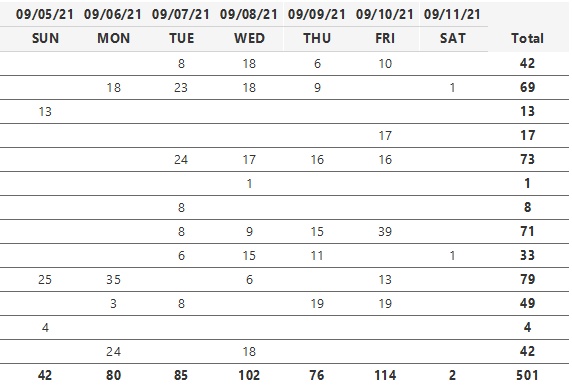
In your top example, you have the date over the day name. If you put the date over the day name in the paginated report does it work?
- Mark as New
- Bookmark
- Subscribe
- Mute
- Subscribe to RSS Feed
- Permalink
- Report Inappropriate Content
- Mark as New
- Bookmark
- Subscribe
- Mute
- Subscribe to RSS Feed
- Permalink
- Report Inappropriate Content
A total shot in the dark here. Does your Calendar table start on January 1st of whatever year and end on December 31st of whatever year? I have seen strange behaviour from time intelligence functions when the caledar table does not contain only complete years.
- Mark as New
- Bookmark
- Subscribe
- Mute
- Subscribe to RSS Feed
- Permalink
- Report Inappropriate Content
Yep, the calendar table starts 1/1/2010 and goes to 12/31/2030. And it's marked as a date table in the Desktop model.

Helpful resources

New to Fabric Survey
If you have recently started exploring Fabric, we'd love to hear how it's going. Your feedback can help with product improvements.

Power BI DataViz World Championships - June 2026
A new Power BI DataViz World Championship is coming this June! Don't miss out on submitting your entry.

Join our Fabric User Panel
Share feedback directly with Fabric product managers, participate in targeted research studies and influence the Fabric roadmap.

Power BI Community Update - March 2026
Check out the March 2026 Power BI update to learn about new features.

| User | Count |
|---|---|
| 57 | |
| 38 | |
| 33 | |
| 19 | |
| 16 |


| User | Count |
|---|---|
| 68 | |
| 66 | |
| 41 | |
| 34 | |
| 25 |


