This time we’re going bigger than ever. Fabric, Power BI, SQL, AI and more. We're covering it all. You won't want to miss it.
Learn moreLevel up your Power BI skills this month - build one visual each week and tell better stories with data! Get started
Hi,
trying to write a custom theme using json, I find Microsoft documentation lacking (no surprise there).
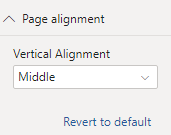
Found ample examples online for visuals alignment, but no Page Alignment json code.
Tried the following excerpt:
"page": {
"*": {
"background": [{
"color": { "solid": { "color": "#ffffff" } },
"transparency": 0,
"alignment": "middle"
},but I still get default page vertical alignment as "top".
Just to make things clear, I want this to be the default set in JSON:
Thank you!
Solved! Go to Solution.
Hi @Anonymous
Also, you can customise a current theme and it looks like this property is not included as well.
Hello @Anonymous ,
maybe too late, but someone else might be still looking for this 🙂
"page": {
"*": {
"displayArea": [
{
"verticalAlignment": "Middle"
}
]
}
}
Hello @Anonymous ,
maybe too late, but someone else might be still looking for this 🙂
"page": {
"*": {
"displayArea": [
{
"verticalAlignment": "Middle"
}
]
}
}
Hi @Anonymous
You can export Theme in the most recent versions and investigate Json file, by the look of it it's not supported yet.
Hi @Anonymous
Also, you can customise a current theme and it looks like this property is not included as well.
Ya thought I'd be able to do it via JSON even though it's not supported in the Themes preview.
Thanks!
Sign up to receive a private message when registration opens and key events begin.
If you have recently started exploring Fabric, we'd love to hear how it's going. Your feedback can help with product improvements.
| User | Count |
|---|---|
| 30 | |
| 23 | |
| 23 | |
| 20 | |
| 16 |
| User | Count |
|---|---|
| 63 | |
| 38 | |
| 25 | |
| 23 | |
| 22 |