cancel
Showing results for 
Search instead for 
Did you mean: 

The Power BI Data Visualization World Championships is back! Get ahead of the game and start preparing now! Learn more

Reply
ovetteabejuela
Impactful Individual

Page Size - Dynamic?

If I set the page size to 16:9 (Aspect Ratio) would that mean that the entire page would adjust to any of the following resolutions:


16:9 aspect ratio resolutions:

1024×576, 1152×648, 1280×720, 1366×768, 1600×900, 1920×1080, 2560×1440 and 3840×2160.


And what if we encounter a different aspect ratio, 4:3 or 16:10 how does the page size adjust?

1 ACCEPTED SOLUTION
v-yulgu-msft
Microsoft Employee
Microsoft Employee

Hi @ovetteabejuela,


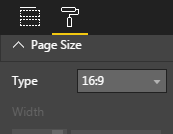
The default page size ratio 16:9 adjusts to this resolution 1280 x 720. To see the actual pixel size being used, please take a look at the greyed out Width and Height fields (1280x720). If you want the report page fit the resolution 1366x768, you shoul set the page size using custom option. And this is different from the ratio od 16 wide by 9 high.


In my opinion, the available page ratio selection and custom resolution setting can be regards as two options to set page size, each ratio size mappes to its own resolution.


In your scenario, you can use page View and Page Size together to create a report that looks its best to fit your screen. Reference: Change the size of a report page


Regards,
Yuliana Gu

Community Support Team _ Yuliana Gu
If this post helps, then please consider Accept it as the solution to help the other members find it more quickly.

View solution in original post

3 REPLIES 3
v-yulgu-msft
Microsoft Employee
Microsoft Employee

Hi @ovetteabejuela,


The default page size ratio 16:9 adjusts to this resolution 1280 x 720. To see the actual pixel size being used, please take a look at the greyed out Width and Height fields (1280x720). If you want the report page fit the resolution 1366x768, you shoul set the page size using custom option. And this is different from the ratio od 16 wide by 9 high.


In my opinion, the available page ratio selection and custom resolution setting can be regards as two options to set page size, each ratio size mappes to its own resolution.


In your scenario, you can use page View and Page Size together to create a report that looks its best to fit your screen. Reference: Change the size of a report page


Regards,
Yuliana Gu

Community Support Team _ Yuliana Gu
If this post helps, then please consider Accept it as the solution to help the other members find it more quickly.

@v-yulgu-msft,


Thank you for the clarification, I would agree that this is the solution Change the size of a report page for multiple users with varying screens resolutions(sizes)

ovetteabejuela
Impactful Individual

Is there anyone who could confirm how the behaviour works if I set the Page Size type to 16:9,


I asked because it doesn't seem to meet my expectation unless I am wrong, for example my screen resolution is at 1366x768 and I was on 16:9 which is the default. When I decided to check what the page resolution was I manually set(Custom) it to 1366x768 and the page expanded which means that it did not detect my current resolution.


Hope to get a confirmation, thank you.


PageSize.PNG

Helpful resources

Announcements
Power BI DataViz World Championships

Power BI Dataviz World Championships

The Power BI Data Visualization World Championships is back! Get ahead of the game and start preparing now!

December 2025 Power BI Update Carousel

Power BI Monthly Update - December 2025

Check out the December 2025 Power BI Holiday Recap!

FabCon Atlanta 2026 carousel

FabCon Atlanta 2026

Join us at FabCon Atlanta, March 16-20, for the ultimate Fabric, Power BI, AI and SQL community-led event. Save $200 with code FABCOMM.