Share feedback directly with Fabric product managers, participate in targeted research studies and influence the Fabric roadmap.
Sign up nowGet Fabric certified for FREE! Don't miss your chance! Learn more
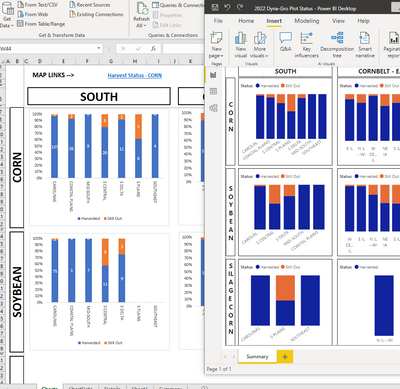
Sorry for asking very elementary questions, but this is only day 2 for me. I am attempting to duplicate an Excel file. The Excel file scrolls to about 100 rows. I was expecting Power BI to do the same. However, I have reached the bottom of the page. What am I missing? Thanks.
Solved! Go to Solution.
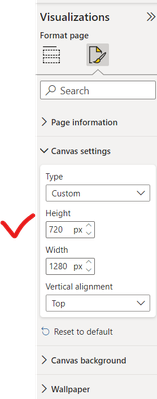
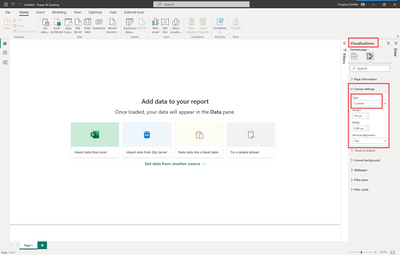
Hi, click on the white canvas outside the visualisation, adjust the page height.
@dlogan The canvas doesn't scroll, you need to increase the canvas size
Yep. Got it. Thanks. I am just trying to find where to do the things I want to do. I know you youngsters have probably never used Access, but this tool reminds me so much of Forms in Access. I feel like this old guy has new life again.
Hi, click on the white canvas outside the visualisation, adjust the page height.
Awesome. The more I use this, the more I love it. Thank you so much.
If you love stickers, then you will definitely want to check out our Community Sticker Challenge!
Check out the January 2026 Power BI update to learn about new features.
| User | Count |
|---|---|
| 62 | |
| 59 | |
| 45 | |
| 21 | |
| 18 |
| User | Count |
|---|---|
| 121 | |
| 116 | |
| 37 | |
| 34 | |
| 30 |