Don't miss your chance to take exam DP-600 or DP-700 on us!
Request nowLearn from the best! Meet the four finalists headed to the FINALS of the Power BI Dataviz World Championships! Register now
I have 3 files and 1 of this is connecting file. The masterfile (relationship).
Now, 1 need a DAX that will determine or create report base on different category with different price range base. using this 3 file
FIRST FILE:
ITEM CATEGORY CATEGORY 2
APPLE FRUITS ORANGE
BANANa FRUITS YELLOW
GRAPES FRUITS PURPLE
CHEERY FRUITS RED
CAT ANIMAL BLACK
DOG ANIMAL WHITE
DOVE ANIMAL WHITE
FISH ANIMAL ORANGE
DRESS CLOTHES BLUE
PANTS CLOTHES DEMIN
SKIRT CLOTHES GREEN
GOWN CLOTHES YELLOW
FILE 2 (with relationship in file 1 using item column)
ITEM PRICE QTY SOLD
APPLES 300 4
BANANA 450 2
DOG 15000 8
CAT 700 2
PANTS 50 7
GOWN 1000 10
FILE 3
CATEGORY RANGES MIN MAX
FRUITS ENTRY 0 300
FRUITS MID 301 999
FRUITS HIGH 1000 above
ANIMAL ENTRY 0 5000
ANIMAL MID 5001 10000
ANIMAL HIGH 10001 ABOVE
CLOTHES ENTRY 0 500
CLOTHES MID 501 5000
CLOTHES HIGH 5001 ABOVE
I need also to connect file 1 and 3.
Thank you,
Eannecute
Hi @Anonymous,
Here I made one sample for your reference, You can refer to the following steps.
1. Enter the data and create a calculated table using the formula.
un = DISTINCT('FILE 3'[CATEGORY])2. Create the relationship between tables as below.
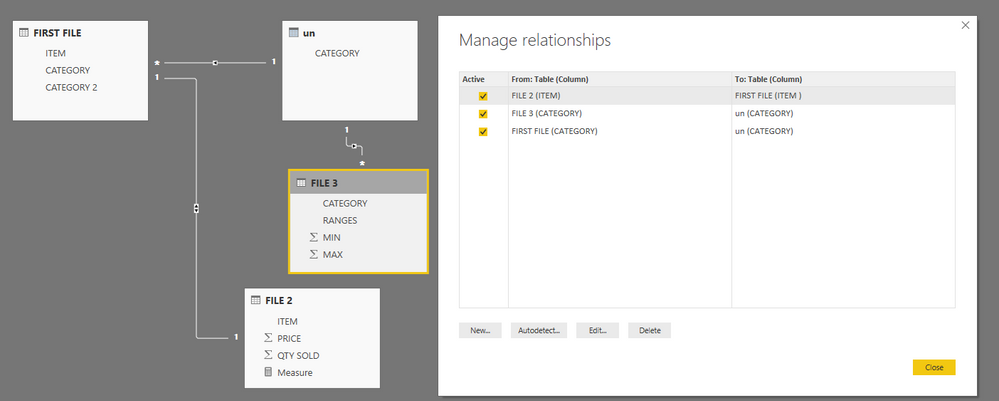
3, Create a measure and make the table filtered by the measure.
Measure = IF(ISBLANK(MAX('FILE 2'[PRICE])),BLANK(),IF(MAX('FILE 2'[PRICE])>=MAX('FILE 3'[MIN]) &&MAX('FILE 2'[PRICE])<=MAX('FILE 3'[MAX]),1,BLANK()))
For mroe details, please check the pbix as attached.
https://www.dropbox.com/s/mfp7sif6aay8jl6/PRICE%20RANGE%20REPORT.pbix?dl=0
Regards,
Frank
Hi @v-frfei-msft,
Error encountered. Is that because some of Max value is " above" and not numeric? If yes , how can i show its morethat range high more than min.
Hi @Anonymous,
Yes, so you should replace the Above to numeric.
Regards,
Frank
Hi @v-frfei-msft,
The folrmulate doesnt work. QTY sold sum up and once i click ranges same qty reflected.
Thank you,
Hi @Anonymous,
Does that make sense? If so, kindly mark my answer as a solution to close the case.
Regards,
Frank
Share feedback directly with Fabric product managers, participate in targeted research studies and influence the Fabric roadmap.
Check out the February 2026 Power BI update to learn about new features.
| User | Count |
|---|---|
| 50 | |
| 40 | |
| 37 | |
| 14 | |
| 14 |
| User | Count |
|---|---|
| 85 | |
| 69 | |
| 38 | |
| 29 | |
| 27 |