Join us at FabCon Atlanta from March 16 - 20, 2026, for the ultimate Fabric, Power BI, AI and SQL community-led event. Save $200 with code FABCOMM.
Register now!The Power BI Data Visualization World Championships is back! Get ahead of the game and start preparing now! Learn more
Hello,
I am fairly new to PowerBI and I'm trying to create a 'measure' that pulls a previous month
(using DirectQuery)
This DAX measure works for pulling my current count and tests against my SQL data-check query
Current UniqueID Count= CALCULATE
(
DISTINCTCOUNT('Table '[UniqueID]), 'DateTable'[CreatedDateRaw])
)
The CreatedDateRaw is a 'Data type' of "Date" and I'm joining on a 'Key' that is in 'Table' (many) to 'DateTable' (one)
The DateTable has dates from 2000-01-01 to 2099-12-31 and one row that is 9999-12-31
But when I try and use PREVIOUSMONTH
Previous UniqueID Count= CALCULATE
(
DISTINCTCOUNT('Table '[UniqueID]), PREVIOUSMONTH('DateTable','DateTable'[CreatedDateRaw])
)I get the error ""An invalid numeric representation of a date value was encountered".
I have searched and it seems that maybe NULL values or possibly an invalid date may be the issue? I know we do have a row in the date field that is 9999-12-31 as mentioned ... So I tried to filter the measure from 2013-2020 and I still receve the error.
I also tried a "DATEADD, -1, Month" structure and that didn't seem to work either.
Full error is
Error Message: MdxScript(Model) (3, 125) Calculation error in measure 'Table[MeasureName]: An invalid numeric representation of a date value was encountered.
Hi @jeremy_R_b,
To make PREVIOUSMONTH function supported in Directory Query mode, please
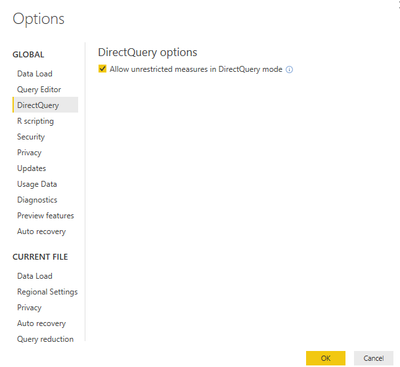
go to file -> options and settings -> options -> direct query ->"Allow unrestricted measures under direct query" .
Best regards,
Yuliana Gu
Hello Yuliani,
I do have that turned on (previously turned on before working on this particular issue).
I'm curious if there is a better way to research what the error may be? I'm a bit unclear on how I could get an incorrect date in the date column, I have looked through the whole table and the only entry is 9999-12-31 and -1, which I have ruled out with testing by forcing the measure to be > and < certain dates.
For what it's worth, I had the same error message when trying to use TOTALMTD on a client's model. The issue turned out to be that there was an entry in the date dimension table for 9999-12-31. When I filtered that row out of the table in the query editor, the error disappeared. This is despite the Power BI documentation saying dates to year 9999 are supported.
Well, I guess it may not be supported in DirectQuery ... wonderful.
The Power BI Data Visualization World Championships is back! Get ahead of the game and start preparing now!
| User | Count |
|---|---|
| 41 | |
| 38 | |
| 36 | |
| 30 | |
| 28 |
| User | Count |
|---|---|
| 129 | |
| 88 | |
| 79 | |
| 68 | |
| 63 |