This time we’re going bigger than ever. Fabric, Power BI, SQL, AI and more. We're covering it all. You won't want to miss it.
Learn moreDid you hear? There's a new SQL AI Developer certification (DP-800). Start preparing now and be one of the first to get certified. Register now
Hello,
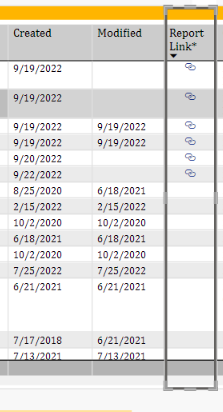
I have a Power BI table with a column that contains various links to web URLs. Not all rows have a link.
I have it set up that clicking on a link opens the URL for that row and that works fine.
An additional request came in to display a tool tip when hovering over that column to display a specific message regarding confidentiality for that URL link.
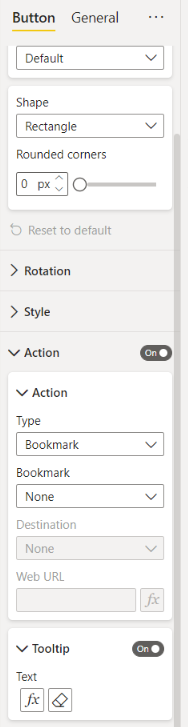
I added a tall transparent button to sit over that column and on hovering, I am able to display the requested message. The button requires an action to display the tooltip. The only action I found that stayed on the same report page and worked was
Type: Bookmark and Bookmark: None. However, now I can’t click on the link to access the URL. I did make the background of the button transparent but that does not work either.
Is there a work around for this? Thanks in advance!
@Reetz ,
You might be better off creating a Tooltip Page.
Lots of info available on how to create a Tooltip page.
Then add this Tooltip Page to your Table visual to display the confidentiality note.
Regards,
Thank you rsbin. I should have mentioned that I did try that first but it is very irritating when the tooltip constantly pops up when hovering over different areas on the table. Was looking for a cleaner solution. But thank you for the very quick response!
Check out the April 2026 Power BI update to learn about new features.
If you have recently started exploring Fabric, we'd love to hear how it's going. Your feedback can help with product improvements.
| User | Count |
|---|---|
| 36 | |
| 32 | |
| 31 | |
| 21 | |
| 15 |
| User | Count |
|---|---|
| 67 | |
| 56 | |
| 31 | |
| 27 | |
| 22 |