cancel
Showing results for 
Search instead for 
Did you mean: 

Get Fabric certified for FREE! Don't miss your chance! Learn more

Reply
azakir
Resolver I
Resolver I

PATH() Error

Hi Guys. 

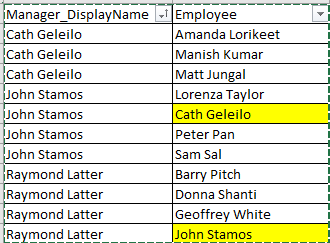
I have the following table with Manager and Employee: 

azakir_0-1702266163701.png


I would like to display it in a Matrix when the manager is expanded, it shows the staff reporting to the manager. Problem is, there are examples where the staff are themselves manager of other staff. Ideally, I'd like to show Raymond Latter Expanded to John Stamos and further expands to Cath Geleilo. 


@Jihwan_Kim helped out with PATH() function. However, I get the following error:

The value 'Raymond Latter' in 'HR_DW_Import'[Manager_DisplayName] must also exist in 'HR_DW_Import'[PATH CC2]. Please add the missing data and try again.


Is there a way to resolve this?

1 ACCEPTED SOLUTION
Anonymous
Not applicable

Hi  @azakir ,


Here are the steps you can follow:

1. Create calculated column.

Test =
var _select=SELECTCOLUMNS('Table',"Man",[Manager_DisplayName])
var _test1=
CONCATENATEX(
    FILTER(ALL('Table'),
    'Table'[Manager_DisplayName]=EARLIER('Table'[Manager_DisplayName])),[Employee],"|")
var _table1=
SUMMARIZE(
    'Table','Table'[Manager_DisplayName],
    "Employe11",
    CONCATENATEX(
        FILTER(ALL('Table'),
        'Table'[Manager_DisplayName]=EARLIER('Table'[Manager_DisplayName])),[Employee],"|"))
var _test2=
IF(
    'Table'[Employee] in _select ,
    MAXX(
        FILTER(_table1,[Manager_DisplayName] =EARLIER('Table'[Employee])),[Employe11]))
return
_test1 &"|"&_test2

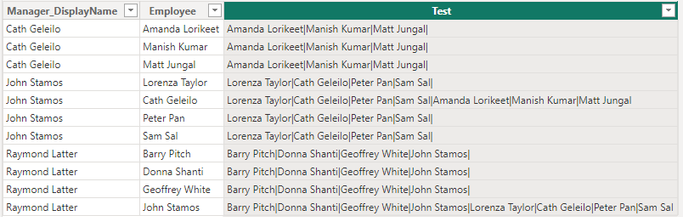
2. Result:

vyangliumsft_0-1702449300259.png


Best Regards,

Liu Yang

If this post helps, then please consider Accept it as the solution to help the other members find it more quickly

View solution in original post

2 REPLIES 2
Anonymous
Not applicable

Hi  @azakir ,


Here are the steps you can follow:

1. Create calculated column.

Test =
var _select=SELECTCOLUMNS('Table',"Man",[Manager_DisplayName])
var _test1=
CONCATENATEX(
    FILTER(ALL('Table'),
    'Table'[Manager_DisplayName]=EARLIER('Table'[Manager_DisplayName])),[Employee],"|")
var _table1=
SUMMARIZE(
    'Table','Table'[Manager_DisplayName],
    "Employe11",
    CONCATENATEX(
        FILTER(ALL('Table'),
        'Table'[Manager_DisplayName]=EARLIER('Table'[Manager_DisplayName])),[Employee],"|"))
var _test2=
IF(
    'Table'[Employee] in _select ,
    MAXX(
        FILTER(_table1,[Manager_DisplayName] =EARLIER('Table'[Employee])),[Employe11]))
return
_test1 &"|"&_test2

2. Result:

vyangliumsft_0-1702449300259.png


Best Regards,

Liu Yang

If this post helps, then please consider Accept it as the solution to help the other members find it more quickly

thanks @Anonymous that did the trick for me. Cheers for your help

Helpful resources

Announcements
Join our Fabric User Panel

Join our Fabric User Panel

Share feedback directly with Fabric product managers, participate in targeted research studies and influence the Fabric roadmap.

Sticker Challenge 2026 Carousel

Join our Community Sticker Challenge 2026

If you love stickers, then you will definitely want to check out our Community Sticker Challenge!

January Power BI Update Carousel

Power BI Monthly Update - January 2026

Check out the January 2026 Power BI update to learn about new features.

FabCon Atlanta 2026 carousel

FabCon Atlanta 2026

Join us at FabCon Atlanta, March 16-20, for the ultimate Fabric, Power BI, AI and SQL community-led event. Save $200 with code FABCOMM.