
Join us at FabCon Atlanta from March 16 - 20, 2026, for the ultimate Fabric, Power BI, AI and SQL community-led event. Save $200 with code FABCOMM.
Register now!The Power BI Data Visualization World Championships is back! Get ahead of the game and start preparing now! Learn more
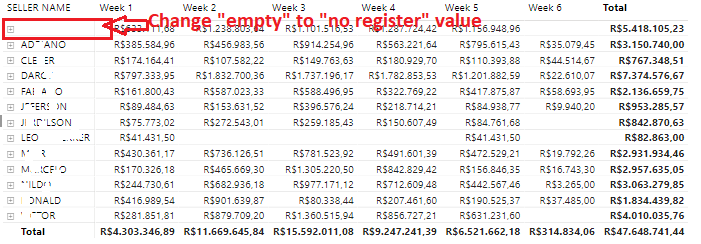
To put it in context: I have 2 related tables, but not all lines are related. When I go to view all the values of the tables in an array, I have empty values (names)
As you can see in the image, I need to fill in the value "empty" with a default value ("not registered").
I know it is possible to ignore these values, but I need them to appear.
How do I force a name on (empty) values without a direct relationship between tables.
Solved! Go to Solution.
Hi Luizcarlospf,
The clean solution to this would be to add a record in your [seller name] column with an unused ID (e.g. -1) and "not registered" as seller name. Then to map all the records who currently do not have a seller associated with them to that new ID. Below you'll find an example:
1
2
Hope that helps!
Regards,
Tim
Proud to be a Super User!
Hi Luizcarlospf,
The clean solution to this would be to add a record in your [seller name] column with an unused ID (e.g. -1) and "not registered" as seller name. Then to map all the records who currently do not have a seller associated with them to that new ID. Below you'll find an example:
1
2
Hope that helps!
Regards,
Tim
Proud to be a Super User!
Thanks!!
the whole problem is the relationship between the tables that I am using. There are sales unrelated to the seller. changing the tables would be impossible due to the large number of empty values. I need a solution with filter or metrics to just change the empty value for some standard name
Hi,
Regarding my earlier solution, within Power query you could use the replace value function replace all empty values at once.
However, if this is not a fitting solution in this case, you could create a calculated column in the sales table and have it filled with the RELATED() value from the seller table and use a SWITCH() to replace the blanks with a different value.
Regards,
Tim
Proud to be a Super User!
The Power BI Data Visualization World Championships is back! Get ahead of the game and start preparing now!
| User | Count |
|---|---|
| 40 | |
| 35 | |
| 34 | |
| 31 | |
| 28 |
| User | Count |
|---|---|
| 137 | |
| 102 | |
| 71 | |
| 67 | |
| 65 |