
cancel
Showing results for 
Search instead for 
Did you mean: 

Next up in the FabCon + SQLCon recap series: The roadmap for Microsoft SQL and Maximizing Developer experiences in Fabric. All sessions are available on-demand after the live show. Register now

Reply
Anonymous
Not applicable

Overlapping Two Matrix Tables

Hi Can we Overlap two Matrix table, As they have the same Name Column, but Actual & Goal columns are by month.

I want to hide the Name column in the goal table. Is it possible ?

Capture 1.PNGThanks,

panda2018


1 ACCEPTED SOLUTION
v-juanli-msft
Community Support
Community Support

Hi @Anonymous

There is no option to Overlap two Matrix table as you metioned inPower BI currently.

Here are two workarounds

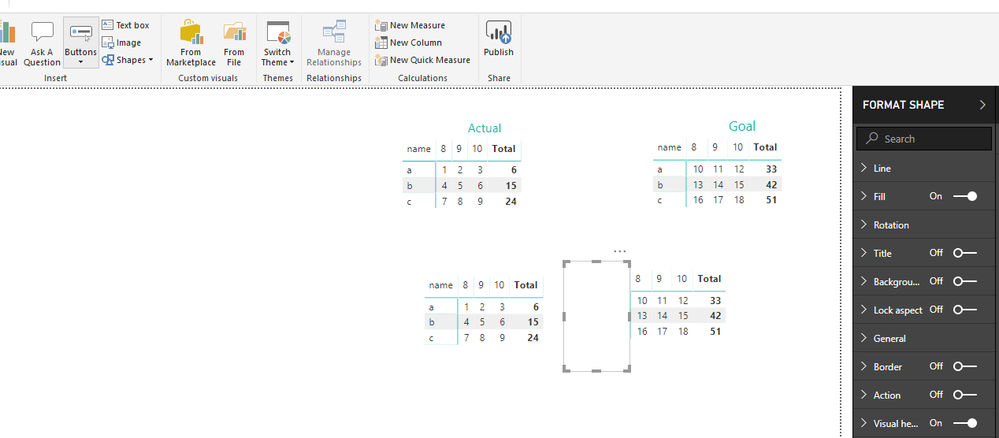
1. create rectangle (Home->Shape)

fill in with "white" color and with no lines or lines of "white" color.

Then move this shape on the matrix as below.

13.png

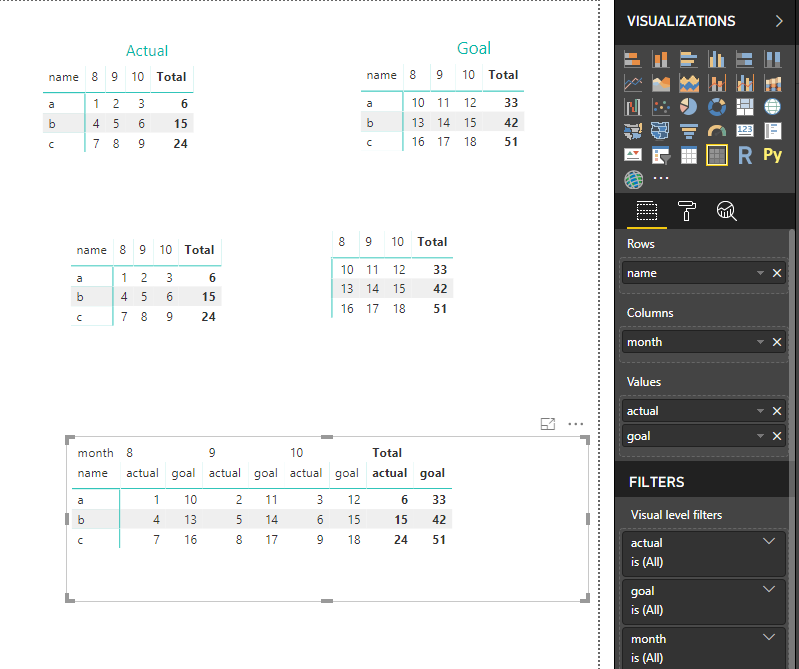
2. add "actual" and "goal" column/measure in the "Value" field.

14.png


Best Regards

Maggie


View solution in original post

5 REPLIES 5
v-juanli-msft
Community Support
Community Support

Hi @Anonymous

There is no option to Overlap two Matrix table as you metioned inPower BI currently.

Here are two workarounds

1. create rectangle (Home->Shape)

fill in with "white" color and with no lines or lines of "white" color.

Then move this shape on the matrix as below.

13.png

2. add "actual" and "goal" column/measure in the "Value" field.

14.png


Best Regards

Maggie


Anonymous
Not applicable

@v-juanli-msft 

I have a broblem though.

When I Put the Actual & Goal in the Value area, It shows the sum Amount in all the months.

The Actuals are correct.

 Capture3.PNG

 Thanks,

panda2018

Hi @Anonymous

Are the [Actual] and [Goal] columns or measures?

If they are columns, right-click on the [Actual] and [Goal] columns in the "Value" field, select "don't summarized".

Or you could create measures such like

measure=SUM([Goal])


Best Regards

Maggie

Anonymous
Not applicable

@v-juanli-msft 

I have a broblem though.

When I Put the Actual & Goal in the Value area, It shows the sum Amount in all the months.

The Actuals are correct.

 Capture3.PNG

 Thanks,

panda2018

Anonymous
Not applicable

WOW...this is cool !!@v-juanli-msft

Thank you so much!!


panda2018

Helpful resources

Announcements
New to Fabric survey Carousel

New to Fabric Survey

If you have recently started exploring Fabric, we'd love to hear how it's going. Your feedback can help with product improvements.

Power BI DataViz World Championships carousel

Power BI DataViz World Championships - June 2026

A new Power BI DataViz World Championship is coming this June! Don't miss out on submitting your entry.

Join our Fabric User Panel

Join our Fabric User Panel

Share feedback directly with Fabric product managers, participate in targeted research studies and influence the Fabric roadmap.

March Power BI Update Carousel

Power BI Community Update - March 2026

Check out the March 2026 Power BI update to learn about new features.