A new Data Days event is coming soon!
This time we’re going bigger than ever. Fabric, Power BI, SQL, AI and more. We're covering it all. You won't want to miss it.
Learn more- Power BI forums
- Get Help with Power BI
- Desktop
- Service
- Report Server
- Power Query
- Mobile Apps
- Developer
- DAX Commands and Tips
- Custom Visuals Development Discussion
- Health and Life Sciences
- Power BI Spanish forums
- Translated Spanish Desktop
- Training and Consulting
- Instructor Led Training
- Dashboard in a Day for Women, by Women
- Galleries
- Data Stories Gallery
- Themes Gallery
- Contests Gallery
- QuickViz Gallery
- Quick Measures Gallery
- Visual Calculations Gallery
- Notebook Gallery
- Translytical Task Flow Gallery
- TMDL Gallery
- R Script Showcase
- Webinars and Video Gallery
- Ideas
- Custom Visuals Ideas (read-only)
- Issues
- Issues
- Events
- Upcoming Events
Level up your Power BI skills this month - build one visual each week and tell better stories with data! Get started
- Power BI forums
- Forums
- Get Help with Power BI
- Desktop
- Overlap table
- Subscribe to RSS Feed
- Mark Topic as New
- Mark Topic as Read
- Float this Topic for Current User
- Bookmark
- Subscribe
- Printer Friendly Page

- Mark as New
- Bookmark
- Subscribe
- Mute
- Subscribe to RSS Feed
- Permalink
- Report Inappropriate Content
Overlap table
Hello,
I'm relatively new at using Power BI, so I hope someone can help me with this question.
I want to make a overlap table of certain products on zip code level.
Example:
I want to make this dataset:
Zip code Product
1000 A
1000 B
1001 A
1001 B
1002 C
1003 B
1003 C
1004 A
1005 B
1006 C
1007 C
1008 A
1009 B
1010 A
Into this table:
| A | B | C | |
| A | 5 | 2 | 0 |
| B | 2 | 5 | 1 |
| C | 0 | 1 | 4 |
Thanks in advance
Solved! Go to Solution.
- Mark as New
- Bookmark
- Subscribe
- Mute
- Subscribe to RSS Feed
- Permalink
- Report Inappropriate Content
Than you for your help! However this is just a subset. Doing this for the whole dataset would take quite a lot of time, because there are many combinations possible.
In another topic I found this:
This did not bring me to the exact table I wanted, so I did the rest by hand. However this took quite a lot of hand work, because all all possible orderings of products appeared in different cells (a,b,c - a,c,b - b,a,c - etc.).


- Mark as New
- Bookmark
- Subscribe
- Mute
- Subscribe to RSS Feed
- Permalink
- Report Inappropriate Content
@Anonymous ,
Could you please explain the number in the matrix?
| A | B | C | |
| A | 5 | 2 | 0 |
| B | 2 | 5 | 1 |
| C | 0 | 1 | 4 |
Regards,
Jimmy Tao
- Mark as New
- Bookmark
- Subscribe
- Mute
- Subscribe to RSS Feed
- Permalink
- Report Inappropriate Content
The 5 upper left means that there are in total 5 zipcodes with product A.
The 2 upper middle means that there are in total 2 zipcodes with as well product A as product B.
The upper right means that there are no zipcodes with as well product A as product C.
I'm mainly interested in the overlap (how many people (zipcodes) have more than 1 product and which product combinations occur most often), so the values for A-A, B-B and C-C are not that important to me. It's mainly about the rest of the values in the matrix.
- Mark as New
- Bookmark
- Subscribe
- Mute
- Subscribe to RSS Feed
- Permalink
- Report Inappropriate Content
@Anonymous ,
So your requirement is to achieve the distinct count of zipcode with three combinations "A&B", "B&C" and "A&C", right? You can create three calculate columns and three measures using DAX below:
Calculate columns:
Combination A&B = CALCULATE(CONCATENATEX('Table', 'Table'[Product], "&"), FILTER(ALLEXCEPT('Table', 'Table'[Zip Code]), 'Table'[Product] = "A" || 'Table'[Product] = "B"))

Combination B&C = CALCULATE(CONCATENATEX('Table', 'Table'[Product], "&"), FILTER(ALLEXCEPT('Table', 'Table'[Zip Code]), 'Table'[Product] = "B" || 'Table'[Product] = "C"))

Combination A&C = CALCULATE(CONCATENATEX('Table', 'Table'[Product], "&"), FILTER(ALLEXCEPT('Table', 'Table'[Zip Code]), 'Table'[Product] = "A" || 'Table'[Product] = "C"))
Measures:
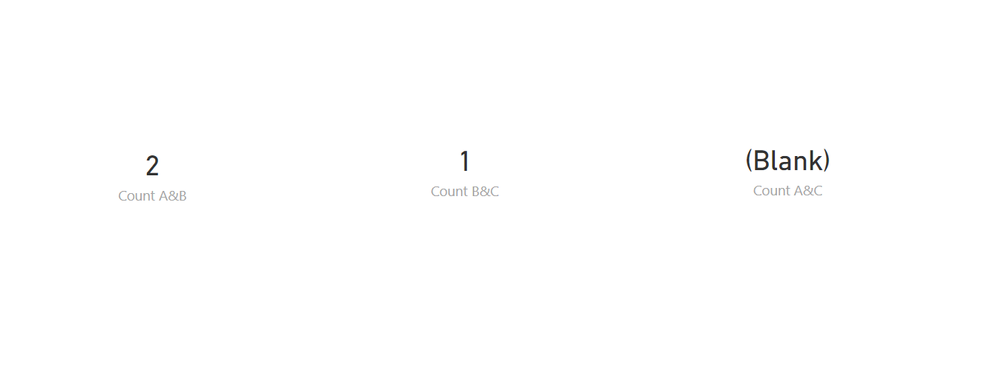
Count A&B = CALCULATE(DISTINCTCOUNT('Table'[Zip Code]), FILTER('Table', 'Table'[Combination A&B] = "A&B"))

Count B&C = CALCULATE(DISTINCTCOUNT('Table'[Zip Code]), FILTER('Table', 'Table'[Combination B&C] = "B&C"))

Count A&C = CALCULATE(DISTINCTCOUNT('Table'[Zip Code]), FILTER('Table', 'Table'[Combination A&C] = "A&C"))
The result will be like below:
Community Support Team _ Jimmy Tao
If this post helps, then please consider Accept it as the solution to help the other members find it more quickly.
- Mark as New
- Bookmark
- Subscribe
- Mute
- Subscribe to RSS Feed
- Permalink
- Report Inappropriate Content
Than you for your help! However this is just a subset. Doing this for the whole dataset would take quite a lot of time, because there are many combinations possible.
In another topic I found this:
This did not bring me to the exact table I wanted, so I did the rest by hand. However this took quite a lot of hand work, because all all possible orderings of products appeared in different cells (a,b,c - a,c,b - b,a,c - etc.).
- Mark as New
- Bookmark
- Subscribe
- Mute
- Subscribe to RSS Feed
- Permalink
- Report Inappropriate Content
Hi @Anonymous , As I have in mind, you can not put the same field in columns and rows in a matrix.
- Mark as New
- Bookmark
- Subscribe
- Mute
- Subscribe to RSS Feed
- Permalink
- Report Inappropriate Content
Thanks for your reply!
There isn't another option in for example the query editor or by using a measure or something to get this done? Is it better to use another program, for example excel to do this? I also tried to do it in excel, but I don't know how to do it in excel either.
Helpful resources

Power BI Monthly Update - April 2026
Check out the April 2026 Power BI update to learn about new features.

Data Days 2026 coming soon!
Sign up to receive a private message when registration opens and key events begin.

New to Fabric Survey
If you have recently started exploring Fabric, we'd love to hear how it's going. Your feedback can help with product improvements.

Power BI DataViz World Championships - June 2026
A new Power BI DataViz World Championship is coming this June! Don't miss out on submitting your entry.

| User | Count |
|---|---|
| 31 | |
| 25 | |
| 21 | |
| 18 | |
| 17 |


| User | Count |
|---|---|
| 62 | |
| 34 | |
| 33 | |
| 25 | |
| 24 |


