Join us at FabCon Atlanta from March 16 - 20, 2026, for the ultimate Fabric, Power BI, AI and SQL community-led event. Save $200 with code FABCOMM.
Register now!The Power BI Data Visualization World Championships is back! Get ahead of the game and start preparing now! Learn more
Hello,
I have a card visual and I would like to outline the data label to the right or left.
Is this possible?
- N
Solved! Go to Solution.
Hi @Niels_T ,
Based on my test, I could not find any setting about Outline.
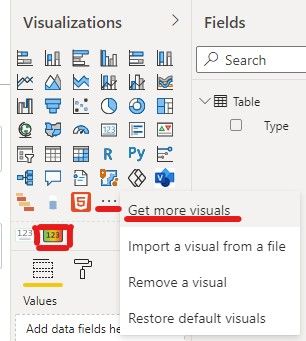
Maybe you could try to import Card with States OKVIZ visual by clicking "Get more visuals"
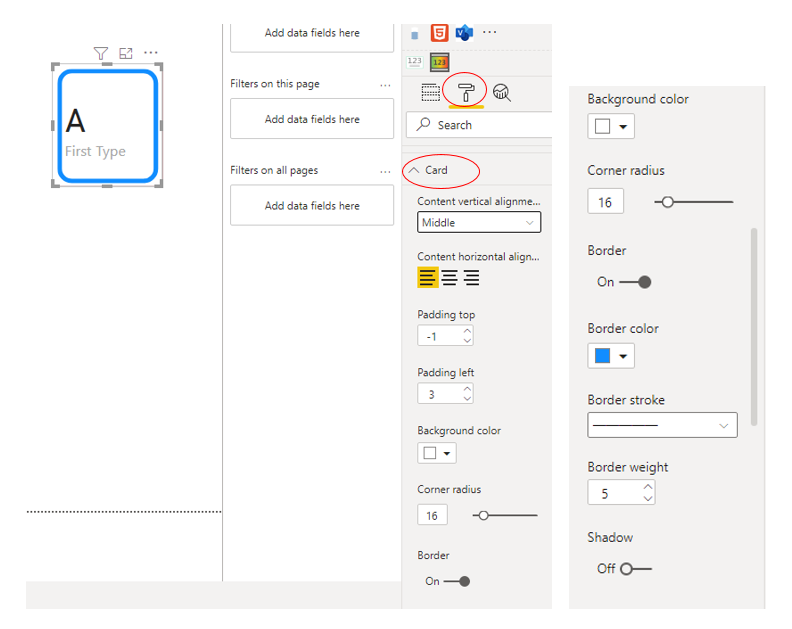
Then do the following settings as shown below:
Best Regards,
Eyelyn Qin
If this post helps, then please consider Accept it as the solution to help the other members find it more quickly.
Hi @Niels_T ,
Based on my test, I could not find any setting about Outline.
Maybe you could try to import Card with States OKVIZ visual by clicking "Get more visuals"
Then do the following settings as shown below:
Best Regards,
Eyelyn Qin
If this post helps, then please consider Accept it as the solution to help the other members find it more quickly.
Hi @Niels_T
Outline the data label, you can add an overlay with a border or you can also use an advanced card visual to achieve this.
https://appsource.microsoft.com/en-us/product/power-bi-visuals/wa104381651?tab=overview
What exactly do you want your visual to look like?, can you post a sample, so that we can help you.
Thanks
Here is what I would like to achieve.
I have this card visual and as you can see it is centered in the middle. In this case I would like to make sure that the outline is to the left so that it always displays on the left.
The Power BI Data Visualization World Championships is back! Get ahead of the game and start preparing now!
| User | Count |
|---|---|
| 39 | |
| 37 | |
| 33 | |
| 32 | |
| 29 |
| User | Count |
|---|---|
| 133 | |
| 88 | |
| 85 | |
| 68 | |
| 64 |