Join us at FabCon Atlanta from March 16 - 20, 2026, for the ultimate Fabric, Power BI, AI and SQL community-led event. Save $200 with code FABCOMM.
Register now!The Power BI Data Visualization World Championships is back! Get ahead of the game and start preparing now! Learn more
Hi All,
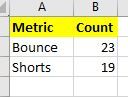
I have data in form of below 2 tables:
Table 1
Table 2
I joined these 2 tables with all data from table 1 and matching data from table 2.
When I try to pull Table1.Metric and Table.Count it just gives same out put as Table 2.
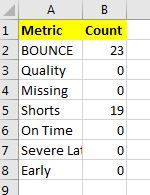
Rather I am expecting as below
Expected Output:
Solved! Go to Solution.
Couple ways to do this:
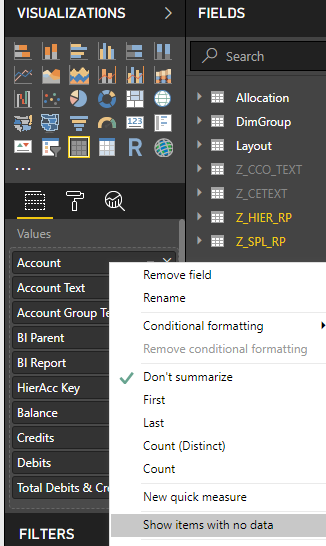
Click "Show items with no data", that'll bring in blanks and not zeros.
Probably best to create a measure that sums the counts from table 2 and use that instead of the related column.
Couple ways to do this:
Click "Show items with no data", that'll bring in blanks and not zeros.
Probably best to create a measure that sums the counts from table 2 and use that instead of the related column.
ohh that was easy one....
Can you please explain how did you join?
Thansk
Raj
The Power BI Data Visualization World Championships is back! Get ahead of the game and start preparing now!
| User | Count |
|---|---|
| 39 | |
| 37 | |
| 33 | |
| 32 | |
| 29 |
| User | Count |
|---|---|
| 133 | |
| 88 | |
| 85 | |
| 68 | |
| 64 |