Join us at FabCon Atlanta from March 16 - 20, 2026, for the ultimate Fabric, Power BI, AI and SQL community-led event. Save $200 with code FABCOMM.
Register now!The Power BI Data Visualization World Championships is back! Get ahead of the game and start preparing now! Learn more
Hi Friends,
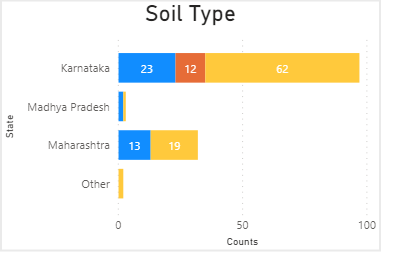
I have created a stack bar chart.
Blue color denotes to : High
Red color denotes to : Low
Yellow color denotes to : Medium
So current ordering is - High, Low, Medium [Ordered Alphabetically]
I want to order it like - High, Medium, Low. But I am not able to do so.
Kindly help me out to make it done. Thanks a lot in advance.
Regards,
Bhu
Solved! Go to Solution.
Hi @Anonymous ,
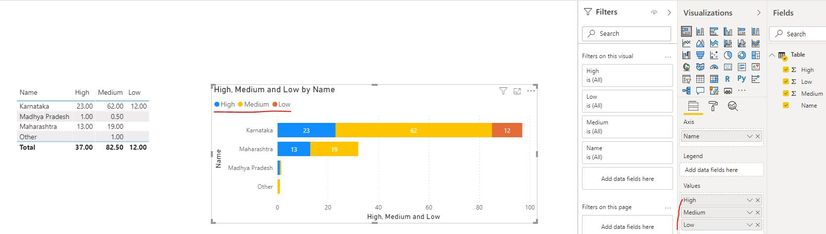
Could you please provide some sample data which used in stacked bar chart in order to provide you a proper solution? If the data have the same structure with the one in below screen shot, you can put the Soil Type fields in Values fields with specific orders just like the part with red mark.
In addition, you can refer the method in the following links.
Custom sort order for axis, columns, legends.... in Power BI
Best Regards
Rena
Hi @Anonymous,
you can create an index for your legend then use sort column by your index column.
Hope this helps.
Hi @mussaenda ,
Thanks for your revert.
But I have 3 columns in same table for different stages of Soil Type having High, Medium and Low.
I think your solution will work only for one column. Others 2 will be disordered by sorting index for 1st column.
Is there any other solution using that I can sort 3-4 charts in different stages ???
Thanks.
Hi @Anonymous ,
Could you please provide some sample data which used in stacked bar chart in order to provide you a proper solution? If the data have the same structure with the one in below screen shot, you can put the Soil Type fields in Values fields with specific orders just like the part with red mark.
In addition, you can refer the method in the following links.
Custom sort order for axis, columns, legends.... in Power BI
Best Regards
Rena
@Anonymous , You can use the same sort column for all three. But you need have a column like
Switch ( True(),
[Col1]="High",1,
[Col1]="Medium",2,
[Col1]="Low",3) // correct the numbers as per need
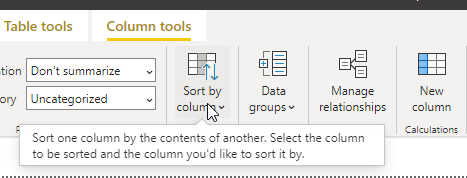
Step for sort column
https://docs.microsoft.com/en-us/power-bi/desktop-sort-by-column
Also, check, you might not need that
The Power BI Data Visualization World Championships is back! Get ahead of the game and start preparing now!
| User | Count |
|---|---|
| 39 | |
| 38 | |
| 38 | |
| 28 | |
| 27 |
| User | Count |
|---|---|
| 124 | |
| 88 | |
| 73 | |
| 66 | |
| 65 |