cancel
Showing results for 
Search instead for 
Did you mean: 

Get Fabric Certified for FREE during Fabric Data Days. Don't miss your chance! Request now

Reply
Anonymous
Not applicable

Order of rows in unpivoted table

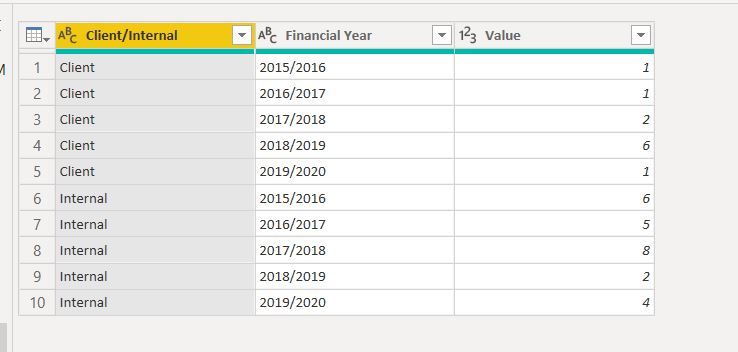
I have an unpivoted table used to create a stacked column chart. See below.BICapture11.JPG

The chart does not display the Financial Years in the correct order. I added an Index column but this didn't work because the table has duplicate values (each financial year). Is there a way to get the financial years in the correct order?

Thanks 

Steve

1 ACCEPTED SOLUTION
Ashish_Mathur
Super User
Super User

Hi,

My suggestion would be to split the Financial Year into 2 columns - delete the second column and rename the first column as Year.  Assuming January is first month of your FY, write this calculated column formula

Date=1*("1/1/"&Data[Year])

Format this as a date column.

Now create a Calendar Table and in a calculated column of the Calendar Table, extract the Year.  Build a relationship from the Date column of your Data Table to the Date column of the Calendar Table.  To your visual, drag Year from the Calendar Table.


Regards,
Ashish Mathur
http://www.ashishmathur.com
https://www.linkedin.com/in/excelenthusiasts/

View solution in original post

6 REPLIES 6
v-gizhi-msft
Community Support
Community Support

Hi,


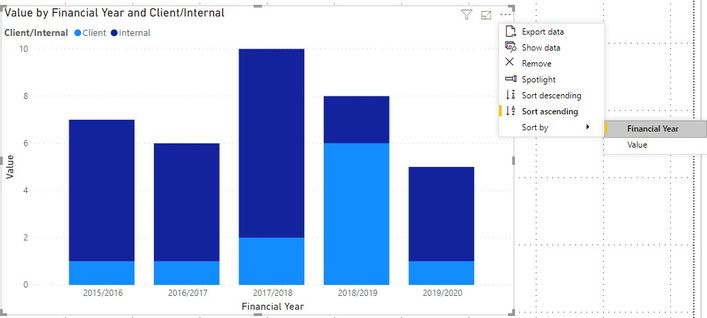
You can change it sort by Financial Year through clicking options on this visual:

30.jpg

Hope this helps.


Best Regards,

Giotto Zhi


Anonymous
Not applicable

Thank you all for the suggested solutions. While some approaches did not seem to work initially, when I deleted the chart and rebuilt it they did work, so I am happy!


Steve 

This is a sneaky feature of 'Sort by Column'.  You either have to remove the relevant field from the visualisation and re-add it OR delete the visual and start again.

Ashish_Mathur
Super User
Super User

Hi,

My suggestion would be to split the Financial Year into 2 columns - delete the second column and rename the first column as Year.  Assuming January is first month of your FY, write this calculated column formula

Date=1*("1/1/"&Data[Year])

Format this as a date column.

Now create a Calendar Table and in a calculated column of the Calendar Table, extract the Year.  Build a relationship from the Date column of your Data Table to the Date column of the Calendar Table.  To your visual, drag Year from the Calendar Table.


Regards,
Ashish Mathur
http://www.ashishmathur.com
https://www.linkedin.com/in/excelenthusiasts/
amitchandak
Super User
Super User

Can you create a custom sort column and mark it as sort

Sort_by_column.png

Share with Power BI Enthusiasts: Full Power BI Video (20 Hours) YouTube
Microsoft Fabric Series 60+ Videos YouTube
Microsoft Fabric Hindi End to End YouTube
HotChilli
Super User
Super User

How about duplicating the column, split it to get the first 4 numbers (call it start year or something).  Set the data type to be number.

You can then use that with the 'Sort by Column' functionality.  i.e. Select Financial Year-> Sort By Column -> start year

Helpful resources

Announcements
November Power BI Update Carousel

Power BI Monthly Update - November 2025

Check out the November 2025 Power BI update to learn about new features.

Fabric Data Days Carousel

Fabric Data Days

Advance your Data & AI career with 50 days of live learning, contests, hands-on challenges, study groups & certifications and more!

FabCon Atlanta 2026 carousel

FabCon Atlanta 2026

Join us at FabCon Atlanta, March 16-20, for the ultimate Fabric, Power BI, AI and SQL community-led event. Save $200 with code FABCOMM.

Top Solution Authors
Top Kudoed Authors