Join us at FabCon Atlanta from March 16 - 20, 2026, for the ultimate Fabric, Power BI, AI and SQL community-led event. Save $200 with code FABCOMM.
Register now!The Power BI Data Visualization World Championships is back! Get ahead of the game and start preparing now! Learn more
Dear Community,
Solved! Go to Solution.
To sort the months you can add a custom column to the 'Calendar table' in Power Query that will allow you to sort the [Month_Year_Short] column:
Text.From([Year]) & Text.PadStart(Text.From([Month_No]), 2, "0")
If you are needing to create a measure to dynamically look back 13 months I would suggest watching this video. It can be modified to 13 months https://www.youtube.com/watch?v=d8Rm7dwM6gc
To sort the months you can add a custom column to the 'Calendar table' in Power Query that will allow you to sort the [Month_Year_Short] column:
Text.From([Year]) & Text.PadStart(Text.From([Month_No]), 2, "0")
If you are needing to create a measure to dynamically look back 13 months I would suggest watching this video. It can be modified to 13 months https://www.youtube.com/watch?v=d8Rm7dwM6gc
Do you have a Calander or Dates table in your model. If so what columns do you have in it?
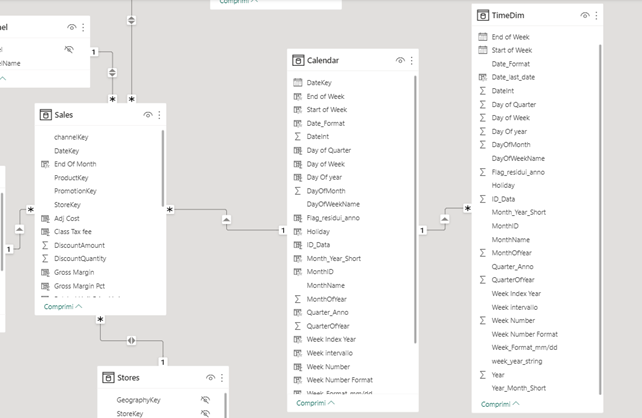
Hi, below a screenshot of the model.
In the matrix I use the "Month-Year-Short" field in the Calendar Table.
In the date filter I use the date key field from the Tine-Dim
The Power BI Data Visualization World Championships is back! Get ahead of the game and start preparing now!
Check out the November 2025 Power BI update to learn about new features.
| User | Count |
|---|---|
| 59 | |
| 43 | |
| 42 | |
| 23 | |
| 17 |
| User | Count |
|---|---|
| 190 | |
| 122 | |
| 96 | |
| 66 | |
| 47 |