cancel
Showing results for 
Search instead for 
Did you mean: 

Try your skills in the Power BI Dataviz World Championship! Round one ends June 26. Join now

Reply
momodj20
Helper II
Helper II

Order By multiple columns

i have a report with a table, can i order a report for multiple columns in the view?


thanks


1 ACCEPTED SOLUTION
v-lid-msft
Community Support
Community Support

Hi @momodj20 ,


We can create a calculated column to order it like following example,


Index = 
VAR p = [Power Level]
VAR n = [Name]
VAR a = [Age]
VAR t1 = 'Table3'
VAR t2 =
    FILTER ( 'Table3', 'Table3'[Power Level] = p )
VAR t3 =
    FILTER ( 'Table3', 'Table3'[Power Level] = p && 'Table3'[Age] = a )
RETURN
    RANKX (
        t1,
        RANKX ( t1, [Power Level],, ASC, SKIP ) * 100
            + RANKX ( t2, [Age],, ASC, SKIP ) * 10
            + RANKX ( t3, [Name],, ASC, SKIP ),
        ,
        DESC,
        SKIP
    )

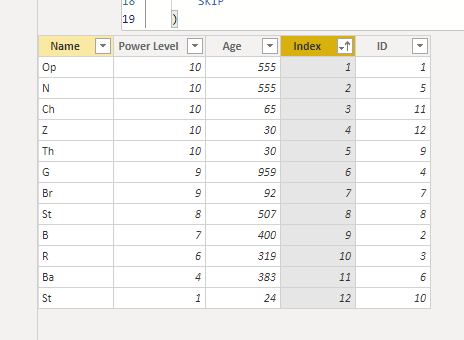
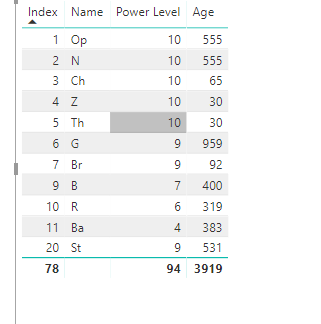
This will sort by Power Level, then Age, and at last sort by name order. 


3.PNG


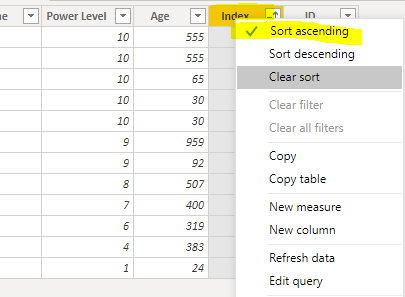
Then if you want to see the order in Data view, just sort by index column.

4.PNG5.PNG


If you want to see order in table visual, you can put the column into the table visual.

6.PNG


BTW, pbix as attached.


Best regards,

Community Support Team _ Dong Li
If this post helps, then please consider Accept it as the solution to help the other members find it more quickly.

Community Support Team _ Dong Li
If this post helps, then please consider Accept it as the solution to help the other members find it more quickly.

View solution in original post

2 REPLIES 2
v-lid-msft
Community Support
Community Support

Hi @momodj20 ,


How about the result after you follow the suggestions mentioned in my original post?Could you please provide more details about it If it doesn't meet your requirement?


Best regards,

Community Support Team _ Dong Li
If this post helps, then please consider Accept it as the solution to help the other members find it more quickly.

Community Support Team _ Dong Li
If this post helps, then please consider Accept it as the solution to help the other members find it more quickly.
v-lid-msft
Community Support
Community Support

Hi @momodj20 ,


We can create a calculated column to order it like following example,


Index = 
VAR p = [Power Level]
VAR n = [Name]
VAR a = [Age]
VAR t1 = 'Table3'
VAR t2 =
    FILTER ( 'Table3', 'Table3'[Power Level] = p )
VAR t3 =
    FILTER ( 'Table3', 'Table3'[Power Level] = p && 'Table3'[Age] = a )
RETURN
    RANKX (
        t1,
        RANKX ( t1, [Power Level],, ASC, SKIP ) * 100
            + RANKX ( t2, [Age],, ASC, SKIP ) * 10
            + RANKX ( t3, [Name],, ASC, SKIP ),
        ,
        DESC,
        SKIP
    )

This will sort by Power Level, then Age, and at last sort by name order. 


3.PNG


Then if you want to see the order in Data view, just sort by index column.

4.PNG5.PNG


If you want to see order in table visual, you can put the column into the table visual.

6.PNG


BTW, pbix as attached.


Best regards,

Community Support Team _ Dong Li
If this post helps, then please consider Accept it as the solution to help the other members find it more quickly.

Community Support Team _ Dong Li
If this post helps, then please consider Accept it as the solution to help the other members find it more quickly.

Helpful resources

Announcements
Fabric Data Days is here Carousel

Fabric Data Days 2026

Don't miss out on Data Days, June 15 through August 7. Learn Fabric, Power BI, SQL, AI and more.

May Power BI Update Carousel

Power BI Monthly Update - May 2026

Check out the May 2026 Power BI update to learn about new features.

Power BI DataViz World Championships carousel

Power BI DataViz World Championships - June 2026

A new Power BI DataViz World Championship is coming this June! Don't miss out on submitting your entry.