cancel
Showing results for 
Search instead for 
Did you mean: 

We've captured the moments from FabCon & SQLCon that everyone is talking about, and we are bringing them to the community, live and on-demand. Starts on April 14th. Register now

Reply
rawmeat
Frequent Visitor

Optimize Summarize dax expression

Hello developers,


Our team recently create a measure to get latest value.
The dax expression we are using is as follows:

Latest Error =
SUMX (
    SELECTCOLUMNS (
        SUMMARIZE (
            BE_PROCESS,
            BE_PROCESS[COL1],
            BE_PROCESS[COL2],
            BE_PROCESS[COL3],
            "Latest Value", CALCULATE (
                MAX ( BE_PROCESS[Error] ),
                FILTER ( BE_PROCESS, BE_PROCESS[TIMESTAMP] = MAX ( BE_PROCESS[TIMESTAMP] ) )
            )
        ),
        "latest value", [Latest Value]
    ),
    [latest value]
)

Since our user is only interested with the latest error they have so we first use summerize to create a group by table and then get error value with the largest timestamp.

The challenge here is this measure is taking too long to display the visuals especially when user apply different filters to the report. (The summerize expression has more columns and we have almost 40 million records in our ssas cube)
Initially we are using a calculated column with calculate and earlier function.  However, this doesn't fit our requirement.

The use case is that we have a filter on the report called users. If only one user is selected or filtered, it should give you the max timestamp for that specific user. If two or more users are slected, it should give you the max timestamp among these users:
User     Timestamp
A           100

A           150
B           200

B           150
If we use sum(error) it will aggregate all these 4 records;

If we use ealier and calculate function to create calcualted column it will aggregate A 150 and B 200;

If we use summarize it will caculate only B 200 (this is what we want).
Any idea or suggestion if we can optimize the above expression? Or any other dax expression could get the same reulst?


Thanks much!

Jason

2 REPLIES 2
v-danhe-msft
Microsoft Employee
Microsoft Employee

Hi @rawmeat,

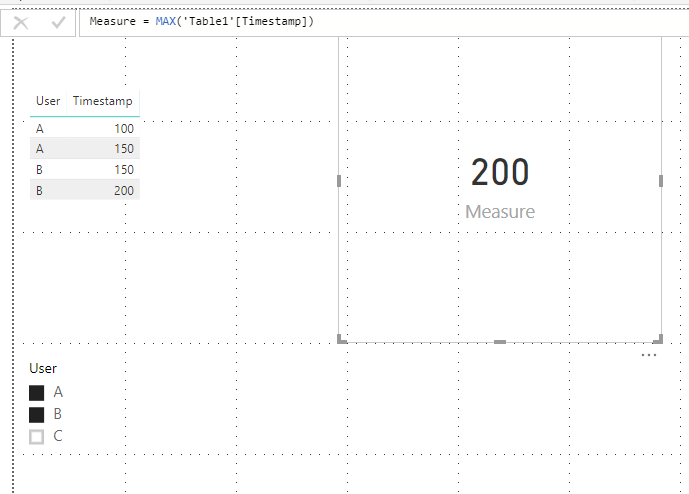
Based on my test, I could ues the max function to get the value.

1.PNG

Are there any other restrictions? If I misunderstand you, please let me know as soon as possible.


Regards,

Daniel He

Community Support Team _ Daniel He
If this post helps, then please consider Accept it as the solution to help the other members find it more quickly.

Thanks for the reply!

Sorry let me explain in detail
Let's say we have the following table in our datasource.

CELL     FLOW    USER    TIMESTAMP       ERROR

A                      A                      1                                  1                      100

A                      A                      1                                  2                      125

A                      A                      2                                  3                      150

B                      A                      1                                  4                      200

B                      B                      1                                  5                      250

B                      B                      2                                  6                      300

In our reports the table structure is as follows and we apply "User" as a filter
CELL FLOW ERROR

Our user wants to know the latest error in the current context.
If we select USER 1, we should see
CELL     FLOW    USER    TIMESTAMP       ERROR

A                      A                      1                                  2                      125

B                      A                      1                                  4                      200


If we select USER 2,
CELL     FLOW    USER    TIMESTAMP       ERROR

A                      A                      2                                  3                      150

B                      B                      2                                  6                      300


If we select all user, we should see
CELL     FLOW    USER    TIMESTAMP       ERROR

A                      A                      2                                  3                      150

B                      A                      1                                  4                      200

B                      B                      2                                  6                      300


So in the report the user will see the following results:
CELL               FLOW             ERROR

A                      A                      150

B                      A                      200

B                      B                      300

Helpful resources

Announcements
New to Fabric survey Carousel

New to Fabric Survey

If you have recently started exploring Fabric, we'd love to hear how it's going. Your feedback can help with product improvements.

Power BI DataViz World Championships carousel

Power BI DataViz World Championships - June 2026

A new Power BI DataViz World Championship is coming this June! Don't miss out on submitting your entry.

Join our Fabric User Panel

Join our Fabric User Panel

Share feedback directly with Fabric product managers, participate in targeted research studies and influence the Fabric roadmap.

March Power BI Update Carousel

Power BI Community Update - March 2026

Check out the March 2026 Power BI update to learn about new features.