cancel
Showing results for 
Search instead for 
Did you mean: 

We've captured the moments from FabCon & SQLCon that everyone is talking about, and we are bringing them to the community, live and on-demand. Starts on April 14th. Register now

Reply
WSMikey
New Member

Operand Type Null Error

Hi Everyone, I'm pretty new to PowerBI & SQL, but learning lots and enjoying it! I have a problem with my calculated column below. 


Current_Period_Budget =
VAR Period = [SelectedMonth]
RETURN
if(RELATED(GLAMF[ACCTBAL]) = "2", -1,1) *
Switch(Period,
9,GLAFS[NETPERD1],
10,GLAFS[NETPERD2],
11,GLAFS[NETPERD3],
12,GLAFS[NETPERD4],
1,GLAFS[NETPERD5],
2,GLAFS[NETPERD6],
3,GLAFS[NETPERD7],
4,GLAFS[NETPERD8],
5,GLAFS[NETPERD9],
6,GLAFS[NETPERD10],
7,GLAFS[NETPERD11],
8,GLAFS[NETPERD12])


My Budget table (GLAFS) has a field for each month - in other words, each month of budget has it's own column. Unpivoting has not been done as it will impact other areas of the model. 


I have a date slicer where the user can select a certain date. [Selected Month] is a measure based on month(selectedvalue(datetable[date])). Based on the month of that date, i'm using a SWITCH function to pull the appropriate month's budget to my "current period budget" calculated column. The desired result is that if the user selectes 04/20/2022, which is the 4th month, then the switch function will pull [NETPERD8]. If the select a date in May, it would pull from [NETPERD9] and so on. 


The formula works without the VAR and using the month(today()) where i currently use "Period". However, that means the result will not be dynamic based on the user selected date. 


I can see the {selectedmonth] measure calculates properly and is an integer. The formula appears to calculate, but then i receive the following error. 


"Operand data type NULL is invalid for sum operator.. The exception was raised by the IDbCommand interface"


any ideas?


5 REPLIES 5
WSMikey
New Member

Another alternative is to create a measure that will return the column i want without using the switch above. I've done this and amended the formula as follows:


Current_Period_Budget =
if(RELATED(GLAMF[ACCTBAL]) = "2", -1,1) * [Budget Column]
 
[Budget Column] = GLAFS[NETPERD7] in this case. 
 
The above formula doesn't work. However, it i type in GLAFS[NETPERD7] instead of using the measure [Budget Column] the formula works. 
 
So - it seems to be reading the result of the measure as if it were text vs. a direct column reference. 
 
not sure if i'm barking up the wrong tree with this alternate solution
 

Hi @WSMikey ,


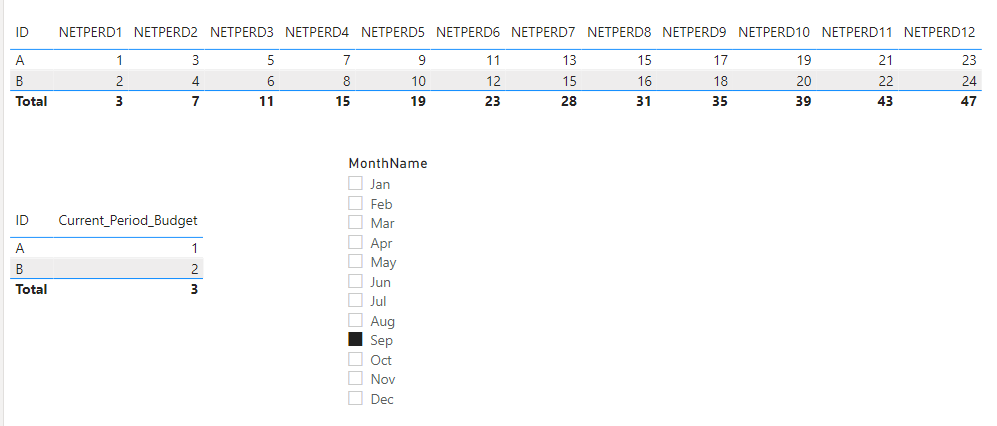
Please use a measure rather than calculated column. Then replace these columns in the formula with the aggregated value of the corresponding columns, for example:


Current_Period_Budget = 
VAR Period = [SelectedMonth]
RETURN
    SWITCH (
        Period,
        9, SUM ( GLAFS[NETPERD1] ),
        10, SUM ( GLAFS[NETPERD2] ),
        11, SUM ( GLAFS[NETPERD3] ),
        12, SUM ( GLAFS[NETPERD4] ),
        1, SUM ( GLAFS[NETPERD5] ),
        2, SUM ( GLAFS[NETPERD6] ),
        3, SUM ( GLAFS[NETPERD7] ),
        4, SUM ( GLAFS[NETPERD8] ),
        5, SUM ( GLAFS[NETPERD9] ),
        6, SUM ( GLAFS[NETPERD10] ),
        7, SUM ( GLAFS[NETPERD11] ),
        8, SUM ( GLAFS[NETPERD12] )
    )

vkkfmsft_0-1650964744065.png


If the problem is still not resolved, please provide detailed error information or the expected result you expect. Let me know immediately, looking forward to your reply.
Best Regards,
Winniz
If this post helps, then please consider Accept it as the solution to help the other members find it more quickly.

Hi @v-kkf-msft , thanks for the response! I have tested and still receive the same error. As such, i have changed my approach. Instead of linking the table as is, I used a custom SQL query to reconfigure and unpivot the data prior to being read by PowerBI. This simplified the project and solved my issue. 

amitchandak
Super User
Super User

@WSMikey ,where is sum here ?


Try like


Current_Period_Budget =
VAR Period = month(maxx(allselected('Date'), 'Date'[date])
RETURN
if(RELATED(GLAMF[ACCTBAL]) = "2", -1,1) *
Switch(Period,
9,GLAFS[NETPERD1],
10,GLAFS[NETPERD2],
11,GLAFS[NETPERD3],
12,GLAFS[NETPERD4],
1,GLAFS[NETPERD5],
2,GLAFS[NETPERD6],
3,GLAFS[NETPERD7],
4,GLAFS[NETPERD8],
5,GLAFS[NETPERD9],
6,GLAFS[NETPERD10],
7,GLAFS[NETPERD11],
8,GLAFS[NETPERD12])

Share with Power BI Enthusiasts: Full Power BI Video (20 Hours) YouTube
Microsoft Fabric Series 60+ Videos YouTube
Microsoft Fabric Hindi End to End YouTube

Hi @amitchandak , thank you for the quick response!


I was wondering the same thing about the Sum - It is not in the formula. The only think i could think of is that somehow, since i am using Direct Query to the SQL DB, it was arising from there. 


I tried the solution above, and variations of it, however, MAXX is not understood in the formula bar. Note - i'm creating the column directly in the PowerBI interface as opposed to Power Query editor - if that matters. 

Helpful resources

Announcements
New to Fabric survey Carousel

New to Fabric Survey

If you have recently started exploring Fabric, we'd love to hear how it's going. Your feedback can help with product improvements.

Power BI DataViz World Championships carousel

Power BI DataViz World Championships - June 2026

A new Power BI DataViz World Championship is coming this June! Don't miss out on submitting your entry.

Join our Fabric User Panel

Join our Fabric User Panel

Share feedback directly with Fabric product managers, participate in targeted research studies and influence the Fabric roadmap.

March Power BI Update Carousel

Power BI Community Update - March 2026

Check out the March 2026 Power BI update to learn about new features.