Don't miss your chance to take the Fabric Data Engineer (DP-700) exam on us!
Learn moreWe've captured the moments from FabCon & SQLCon that everyone is talking about, and we are bringing them to the community, live and on-demand. Starts on April 14th. Register now
Hello all, I have a fairly simple question as a Power BI novice.
I've attempted to read, and re-read this article: https://docs.microsoft.com/en-us/power-bi/refresh-desktop-file-onedrive. I'm most likely over-analyzing their wording, because it is still not clear. Nonetheless, I must be certain I've gained 100% full understanding of how this works.
I currently have an Excel file in OneDrive used as the dataset which constantly has new rows added every few minutes. Right now I have a simple multi-row card pinned to my dashboard showing the results of what has been added to the sheet today. So I have 3 simple questions:
1) When I click "Refresh now" from the Power BI app workspace dataset menu, is this loading all new changes to the spreadsheet?
2) I've checked off "Display last refresh time" on my dashboard options. When the dashboard says "Refreshed: 2 minutes ago" does this refer to the visualizations link to the dataset, or the dataset's link to the excel file?
3) Within the "Schedule refresh" options within the dataset, it says "By default, OneDrive updates files hourly" Is there any way to adjust this frequency to every 15 minutes or another time period shorter than 1 hour?
Solved! Go to Solution.
Basically the link explains about keeping the pbix files in OneDrive or SharePoint Team site. Not about connecting Power BI Desktop with excel files in OneDrive.
If you click Refresh Now button in dataset settings, it should bring all the row changes from your excel. (It may fail due to schema change or password expiration).
Check out the below links
https://docs.microsoft.com/en-us/power-bi/refresh-data#data-refresh
Did I answer your question? Mark my post as a solution!
Appreciate with a kudos 🙂
Hi @Lynk_RM .
Q1:Yes,it is loading all new changes which are made on the data source in Onedrive.
Q2:Refresh means datasets refresh which is linked to the excel file,and the visualizations will be refreshed synchronously
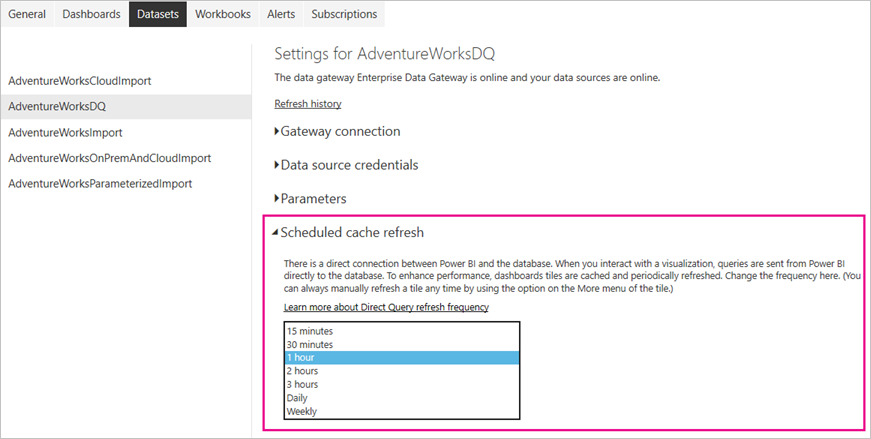
Q3:For onedrive,hourly is the only choice for refresh,if you wanna change the frequency,the best choice for you is to use a live connection way to connect with the data,such as SQL,etc..Then you will see "schedule cache refresh",where you can choose 15min,30min...Otherwise,you can only choose on-demand refresh ..
Hi @Lynk_RM .
Q1:Yes,it is loading all new changes which are made on the data source in Onedrive.
Q2:Refresh means datasets refresh which is linked to the excel file,and the visualizations will be refreshed synchronously
Q3:For onedrive,hourly is the only choice for refresh,if you wanna change the frequency,the best choice for you is to use a live connection way to connect with the data,such as SQL,etc..Then you will see "schedule cache refresh",where you can choose 15min,30min...Otherwise,you can only choose on-demand refresh ..
Basically the link explains about keeping the pbix files in OneDrive or SharePoint Team site. Not about connecting Power BI Desktop with excel files in OneDrive.
If you click Refresh Now button in dataset settings, it should bring all the row changes from your excel. (It may fail due to schema change or password expiration).
Check out the below links
https://docs.microsoft.com/en-us/power-bi/refresh-data#data-refresh
Did I answer your question? Mark my post as a solution!
Appreciate with a kudos 🙂
If you have recently started exploring Fabric, we'd love to hear how it's going. Your feedback can help with product improvements.
A new Power BI DataViz World Championship is coming this June! Don't miss out on submitting your entry.
Share feedback directly with Fabric product managers, participate in targeted research studies and influence the Fabric roadmap.
| User | Count |
|---|---|
| 56 | |
| 40 | |
| 36 | |
| 20 | |
| 18 |
| User | Count |
|---|---|
| 74 | |
| 72 | |
| 38 | |
| 35 | |
| 26 |