Join us at FabCon Atlanta from March 16 - 20, 2026, for the ultimate Fabric, Power BI, AI and SQL community-led event. Save $200 with code FABCOMM.
Register now!The Power BI Data Visualization World Championships is back! Get ahead of the game and start preparing now! Learn more
Hi,
im looking to build matrix graphs (or any, doesnt really mater) where, using slicers, i want to compare one part of a dataset v the whole dataset minus that part.
(so, dataset is 5 companies, i want to compare results from company A v results from company BCDE, company C v company ABDE etc)
Is there a way to use one slicer to select both the company i want to compare and simultaneously mirror that selection onto a second, further identical graph?
I know i can just set up one graph to include the full dataset, and use slicers to modify the other, but that means that the overall graph would still include the data for the company i want to check out (basically comparing it with at least part of itself), and i'd rather not do that.
Please advise 🙂
Kind regards,
Ramon
Solved! Go to Solution.
Hi, @Anonymous
Based on your description, I created data to reproduce your scenario.
Table:
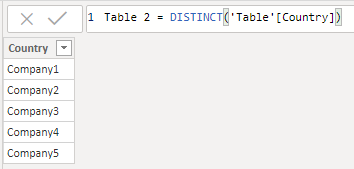
You can create a calculated table as follows and use its column as the slicer.
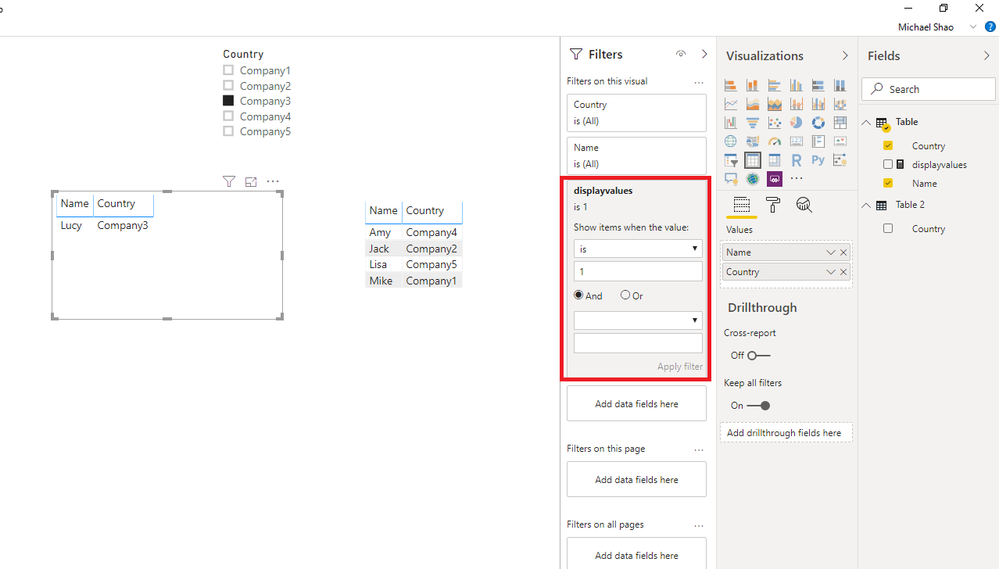
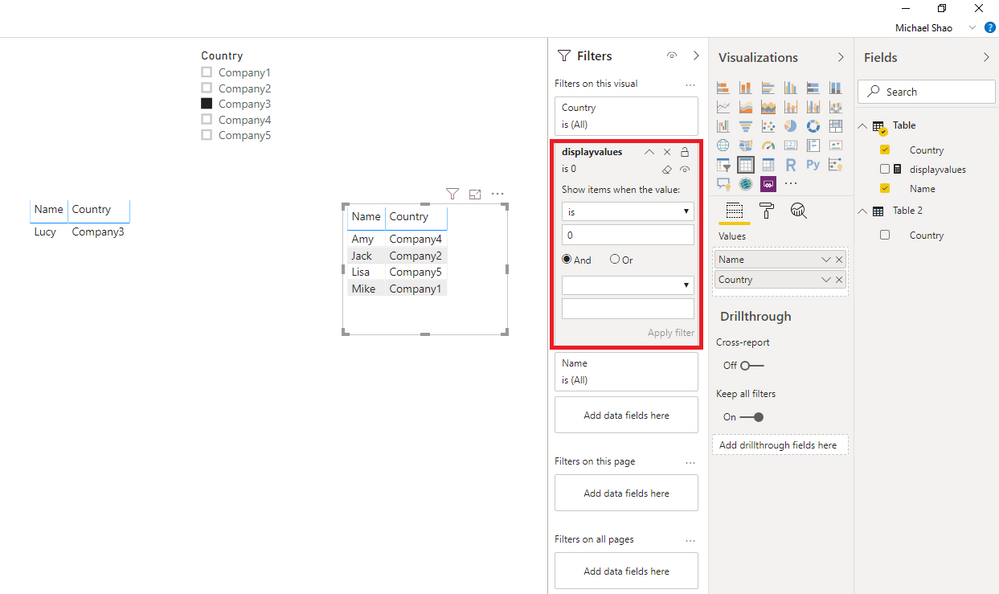
Then you need to create a measurea as below and put it in the corresponding visual level filter.
displayvalues =
var _currentcountry = SELECTEDVALUE('Table 2'[Country])
return
IF(
MAX('Table'[Country]) = _currentcountry,
1,
0
)
Result:
Best Regards
Allan
If this post helps, then please consider Accept it as the solution to help the other members find it more quickly.
Hi, @Anonymous
Based on your description, I created data to reproduce your scenario.
Table:
You can create a calculated table as follows and use its column as the slicer.
Then you need to create a measurea as below and put it in the corresponding visual level filter.
displayvalues =
var _currentcountry = SELECTEDVALUE('Table 2'[Country])
return
IF(
MAX('Table'[Country]) = _currentcountry,
1,
0
)
Result:
Best Regards
Allan
If this post helps, then please consider Accept it as the solution to help the other members find it more quickly.
@Anonymous
You have to create two sets of measure. A regular measure includes the selection and another measure that excludes the selection.
Refer to these posts.
https://community.powerbi.com/t5/Desktop/Exclude-data-based-on-Slicer/m-p/608675
https://community.powerbi.com/t5/Desktop/Exclude-value-via-a-slicer/m-p/467691
If it helps, mark it as a solution
Kudos are nice too
The Power BI Data Visualization World Championships is back! Get ahead of the game and start preparing now!
| User | Count |
|---|---|
| 38 | |
| 36 | |
| 33 | |
| 30 | |
| 28 |
| User | Count |
|---|---|
| 128 | |
| 88 | |
| 79 | |
| 67 | |
| 62 |