cancel
Showing results for 
Search instead for 
Did you mean: 

Vote for your favorite vizzies from the Power BI Dataviz World Championship submissions. Vote now!

Reply
Anonymous
Not applicable

One dimension for multiple fact tables - how to filter?

Hi,


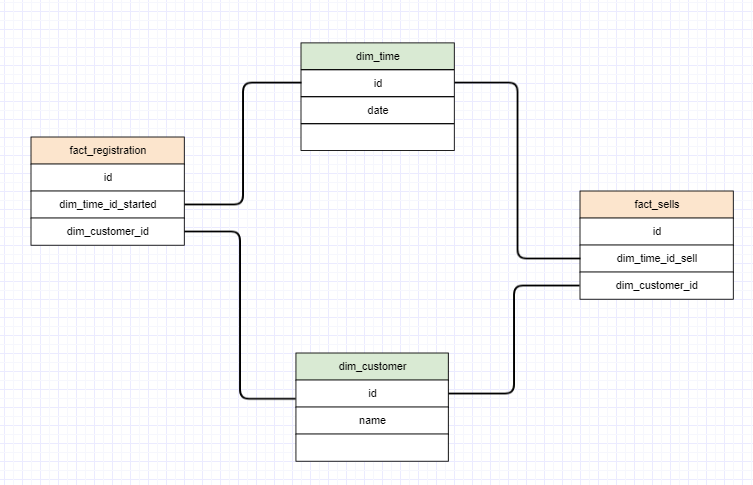
they say: create only one dim_time table for all facts. So:


111.PNG


Now I have one dim_time which relates to multiple fact tables. The problem is, when I use this dim_time for filtering to a specific date it will filter all the other facts for that date as well. 


When I want to filter only the registrations for a specific date and get all the sales for these customers who registerd at that date.

Or get all the sales for a specific date and see the registrations for the customers who did that sells.


Do I need two dim_time-dimensions for that?


I am using the SSAS and my Power BI would use this model after it is done. 

1 ACCEPTED SOLUTION
AlexisOlson
Super User
Super User

You can write measures that remove filters. You can also set the time relationships up as inactive and only activate them within certain measures (USERELATIOINSHIP).


If you need to control filters for the fact tables independently and simultaneously with slicers, then it may be better to have multiple time dimensions.

View solution in original post

2 REPLIES 2
AlexisOlson
Super User
Super User

You can write measures that remove filters. You can also set the time relationships up as inactive and only activate them within certain measures (USERELATIOINSHIP).


If you need to control filters for the fact tables independently and simultaneously with slicers, then it may be better to have multiple time dimensions.

Anonymous
Not applicable

Okey, than I was right with the two dimensions , one for each time. 

Helpful resources

Announcements
Power BI DataViz World Championships

Power BI Dataviz World Championships

Vote for your favorite vizzies from the Power BI World Championship submissions!

Sticker Challenge 2026 Carousel

Join our Community Sticker Challenge 2026

If you love stickers, then you will definitely want to check out our Community Sticker Challenge!

January Power BI Update Carousel

Power BI Monthly Update - January 2026

Check out the January 2026 Power BI update to learn about new features.

FabCon Atlanta 2026 carousel

FabCon Atlanta 2026

Join us at FabCon Atlanta, March 16-20, for the ultimate Fabric, Power BI, AI and SQL community-led event. Save $200 with code FABCOMM.