Join us at FabCon Atlanta from March 16 - 20, 2026, for the ultimate Fabric, Power BI, AI and SQL community-led event. Save $200 with code FABCOMM.
Register now!Learn from the best! Meet the four finalists headed to the FINALS of the Power BI Dataviz World Championships! Register now
Hi!
I have a table with reservations. I have check in date and number of nights.
I want to create a visual with the ocupation each day in the hotel, for example a bar chart. To get this i want to create a calendar table with the ocupated rooms each day.
So for example If the check in date is on 10 of april and the number of nights are 2 there will be 1 occupated room on 10/04 and 11/04.
The table format would be DATE Rooms Occupated
. .
10/04/2019 1
11/04/2019 1
12/04/2019 0
How can I create these table?
Thank you in advance
Solved! Go to Solution.
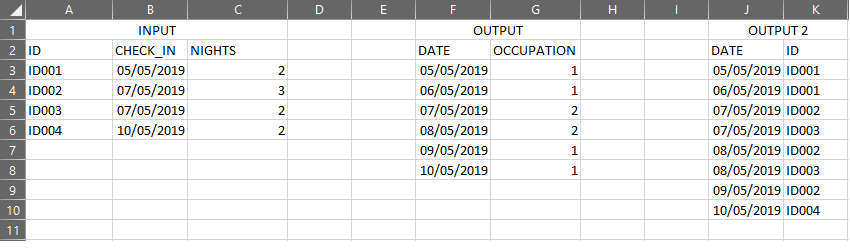
@Anonymous Please try this as a New Table to achieve your desired output i.e. Output 2 as mentioned above.
Test304Out = VAR _Date = SELECTCOLUMNS(GENERATE(CALENDAR(MIN(Test304RowSplit[CheckIn]),MAX(Test304RowSplit[CheckIn])),Test304RowSplit),"Date",[Date],"ID",[ID],"CheckOut",Test304RowSplit[CheckIn]+(Test304RowSplit[Nights]-1),"ExcludeFlag",IF([Date]>=Test304RowSplit[CheckIn] && [Date]<=Test304RowSplit[CheckIn]+(Test304RowSplit[Nights]-1),"N","Y")) RETURN SELECTCOLUMNS(FILTER(_Date,[ExcludeFlag]="N"),"Date",[Date],"ID",[ID])
Proud to be a PBI Community Champion
@Anonymous Just to confirm - The above table is your expected output based on the input table (which contains checkin data and no. of nights booked). Could you please post sample test input data and assuming the above table is your expected output (Date and Rooms Occupated)
Proud to be a PBI Community Champion
@PattemManohar Here you have what you asked for. The output 2 is the desired but i conform with output 1 too
@Anonymous Please try this as a New Table to achieve your desired output i.e. Output 2 as mentioned above.
Test304Out = VAR _Date = SELECTCOLUMNS(GENERATE(CALENDAR(MIN(Test304RowSplit[CheckIn]),MAX(Test304RowSplit[CheckIn])),Test304RowSplit),"Date",[Date],"ID",[ID],"CheckOut",Test304RowSplit[CheckIn]+(Test304RowSplit[Nights]-1),"ExcludeFlag",IF([Date]>=Test304RowSplit[CheckIn] && [Date]<=Test304RowSplit[CheckIn]+(Test304RowSplit[Nights]-1),"N","Y")) RETURN SELECTCOLUMNS(FILTER(_Date,[ExcludeFlag]="N"),"Date",[Date],"ID",[ID])
Proud to be a PBI Community Champion
Share feedback directly with Fabric product managers, participate in targeted research studies and influence the Fabric roadmap.
Check out the February 2026 Power BI update to learn about new features.
| User | Count |
|---|---|
| 52 | |
| 50 | |
| 34 | |
| 15 | |
| 14 |
| User | Count |
|---|---|
| 93 | |
| 77 | |
| 41 | |
| 26 | |
| 26 |