FabCon is coming to Atlanta
Join us at FabCon Atlanta from March 16 - 20, 2026, for the ultimate Fabric, Power BI, AI and SQL community-led event. Save $200 with code FABCOMM.
Register now!- Power BI forums
- Get Help with Power BI
- Desktop
- Service
- Report Server
- Power Query
- Mobile Apps
- Developer
- DAX Commands and Tips
- Custom Visuals Development Discussion
- Health and Life Sciences
- Power BI Spanish forums
- Translated Spanish Desktop
- Training and Consulting
- Instructor Led Training
- Dashboard in a Day for Women, by Women
- Galleries
- Data Stories Gallery
- Themes Gallery
- Contests Gallery
- QuickViz Gallery
- Quick Measures Gallery
- Visual Calculations Gallery
- Notebook Gallery
- Translytical Task Flow Gallery
- TMDL Gallery
- R Script Showcase
- Webinars and Video Gallery
- Ideas
- Custom Visuals Ideas (read-only)
- Issues
- Issues
- Events
- Upcoming Events
The Power BI Data Visualization World Championships is back! Get ahead of the game and start preparing now! Learn more
- Power BI forums
- Forums
- Get Help with Power BI
- Desktop
- Obtain percentage of different tables from a table...
- Subscribe to RSS Feed
- Mark Topic as New
- Mark Topic as Read
- Float this Topic for Current User
- Bookmark
- Subscribe
- Printer Friendly Page

- Mark as New
- Bookmark
- Subscribe
- Mute
- Subscribe to RSS Feed
- Permalink
- Report Inappropriate Content
Obtain percentage of different tables from a table of totals
Hello all,
I am working on setting up some KPIs for my team to show in the organization.
I have obtained my data from 2 excel files one for incidents caused by changes, other one is a raw file of changes created on the year.
from these 2 files I was able to obtain the 6 different visualization tables, Primary visualization table is "Approved changes"and what I want is to be able to obtain the percentage of other tables related to the total showed in my primary table.
Primary visualization table, total approved changes in the year is 3174

So for example, I have this another table, called Standard changes which is a subtype obtained from the change file.

so the question is, how can I calculate the percentage of each month's and also for total of standard changes against Approved changes from primary visualization table. example of the total would be: 1947/3174*100 = 61%
thanks!
Victor.
Solved! Go to Solution.


- Mark as New
- Bookmark
- Subscribe
- Mute
- Subscribe to RSS Feed
- Permalink
- Report Inappropriate Content
Hello @VictorMontiel ,
Is there a reality between these two tables?
Thank you
Pragati
- Mark as New
- Bookmark
- Subscribe
- Mute
- Subscribe to RSS Feed
- Permalink
- Report Inappropriate Content
HI @VictorMontiel ,
As you have got relationship between these 2 tables, you can create a caluclation somehting like below:
Measure = DIVIDE(SUM(TBALE1[ApprovedChnages]), SUM(Table2[Standard]), 0)
Replace your tablenames and column names in above dax.
Thanks,
Pragati
- Mark as New
- Bookmark
- Subscribe
- Mute
- Subscribe to RSS Feed
- Permalink
- Report Inappropriate Content
- Mark as New
- Bookmark
- Subscribe
- Mute
- Subscribe to RSS Feed
- Permalink
- Report Inappropriate Content
Hi, Pragati. I made a relationship on business service field, so I could add a filter at the top.
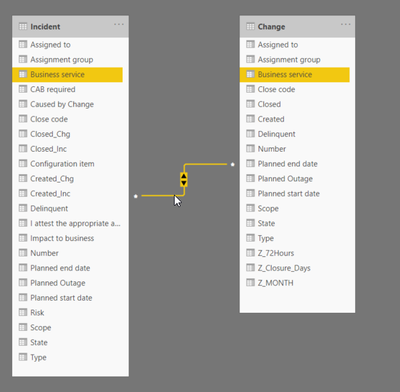
here's how it all looks.
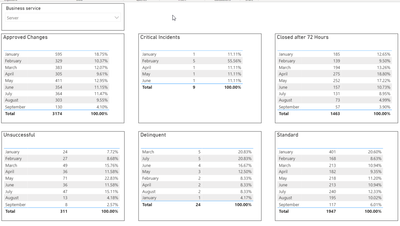
best.


- Mark as New
- Bookmark
- Subscribe
- Mute
- Subscribe to RSS Feed
- Permalink
- Report Inappropriate Content
Hi @VictorMontiel ,
Is Pragati11's answer helpful? If it is, kindly accept it as a solution. More people will benefit from this thread. If you are still confused about it, please share more details to us. Thanks!
Xue Ding
If this post helps, then please consider Accept it as the solution to help the other members find it more quickly.
- Mark as New
- Bookmark
- Subscribe
- Mute
- Subscribe to RSS Feed
- Permalink
- Report Inappropriate Content
HI @VictorMontiel ,
As you have got relationship between these 2 tables, you can create a caluclation somehting like below:
Measure = DIVIDE(SUM(TBALE1[ApprovedChnages]), SUM(Table2[Standard]), 0)
Replace your tablenames and column names in above dax.
Thanks,
Pragati
- Mark as New
- Bookmark
- Subscribe
- Mute
- Subscribe to RSS Feed
- Permalink
- Report Inappropriate Content
thanks, Pragati.
your suggestion helped me to find a way to put all the info in a single table.
what I did was to create additional columns per each KPI I want to show, with values 1, 0 post that I was able to put them all together in a single table with their respective percentages.
here's how it looks.

Helpful resources

Power BI Dataviz World Championships
The Power BI Data Visualization World Championships is back! Get ahead of the game and start preparing now!

Power BI Monthly Update - December 2025
Check out the December 2025 Power BI Holiday Recap!

FabCon Atlanta 2026
Join us at FabCon Atlanta, March 16-20, for the ultimate Fabric, Power BI, AI and SQL community-led event. Save $200 with code FABCOMM.

| User | Count |
|---|---|
| 41 | |
| 38 | |
| 36 | |
| 30 | |
| 28 |


| User | Count |
|---|---|
| 128 | |
| 88 | |
| 79 | |
| 67 | |
| 62 |


