cancel
Showing results for 
Search instead for 
Did you mean: 

Learn from the best! Meet the four finalists headed to the FINALS of the Power BI Dataviz World Championships! Register now

Reply
dplandry
Regular Visitor

OMIT ROWS WITH NO DATA

Hey guys


I built a report that shows sales by customer with customers down the left side and months across the top with sales figures.  The report pulls every customer regardless of whether they had sales in the current year.  How can I modify the report to only show customers with sales data?


Thanks

Dwayne

2 REPLIES 2
Anonymous
Not applicable

Please share the sample data for better understanding your issue. 


If a cusotmer doesn' have any sales in a year eg,2017, is there any record regarding this customer in that year, such as total sales = 0 or total sales is null?


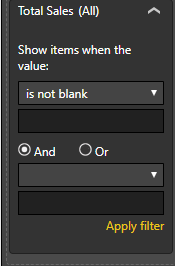
Did you try to use advance filter to exclude the customers without sales info?

2018-05-14_10-32-54.png


Anonymous
Not applicable

@dplandry,

Please share sample data of your table and post expected result here. If you want to show this year sales, you can create a calculated column using DAX below, then create a slicer using this column or drag this column to visual level filter and set its value to1.

Column= if(YEAR(Table[Date])=YEAR(today()),1,0)


Regards,
Lydia

Helpful resources

Announcements
Power BI DataViz World Championships carousel

Power BI DataViz World Championships - June 2026

A new Power BI DataViz World Championship is coming this June! Don't miss out on submitting your entry.

Join our Fabric User Panel

Join our Fabric User Panel

Share feedback directly with Fabric product managers, participate in targeted research studies and influence the Fabric roadmap.

March Power BI Update Carousel

Power BI Community Update - March 2026

Check out the March 2026 Power BI update to learn about new features.