FabCon is coming to Atlanta
Join us at FabCon Atlanta from March 16 - 20, 2026, for the ultimate Fabric, Power BI, AI and SQL community-led event. Save $200 with code FABCOMM.
Register now!- Power BI forums
- Get Help with Power BI
- Desktop
- Service
- Report Server
- Power Query
- Mobile Apps
- Developer
- DAX Commands and Tips
- Custom Visuals Development Discussion
- Health and Life Sciences
- Power BI Spanish forums
- Translated Spanish Desktop
- Training and Consulting
- Instructor Led Training
- Dashboard in a Day for Women, by Women
- Galleries
- Data Stories Gallery
- Themes Gallery
- Contests Gallery
- QuickViz Gallery
- Quick Measures Gallery
- Visual Calculations Gallery
- Notebook Gallery
- Translytical Task Flow Gallery
- TMDL Gallery
- R Script Showcase
- Webinars and Video Gallery
- Ideas
- Custom Visuals Ideas (read-only)
- Issues
- Issues
- Events
- Upcoming Events
The Power BI Data Visualization World Championships is back! Get ahead of the game and start preparing now! Learn more
- Power BI forums
- Forums
- Get Help with Power BI
- Desktop
- Re: OLE DB or ODBC Error - Could not load the visu...
- Subscribe to RSS Feed
- Mark Topic as New
- Mark Topic as Read
- Float this Topic for Current User
- Bookmark
- Subscribe
- Printer Friendly Page

- Mark as New
- Bookmark
- Subscribe
- Mute
- Subscribe to RSS Feed
- Permalink
- Report Inappropriate Content
OLE DB or ODBC Error - Could not load the visual
Hello,
Using Direct Query (HANA View) I am facing the error OLE DB or ODBC Error - Could not load the visual.
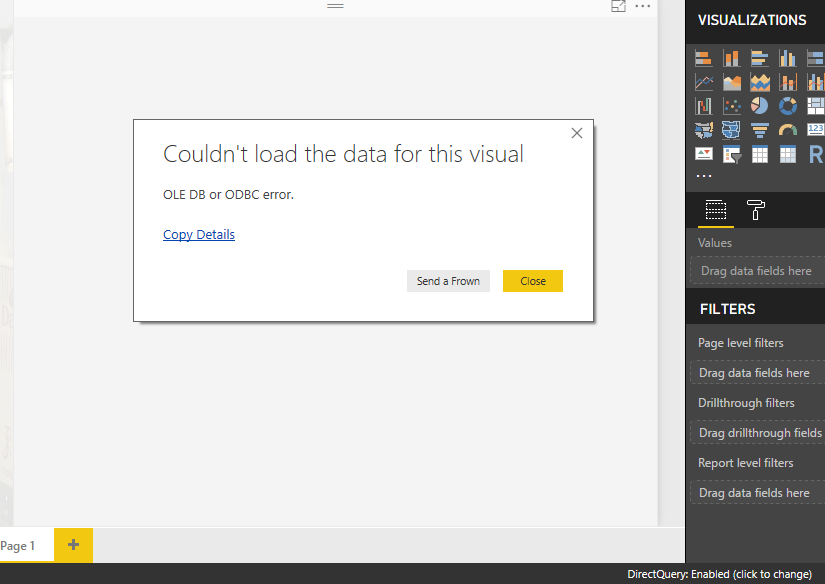

Regards
Chanukya

- Mark as New
- Bookmark
- Subscribe
- Mute
- Subscribe to RSS Feed
- Permalink
- Report Inappropriate Content
Hi @chanukya_p,
Can you share the trace file? You can send a Message.
Please upgrade the Desktop to the latest version.
Best Regards,
Dale
If this post helps, then please consider Accept it as the solution to help the other members find it more quickly.
- Mark as New
- Bookmark
- Subscribe
- Mute
- Subscribe to RSS Feed
- Permalink
- Report Inappropriate Content
Hello Dale,
Thanks for your reply. I am not able to find the option to attach trace file. Can you kindly suggest me?
As of now I have pasted the error description as below:
Feedback Type:
Frown (Error)
Timestamp:
2018-06-05T08:02:50.1925304Z
Local Time:
2018-06-05T13:32:50.1925304+05:30
Session ID:
a8b22c30-031b-487b-aab7-96c562bf4a47
Release:
January 2018
Product Version:
2.54.4970.961 (PBIDesktop) (x64)
Error Message:
OLE DB or ODBC error.
OS Version:
Microsoft Windows NT 10.0.10240.0 (x64 en-US)
CLR Version:
4.6 or later [Release Number = 393295]
Peak Virtual Memory:
33.9 GB
Private Memory:
348 MB
Peak Working Set:
393 MB
IE Version:
11.0.10240.16384
User ID:
e394a404-9515-4cfb-8c8f-e2a9f67cf377
Workbook Package Info:
1* - en-IN, Query Groups: 0, fastCombine: Disabled, runBackgroundAnalysis: True.
Telemetry Enabled:
True
Screenshot:
Model Default Mode:
DirectQuery
Snapshot Trace Logs:
C:\Users\chanukya.INTELIZEST\AppData\Local\Microsoft\Power BI Desktop\FrownSnapShot1511012762.zip
Performance Trace Logs:
C:\Users\chanukya.INTELIZEST\AppData\Local\Microsoft\Power BI Desktop\PerformanceTraces.zip
Enabled Preview Features:
PBI_shapeMapVisualEnabled
PBI_EnableReportTheme
PBI_numericSlicerEnabled
PBI_SpanishLinguisticsEnabled
PBI_daxTemplatesEnabled
CustomConnectors
PBI_reportBookmarks
PBI_AdobeAnalytics
PBI_qnaExplore
PBI_variationUIChange
Disabled DirectQuery Options:
PBI_DirectQuery_Unrestricted
Cloud:
GlobalCloud
Activity ID:
null
Time:
Tue Jun 05 2018 13:32:40 GMT+0530 (India Standard Time)
Error Code:
QueryUserError
OData Error Message:
Failed to execute the DAX query.
DPI Scale:
100%
Supported Services:
Power BI
Formulas:
section Section1;
shared P_AND_L_ECC = let
Source = SapHana.Database("localhost:30215"),
Contents = Source{[Name="Contents"]}[Data],
#"KPI-1" = Contents{[Name="KPI-1"]}[Data],
P_AND_L_ECC1 = #"KPI-1"{[Name="P_AND_L_ECC"]}[Data],
#"Added Items" = Cube.Transform(P_AND_L_ECC1,
{
{Cube.AddAndExpandDimensionColumn, "ACCOUNT_GROUP_1", {"ACCOUNT_GROUP_1"}, {"ACCOUNT_GROUP_1"}},
{Cube.AddAndExpandDimensionColumn, "ACCOUNT_GROUP_2", {"ACCOUNT_GROUP_2"}, {"ACCOUNT_GROUP_2"}},
{Cube.AddAndExpandDimensionColumn, "ACCOUNT_GROUP_3", {"ACCOUNT_GROUP_3"}, {"ACCOUNT_GROUP_3"}},
{Cube.AddAndExpandDimensionColumn, "ACCOUNT_NAME", {"ACCOUNT_NAME"}, {"ACCOUNT_NAME"}},
{Cube.AddAndExpandDimensionColumn, "ACCOUNT_NUMBER", {"ACCOUNT_NUMBER"}, {"ACCOUNT_NUMBER"}},
{Cube.AddAndExpandDimensionColumn, "BA_DESC", {"BA_DESC"}, {"BA_DESC"}},
{Cube.AddAndExpandDimensionColumn, "BS_TYPE", {"BS_TYPE"}, {"BS_TYPE"}},
{Cube.AddAndExpandDimensionColumn, "BUSINESS_AREA", {"BUSINESS_AREA"}, {"BUSINESS_AREA"}},
{Cube.AddAndExpandDimensionColumn, "CC_DESC", {"CC_DESC"}, {"CC_DESC"}},
{Cube.AddAndExpandDimensionColumn, "COMPANY_CODE", {"COMPANY_CODE"}, {"COMPANY_CODE"}},
{Cube.AddAndExpandDimensionColumn, "CONTROLING_AREA", {"CONTROLING_AREA"}, {"CONTROLING_AREA"}},
{Cube.AddAndExpandDimensionColumn, "COST_CENTER", {"COST_CENTER"}, {"COST_CENTER"}},
{Cube.AddAndExpandDimensionColumn, "FA_DESC", {"FA_DESC"}, {"FA_DESC"}},
{Cube.AddAndExpandDimensionColumn, "FUNCTIONAL_AREA", {"FUNCTIONAL_AREA"}, {"FUNCTIONAL_AREA"}},
{Cube.AddAndExpandDimensionColumn, "NOTIFICATION_CONTROL", {"NOTIFICATION_CONTROL"}, {"NOTIFICATION_CONTROL"}},
{Cube.AddAndExpandDimensionColumn, "PC_DESC", {"PC_DESC"}, {"PC_DESC"}},
{Cube.AddAndExpandDimensionColumn, "PERIOD", {"PERIOD"}, {"PERIOD"}},
{Cube.AddAndExpandDimensionColumn, "PL_TYPE", {"PL_TYPE"}, {"PL_TYPE"}},
{Cube.AddAndExpandDimensionColumn, "PROFIT_CENTER", {"PROFIT_CENTER"}, {"PROFIT_CENTER"}},
{Cube.AddAndExpandDimensionColumn, "SEGMENT", {"SEGMENT"}, {"SEGMENT"}},
{Cube.AddAndExpandDimensionColumn, "YEAR", {"YEAR"}, {"YEAR"}},
{Cube.AddMeasureColumn, "AMOUNT", "AMOUNT"}
})
in
#"Added Items";
- Mark as New
- Bookmark
- Subscribe
- Mute
- Subscribe to RSS Feed
- Permalink
- Report Inappropriate Content
Hi @chanukya_p,
Please upgrade the Desktop first. It's May 2018 now and the June 2018 is available soon. You still use the January 2018.
Best Regards,
Dale
If this post helps, then please consider Accept it as the solution to help the other members find it more quickly.
- Mark as New
- Bookmark
- Subscribe
- Mute
- Subscribe to RSS Feed
- Permalink
- Report Inappropriate Content
Hello Dale,
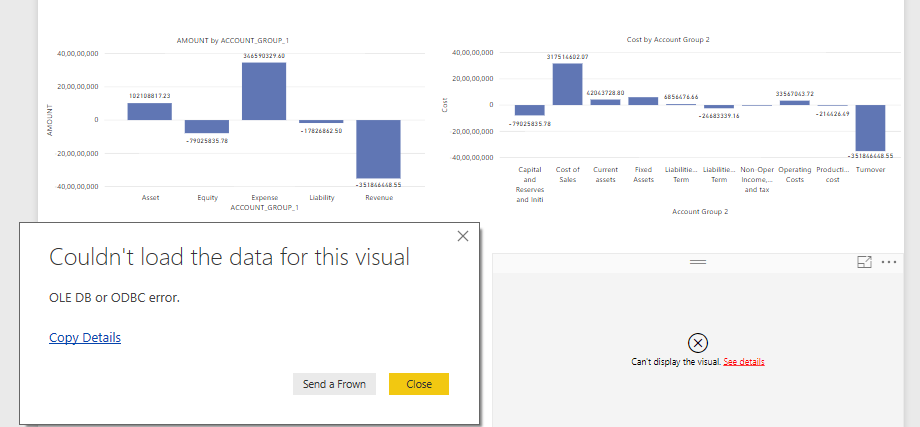
I have upgraded the Desktop version to May 2018. Still its the same issue for only one chart. Please find the screenshot and also below are the details.
Feedback Type:
Frown (Error)
Timestamp:
2018-06-06T13:11:34.1129984Z
Local Time:
2018-06-06T18:41:34.1129984+05:30
Session ID:
f1f4a34a-eafe-48c0-af98-ed4480e3f023
Release:
May 2018
Product Version:
2.58.5103.501 (PBIDesktop) (x64)
Error Message:
OLE DB or ODBC error.
OS Version:
Microsoft Windows NT 10.0.10240.0 (x64 en-US)
CLR Version:
4.6 or later [Release Number = 393295]
Peak Virtual Memory:
33.9 GB
Private Memory:
295 MB
Peak Working Set:
419 MB
IE Version:
11.0.10240.16384
User ID:
e394a404-9515-4cfb-8c8f-e2a9f67cf377
Workbook Package Info:
1* - en-IN, Query Groups: 0, fastCombine: Disabled, runBackgroundAnalysis: True.
Telemetry Enabled:
True
Model Default Mode:
DirectQuery
Snapshot Trace Logs:
C:\Users\chanukya.INTELIZEST\AppData\Local\Microsoft\Power BI Desktop\FrownSnapShot1332355169.zip
Performance Trace Logs:
C:\Users\chanukya.INTELIZEST\AppData\Local\Microsoft\Power BI Desktop\PerformanceTraces.zip
Enabled Preview Features:
PBI_shapeMapVisualEnabled
PBI_EnableReportTheme
PBI_SpanishLinguisticsEnabled
CustomConnectors
PBI_qnaExplore
PBI_variationUIChange
Disabled Preview Features:
PBI_newFromWeb
AdobeAnalytics_UseHierarchicalNavigation
PBI_canvasTooltips
PBI_showIncrementalRefreshPolicy
Disabled DirectQuery Options:
PBI_DirectQuery_Unrestricted
TreatHanaAsRelationalSource
Cloud:
GlobalCloud
DPI Scale:
100%
Supported Services:
Power BI
Formulas:
section Section1;
shared P_AND_L_ECC = let
Source = SapHana.Database("localhost:30215"),
Contents = Source{[Name="Contents"]}[Data],
#"KPI-1" = Contents{[Name="KPI-1"]}[Data],
P_AND_L_ECC1 = #"KPI-1"{[Name="P_AND_L_ECC"]}[Data],
#"Added Items" = Cube.Transform(P_AND_L_ECC1,
{
{Cube.AddAndExpandDimensionColumn, "ACCOUNT_GROUP_1", {"ACCOUNT_GROUP_1"}, {"ACCOUNT_GROUP_1"}},
{Cube.AddAndExpandDimensionColumn, "ACCOUNT_GROUP_2", {"ACCOUNT_GROUP_2"}, {"ACCOUNT_GROUP_2"}},
{Cube.AddAndExpandDimensionColumn, "ACCOUNT_GROUP_3", {"ACCOUNT_GROUP_3"}, {"ACCOUNT_GROUP_3"}},
{Cube.AddAndExpandDimensionColumn, "ACCOUNT_NAME", {"ACCOUNT_NAME"}, {"ACCOUNT_NAME"}},
{Cube.AddAndExpandDimensionColumn, "ACCOUNT_NUMBER", {"ACCOUNT_NUMBER"}, {"ACCOUNT_NUMBER"}},
{Cube.AddAndExpandDimensionColumn, "BA_DESC", {"BA_DESC"}, {"BA_DESC"}},
{Cube.AddAndExpandDimensionColumn, "BS_TYPE", {"BS_TYPE"}, {"BS_TYPE"}},
{Cube.AddAndExpandDimensionColumn, "BUSINESS_AREA", {"BUSINESS_AREA"}, {"BUSINESS_AREA"}},
{Cube.AddAndExpandDimensionColumn, "CC_DESC", {"CC_DESC"}, {"CC_DESC"}},
{Cube.AddAndExpandDimensionColumn, "COMPANY_CODE", {"COMPANY_CODE"}, {"COMPANY_CODE"}},
{Cube.AddAndExpandDimensionColumn, "CONTROLING_AREA", {"CONTROLING_AREA"}, {"CONTROLING_AREA"}},
{Cube.AddAndExpandDimensionColumn, "COST_CENTER", {"COST_CENTER"}, {"COST_CENTER"}},
{Cube.AddAndExpandDimensionColumn, "FA_DESC", {"FA_DESC"}, {"FA_DESC"}},
{Cube.AddAndExpandDimensionColumn, "FUNCTIONAL_AREA", {"FUNCTIONAL_AREA"}, {"FUNCTIONAL_AREA"}},
{Cube.AddAndExpandDimensionColumn, "NOTIFICATION_CONTROL", {"NOTIFICATION_CONTROL"}, {"NOTIFICATION_CONTROL"}},
{Cube.AddAndExpandDimensionColumn, "PC_DESC", {"PC_DESC"}, {"PC_DESC"}},
{Cube.AddAndExpandDimensionColumn, "PERIOD", {"PERIOD"}, {"PERIOD"}},
{Cube.AddAndExpandDimensionColumn, "PL_TYPE", {"PL_TYPE"}, {"PL_TYPE"}},
{Cube.AddAndExpandDimensionColumn, "PROFIT_CENTER", {"PROFIT_CENTER"}, {"PROFIT_CENTER"}},
{Cube.AddAndExpandDimensionColumn, "SEGMENT", {"SEGMENT"}, {"SEGMENT"}},
{Cube.AddAndExpandDimensionColumn, "YEAR", {"YEAR"}, {"YEAR"}},
{Cube.AddMeasureColumn, "AMOUNT", "AMOUNT"}
})
in
#"Added Items";
- Mark as New
- Bookmark
- Subscribe
- Mute
- Subscribe to RSS Feed
- Permalink
- Report Inappropriate Content
Hello Dale,
I have upgraded the desktop. There is some issue with a backend. Once it is rectified I will check the issue is arising again or not and will keep you posted.
Regards,
Chanukya
- Mark as New
- Bookmark
- Subscribe
- Mute
- Subscribe to RSS Feed
- Permalink
- Report Inappropriate Content
Hello Dale,
I have upgraded the desktop. There is some issue with a backend. Once it is rectified I will check the issue is arising again or not and will keep you posted.
Regards,
Chanukya

Helpful resources

Power BI Dataviz World Championships
The Power BI Data Visualization World Championships is back! Get ahead of the game and start preparing now!

Power BI Monthly Update - November 2025
Check out the November 2025 Power BI update to learn about new features.

FabCon Atlanta 2026
Join us at FabCon Atlanta, March 16-20, for the ultimate Fabric, Power BI, AI and SQL community-led event. Save $200 with code FABCOMM.

| User | Count |
|---|---|
| 59 | |
| 43 | |
| 42 | |
| 23 | |
| 17 |


| User | Count |
|---|---|
| 190 | |
| 122 | |
| 96 | |
| 66 | |
| 46 |


