FabCon is coming to Atlanta
Join us at FabCon Atlanta from March 16 - 20, 2026, for the ultimate Fabric, Power BI, AI and SQL community-led event. Save $200 with code FABCOMM.
Register now!- Power BI forums
- Get Help with Power BI
- Desktop
- Service
- Report Server
- Power Query
- Mobile Apps
- Developer
- DAX Commands and Tips
- Custom Visuals Development Discussion
- Health and Life Sciences
- Power BI Spanish forums
- Translated Spanish Desktop
- Training and Consulting
- Instructor Led Training
- Dashboard in a Day for Women, by Women
- Galleries
- Data Stories Gallery
- Themes Gallery
- Contests Gallery
- QuickViz Gallery
- Quick Measures Gallery
- Visual Calculations Gallery
- Notebook Gallery
- Translytical Task Flow Gallery
- TMDL Gallery
- R Script Showcase
- Webinars and Video Gallery
- Ideas
- Custom Visuals Ideas (read-only)
- Issues
- Issues
- Events
- Upcoming Events
The Power BI Data Visualization World Championships is back! Get ahead of the game and start preparing now! Learn more
- Power BI forums
- Forums
- Get Help with Power BI
- Desktop
- Number of Business Days
- Subscribe to RSS Feed
- Mark Topic as New
- Mark Topic as Read
- Float this Topic for Current User
- Bookmark
- Subscribe
- Printer Friendly Page

- Mark as New
- Bookmark
- Subscribe
- Mute
- Subscribe to RSS Feed
- Permalink
- Report Inappropriate Content
Number of Business Days
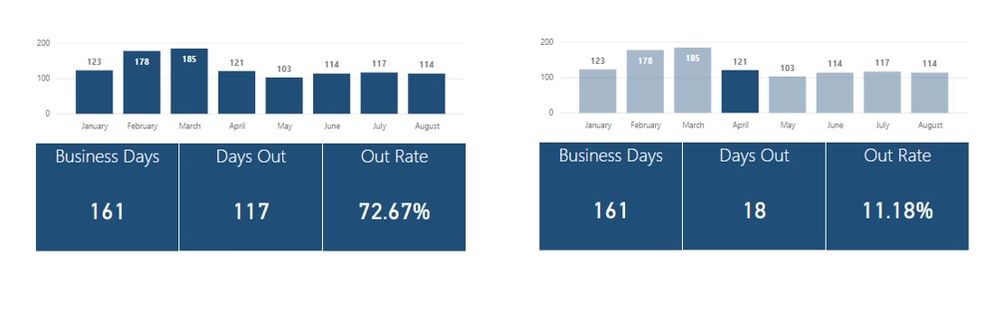
I have my source Days Out table as well as a Business Days table and a Holidays table...and they're alll working fine. The issue is when I filter the dashboard on the month, the number of business days doesn't change.
So I guess I need to figure out how to base the business days on the Days Out table while counting the number of business days available for that particular month selected.
Thoughts??

- Mark as New
- Bookmark
- Subscribe
- Mute
- Subscribe to RSS Feed
- Permalink
- Report Inappropriate Content
Hi,
Can you post a picture of your data model and your dax for Business Days?
Your interactions will be depenedant on your relationship and where your months for your graph visual is coming from.
- Mark as New
- Bookmark
- Subscribe
- Mute
- Subscribe to RSS Feed
- Permalink
- Report Inappropriate Content
The Days Out table is a stand alone table with no relationship, but here's the DAX for business days:
WorkDay = IF(WEEKDAY('Calendar'[Date],2)>5,0, IF('Calendar'[Date]=RELATED(tblHolidays[HolidayDate]),0,1))
- Mark as New
- Bookmark
- Subscribe
- Mute
- Subscribe to RSS Feed
- Permalink
- Report Inappropriate Content
Could you send a post a copy of your PBiX?
There could be 101 reason why it doen't work, i have a feeling you either need a relationship in your model or you visual bar graph table is fed of one table and as your relationships don't exist it won't filter your business days.
- Mark as New
- Bookmark
- Subscribe
- Mute
- Subscribe to RSS Feed
- Permalink
- Report Inappropriate Content
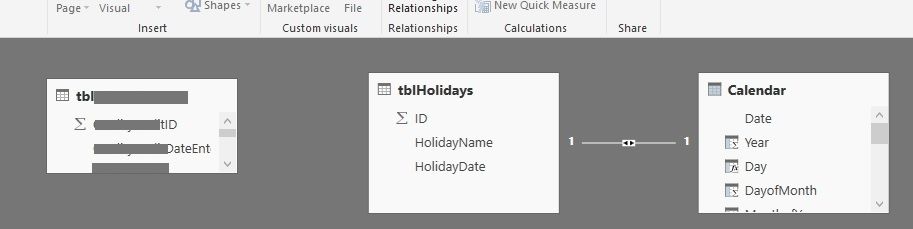
The bar graph is based on the TicketID from tblDaysOut that is a stand alone table with no relationship, but here's the DAX for business days:
WorkDay = IF(WEEKDAY('Calendar'[Date],2)>5,0, IF('Calendar'[Date]=RELATED(tblHolidays[HolidayDate]),0,1))
I guess I'm looking for the best way to create a relationship between the tblDaysOut TicketDate column and the Calendar table Date column.


- Mark as New
- Bookmark
- Subscribe
- Mute
- Subscribe to RSS Feed
- Permalink
- Report Inappropriate Content
Hi @rspears2001
From information above, the Business Days table is a calculated table created with the "date" column from Calendar table.
Please note that, since the Business Days table is a calculated table, it is static, it can't change with the slicer (using "date" column from Calendar table).
Also, as I known, it is not supported to create relationships between the two tables based on the "date" column, for the calculated table is created by this column.
I would suggest you to create a measure for "WorkDay", thus, it can change with the slicer.
Best Regards
Maggie
- Mark as New
- Bookmark
- Subscribe
- Mute
- Subscribe to RSS Feed
- Permalink
- Report Inappropriate Content
Hi @v-juanli-msft thanks for the response. I thought about just adding the workday measure to my table but how would I account for or capture work days that there is no activity?
Here's a handful of my KPI's:
- # of activities in a given period
- # of work days in that period
- # of work days with activity in that period
- % of work days that had activity in that period
Thanks again,
Rodney
- Mark as New
- Bookmark
- Subscribe
- Mute
- Subscribe to RSS Feed
- Permalink
- Report Inappropriate Content
Hi @rspears2001
Does the measure "Workdays" work for you when you add it to the kpi?
You want to calculate work days that there is no activity, right?
And the four items listed are all you want to calculate with measures, right?
However, without some example data, I can't figure out these measure.
Best Regards
Maggie
- Mark as New
- Bookmark
- Subscribe
- Mute
- Subscribe to RSS Feed
- Permalink
- Report Inappropriate Content
Here's a really basic test version,. but I think you'll get the gist:
https://www.dropbox.com/s/r01di46zlwqdrdi/Work_Days_Test.pbix?dl=0
Helpful resources

Power BI Dataviz World Championships
The Power BI Data Visualization World Championships is back! Get ahead of the game and start preparing now!

Power BI Monthly Update - November 2025
Check out the November 2025 Power BI update to learn about new features.

FabCon Atlanta 2026
Join us at FabCon Atlanta, March 16-20, for the ultimate Fabric, Power BI, AI and SQL community-led event. Save $200 with code FABCOMM.

| User | Count |
|---|---|
| 59 | |
| 43 | |
| 42 | |
| 23 | |
| 17 |


| User | Count |
|---|---|
| 190 | |
| 122 | |
| 96 | |
| 66 | |
| 47 |


