Join us at FabCon Atlanta from March 16 - 20, 2026, for the ultimate Fabric, Power BI, AI and SQL community-led event. Save $200 with code FABCOMM.
Register now!The Power BI Data Visualization World Championships is back! Get ahead of the game and start preparing now! Learn more
Hello everyone
I have created a report in Power BI Desktop. It is not linked to Service.
When i created the report i set the regional settings (local file) to danish, so the number and date format would be correct, but for some reason the format is only correct in the query editor and data view. When I create a visual (table), it shows the numberformat as an american format.
I have Windows 10 on my computer, if that can affect the problem somehow. My regional settings in windows is set to danish as well.
Datasource is an azure sql-server database.
I hope you guys can help me, thanks in advance
EDIT - SOLUTION:
It was the Windows region settings making the mess. It was set to "English (Denmark)" before and after I changed it to "Danish (Denmark)" PBI Desktop formatted correctly after a restart.
Solved! Go to Solution.
It was the Windows region settings making the mess. It was set to "English (Denmark)" before and after I changed it to "Danish (Denmark)" PBI Desktop formatted correctly after a restart.
Hi MSA-SOJ,
Could you please share the screenshot to us for analysis?
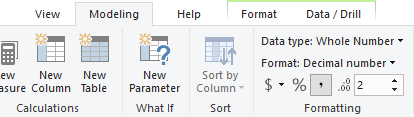
Generally, the number format displayed in visual should be same in model, please try to change it in Modeling -> Formatting.
Best Regards,
Teige
Hi Teige
Thanks for replying
Here is a number of screenshots of my data, and what i have tried since i submitted the question:
My numbers in query editor - the data is shown and the only steps made are source and navigation:
Here my numbers have a comma for decimals, which is what i want.
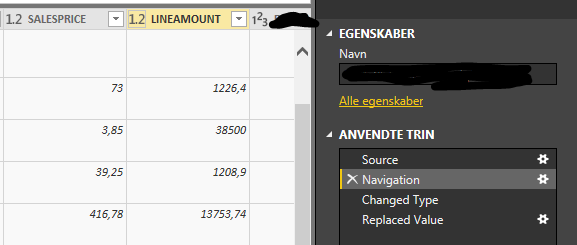
Query editor
The the data view my numbers is also have commas for decimals.
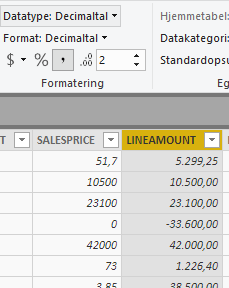
Data view
The the report view in my visuals the numbers are formattet american and have a dot for the decimals. The modelling > formatting is greyed out here.
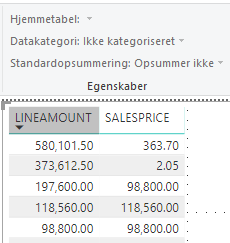
Report view
The things i have tried includes:
Format the numbers as text in query editor and using DAX VALUE() to correct it - still american format
Using DAX FORMAT() - kinda worked as i had commas, but formattede my numbers as text, which ruined the aggregating functions and removed the totals in my visuals.
Formatting numbers as danish currency using modeling > formatting - still american format in visuals.
I hope this i enough information for you to help me better.
Thank you alot
The Power BI Data Visualization World Championships is back! Get ahead of the game and start preparing now!
| User | Count |
|---|---|
| 39 | |
| 39 | |
| 37 | |
| 29 | |
| 24 |
| User | Count |
|---|---|
| 120 | |
| 95 | |
| 70 | |
| 69 | |
| 65 |