cancel
Showing results for 
Search instead for 
Did you mean: 

Learn from the best! Meet the four finalists headed to the FINALS of the Power BI Dataviz World Championships! Register now

Reply
Anonymous
Not applicable

Number Visualization

Hi All,


I have odd requirement to fulfil


Values in DBClient Requrement
100.25100.25
15.35715.36
1515
1313


can this  number format achievable ?


1 ACCEPTED SOLUTION

You will need to create a measure or a calculate column to format  the numbers. Try this:


Measure =
IF (
    SUM ( Table[Number] ) = INT ( SUM ( Table[Number] ) ),
    FORMAT ( SUM ( Table[Number] ), "#,#" ),
    FORMAT ( SUM ( Table[Number] ), "#,0.00" )
)


or

Column =
IF (
    Table[Number] = INT ( Table[Number] ),
    FORMAT ( Table[Number], "#,#" ),
    FORMAT ( Table[Number], "#,0.00" )
)


Please take note that the result will be of text data type.


Dane Belarmino | Microsoft MVP | Proud to be a Super User!

Did I answer your question? Mark my post as a solution!


"Tell me and I’ll forget; show me and I may remember; involve me and I’ll understand."
Need Power BI consultation, get in touch with me on LinkedIn or hire me on UpWork.
Learn with me on YouTube @DAXJutsu or follow my page on Facebook @DAXJutsuPBI.

View solution in original post

3 REPLIES 3
danextian
Super User
Super User

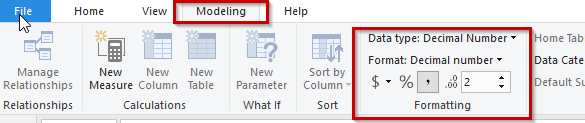
You may format by selecting a field (column or measure) then going to Modeling tab. 
format a field.png


Dane Belarmino | Microsoft MVP | Proud to be a Super User!

Did I answer your question? Mark my post as a solution!


"Tell me and I’ll forget; show me and I may remember; involve me and I’ll understand."
Need Power BI consultation, get in touch with me on LinkedIn or hire me on UpWork.
Learn with me on YouTube @DAXJutsu or follow my page on Facebook @DAXJutsuPBI.
Anonymous
Not applicable

Appreciate ur @danextian  reply
I will describe my more  


As my knowlage,

under the same column heading, two data format need to show


decimal number with 2 decimal places 
100.25
15.36

And aslo 


15
13
need to visualise like whole number

end result need to be
100.25
15.36

15

13


how can i achive this?

You will need to create a measure or a calculate column to format  the numbers. Try this:


Measure =
IF (
    SUM ( Table[Number] ) = INT ( SUM ( Table[Number] ) ),
    FORMAT ( SUM ( Table[Number] ), "#,#" ),
    FORMAT ( SUM ( Table[Number] ), "#,0.00" )
)


or

Column =
IF (
    Table[Number] = INT ( Table[Number] ),
    FORMAT ( Table[Number], "#,#" ),
    FORMAT ( Table[Number], "#,0.00" )
)


Please take note that the result will be of text data type.


Dane Belarmino | Microsoft MVP | Proud to be a Super User!

Did I answer your question? Mark my post as a solution!


"Tell me and I’ll forget; show me and I may remember; involve me and I’ll understand."
Need Power BI consultation, get in touch with me on LinkedIn or hire me on UpWork.
Learn with me on YouTube @DAXJutsu or follow my page on Facebook @DAXJutsuPBI.

Helpful resources

Announcements
Power BI DataViz World Championships carousel

Power BI DataViz World Championships - June 2026

A new Power BI DataViz World Championship is coming this June! Don't miss out on submitting your entry.

Join our Fabric User Panel

Join our Fabric User Panel

Share feedback directly with Fabric product managers, participate in targeted research studies and influence the Fabric roadmap.

March Power BI Update Carousel

Power BI Community Update - March 2026

Check out the March 2026 Power BI update to learn about new features.