cancel
Showing results for 
Search instead for 
Did you mean: 

The Power BI Data Visualization World Championships is back! Get ahead of the game and start preparing now! Learn more

Reply
Giovani
Helper I
Helper I

Not upload all excel spreadsheet in powerBI desktop

I have a spreadsheet with 500.000 rows and 19 columns that I am trying to upload to PowerBI desktop.

When I upload there are only 65.000 rows.There is a way that I can upload all spreadsheet content?


1 ACCEPTED SOLUTION
v-haibl-msft
Microsoft Employee
Microsoft Employee

@Giovani


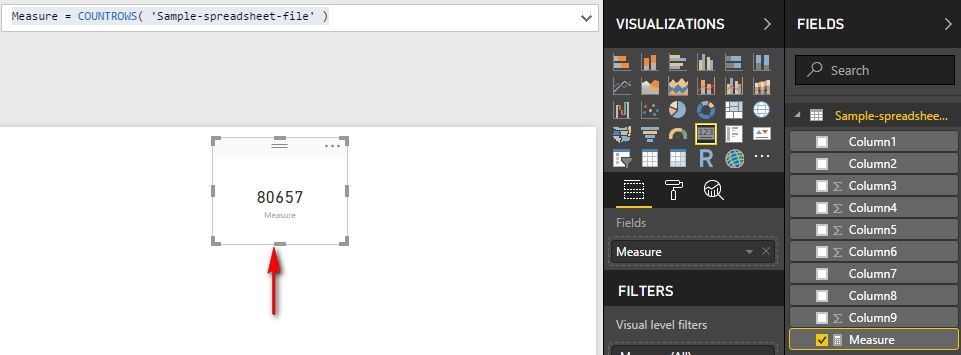
As @Caitlin_Knox suggested, could you please create a measure like following one to check the actual rows imported to PBI Desktop?


Measure = COUNTROWS( 'TableName' )

I just tested with latest Nov 2017 version of PBI Desktop and I could import more than 65000 rows here.


Not upload all excel spreadsheet in powerBI desktop_1.jpg


Best Regards,
Herbert

View solution in original post

4 REPLIES 4
v-haibl-msft
Microsoft Employee
Microsoft Employee

@Giovani


As @Caitlin_Knox suggested, could you please create a measure like following one to check the actual rows imported to PBI Desktop?


Measure = COUNTROWS( 'TableName' )

I just tested with latest Nov 2017 version of PBI Desktop and I could import more than 65000 rows here.


Not upload all excel spreadsheet in powerBI desktop_1.jpg


Best Regards,
Herbert

Hi Herbert,


I couldn`t solve this issue. I removed Power Bi Desktop and installed again. 

Now it is working and loading all data.


Thanks.

Caitlin_Knox
Advocate III
Advocate III

Are you seeing that row coutn in the query editor? Or did you use the COUNTROWS function to check your model? I know in the Query editor, it doesn't necessarily bring in all the rows right there. I would try adding a calculated measure to count the rows once you've loaded the data to the model from the editor.

Actually, it stops to load the data in 65.0000 rows. 

I am construction Line and stacked column chart and that doesn't have the date after the 65.000 lines.  Meaning that this data didn`t load. 

Helpful resources

Announcements
November Power BI Update Carousel

Power BI Monthly Update - November 2025

Check out the November 2025 Power BI update to learn about new features.

Fabric Data Days Carousel

Fabric Data Days

Advance your Data & AI career with 50 days of live learning, contests, hands-on challenges, study groups & certifications and more!

FabCon Atlanta 2026 carousel

FabCon Atlanta 2026

Join us at FabCon Atlanta, March 16-20, for the ultimate Fabric, Power BI, AI and SQL community-led event. Save $200 with code FABCOMM.