cancel
Showing results for 
Search instead for 
Did you mean: 

The Power BI Data Visualization World Championships is back! Get ahead of the game and start preparing now! Learn more

Reply
Anonymous
Not applicable

Not showing account options when connecting to Parquet or ADLS

Hi All

When i tried to connect to Parquet file using parquet connector , after entering the url on the left hand side it gave me few options , like Anonymous, basic, windows.. once i tried anonymous i was not able to connect and tried again this time it wont show the options. I closed , DID NOT save and reopened PBI Desktop, restarted my machine still i do not see those options again, please need help.

Thanks

1 ACCEPTED SOLUTION
v-lionel-msft
Community Support
Community Support

Hi @Anonymous ,


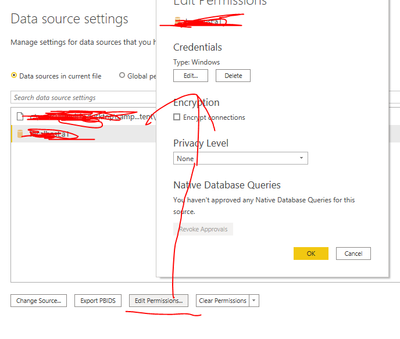
Try to do find this feature.

Options and settings -> Data source settings

v-lionel-msft_0-1620351558984.png


Best regards,
Lionel Chen

If this post helps, then please consider Accept it as the solution to help the other members find it more quickly.


View solution in original post

4 REPLIES 4
v-lionel-msft
Community Support
Community Support

Hi @Anonymous ,


Try to do find this feature.

Options and settings -> Data source settings

v-lionel-msft_0-1620351558984.png


Best regards,
Lionel Chen

If this post helps, then please consider Accept it as the solution to help the other members find it more quickly.


Anonymous
Not applicable

Thanks @v-lionel-msft 

amitchandak
Super User
Super User

@Anonymous , have you tried basic?

But this seem like a different approch

https://docs.microsoft.com/en-us/power-query/connectors/datalakestorage

Share with Power BI Enthusiasts: Full Power BI Video (20 Hours) YouTube
Microsoft Fabric Series 60+ Videos YouTube
Microsoft Fabric Hindi End to End YouTube
Anonymous
Not applicable

@amitchandak thanks tried the link already. With the approach mentioned , the file in ADLS is 500MB and when i connect using PBI and try to load the data the query window shows processing way more than 500MB, wonder what else it is processing and finally fails with the out of memory error.

I think you did not understand my question when you asked me if i tried Basic. I do NOT get an option to choose, as soon as i enter the url, i get a message to edit,retry or cancel. It does NOT give me an option to choose the kind of credential i want to use.

Thanks

Helpful resources

Announcements
Power BI DataViz World Championships

Power BI Dataviz World Championships

The Power BI Data Visualization World Championships is back! Get ahead of the game and start preparing now!

December 2025 Power BI Update Carousel

Power BI Monthly Update - December 2025

Check out the December 2025 Power BI Holiday Recap!

FabCon Atlanta 2026 carousel

FabCon Atlanta 2026

Join us at FabCon Atlanta, March 16-20, for the ultimate Fabric, Power BI, AI and SQL community-led event. Save $200 with code FABCOMM.