cancel
Showing results for 
Search instead for 
Did you mean: 

The Power BI Data Visualization World Championships is back! Get ahead of the game and start preparing now! Learn more

Reply
Ryszard
Frequent Visitor

Not enought memory

Hi there.


I am quite new PowerBi user without experience with DAX and SQL. My issue is linked with PowerBi command Not enought memory during SQL data importing to PowerBi.I executed some community suggestions for instance: remove unnessesary colums; i disable "Allow data preview to download in the background". That hepled partialy; it's mean before i could load 40 mln rows now i can load 103 mln rows before error occur. is it possible (and how to do it) to filter by date, for instance load data from sql to the PowerBi model only from 3 years before now?

4 REPLIES 4
Keith_H
Advocate I
Advocate I

This thread shows how to build the SQL into your query - writing it should be pretty straightforward, something like


SELECT * from [YourTable] where [DateYourInterestedIn] >= DATEADD(year, -3, CURRENT_TIMESTAMP);


depending on what your server is runing and how much data you want to pull

Thank you for prompt reply.


I tried your code but, there is a syntax error. Anyway i use column filter properties(date/time filters), but it seem that there is still to many records for PowerBi/available memory to load (i loaded data from 2017-12-29 and when i try 2017-12-01 memory limitation message appear) 

Hi @Ryszard,

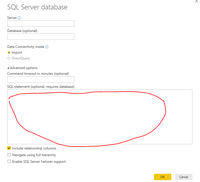
When you use SQL statement to filter your data, please test using SSMS, then type the accurate SQL statement in the red line box.

2.PNG

Best Regards,
Angelia

comish4lif
Helper II
Helper II

This isn't a solution, but I have a related question.


When you use SQL to load rows, does PBI use the indexes in the database associated with those tables?


Are there best practices available to load large datasets in PBI?

Helpful resources

Announcements
Power BI DataViz World Championships

Power BI Dataviz World Championships

The Power BI Data Visualization World Championships is back! Get ahead of the game and start preparing now!

December 2025 Power BI Update Carousel

Power BI Monthly Update - December 2025

Check out the December 2025 Power BI Holiday Recap!

FabCon Atlanta 2026 carousel

FabCon Atlanta 2026

Join us at FabCon Atlanta, March 16-20, for the ultimate Fabric, Power BI, AI and SQL community-led event. Save $200 with code FABCOMM.