Learn from the best! Meet the four finalists headed to the FINALS of the Power BI Dataviz World Championships! Register now
Hi all, have a problem,
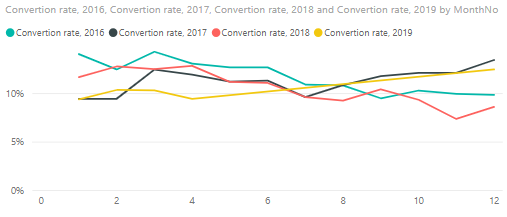
This is convertion (opportunity/lead) graph as we see there is quite chaotic , but after a minute you can see patterns.
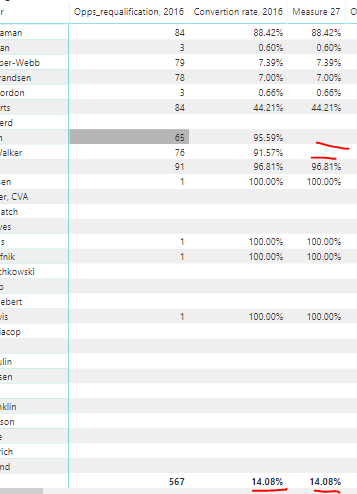
Then I created a table by employee with convertion (convertion rate) by years by months (table below just January) and with opportynity number (opps_requalification_) to find out is there any person who convert more than convertion average. That can potentially mean that lead# = opportunity# wich is not good for overall convertion.
So, for 2016 there are people who convert with convertion rate 91%, 95%, I want to remove them from my data set. How to do that? Pleeeese help!
Convertion rate, 2016 = CALCULATE([Convertion rate_with _requalification], YEAR(Leads[CreatedDate])=2016) Convertion rate_with _requalification = [opps_from_month_with_requlification]/[Leads Web Robs_with_requalification] opps_from_month_with_requlification = calculate(countx(leads, Leads[Opps_with requalification])) Leads Web Robs_with_requalification = calculate(countx(leads, Leads[CreatedDate GSP Leads]), Leads[leads_with_requalification]="iFinance - NonReferred")
Solved! Go to Solution.
Hi @Anonymous
You may create a measure to get the correct total,For example:
Measure = SUMX ( Table, [Measure 27] )
If it is not your case,please share some simplified assumed sample data and expected output which would be helpful to provide an accurate solution.For further,please refer to How to Get Your Question Answered Quickly.
Regards,
Hi @Anonymous
If you want to show the value 91% and 95% as blank,you may create an IF condition like below:
Measure =
IF (
TRUNC ( [Convertion rate, 2016], 2 ) IN { 0.91, 0.95 },
BLANK (),
[Convertion rate, 2016]
)
Regards,
Thank you @v-cherch-msft for reply, but after applying trunc , it does not recalculate overall conversion, I have highlited. Do you know why? and how can I remove those date from overall convertion calculation?
Hi @Anonymous
You may create a measure to get the correct total,For example:
Measure = SUMX ( Table, [Measure 27] )
If it is not your case,please share some simplified assumed sample data and expected output which would be helpful to provide an accurate solution.For further,please refer to How to Get Your Question Answered Quickly.
Regards,
If you have recently started exploring Fabric, we'd love to hear how it's going. Your feedback can help with product improvements.
A new Power BI DataViz World Championship is coming this June! Don't miss out on submitting your entry.
Share feedback directly with Fabric product managers, participate in targeted research studies and influence the Fabric roadmap.
| User | Count |
|---|---|
| 57 | |
| 38 | |
| 33 | |
| 19 | |
| 16 |
| User | Count |
|---|---|
| 69 | |
| 66 | |
| 42 | |
| 32 | |
| 25 |