cancel
Showing results for 
Search instead for 
Did you mean: 

The Power BI Data Visualization World Championships is back! Get ahead of the game and start preparing now! Learn more

Reply
nolan0716
Regular Visitor

Not capturing values using dateadd

Hi,


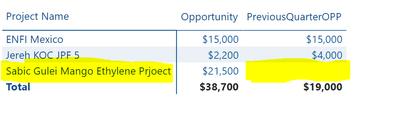
So I was comparing the current value (Opportunity) and the value 3 months prior (PrevQuarterOPP) using the dateadd function but its not getting the correct value or should I say its not capturing the value. See screenshot below


nolan0716_1-1675330319531.png

When I checked the data source. I found out that Decision Period column changed inputs for the 2 months i'm comparing. The Decision Period changed from PD12 FY23 to PD6 FY24


Current Filter - Updated Month (January 2023)

Year - FY23, FY24

nolan0716_2-1675330377139.png


I wanted to display the value even if the Decision Period Change


3 REPLIES 3
Anonymous
Not applicable

Hi @nolan0716 ,


You can try code as below to create a measure.

PreviousQuarterOPP =
VAR _SELECTDATE =
    MIN ( 'TableName'[Updated Month] )
VAR _RangeStart =
    EOMONTH ( _SELECTDATE, -4 ) + 1
RETURN
    CALCULATE (
        SUM ( 'TableName'[Opportunity] ),
        FILTER (
            ALL ( 'TableName' ),
            'TableName'[Updated Month] >= _RangeStart
                && 'TableName'[Updated Month] < _SELECTDATE
        )
    )


Best Regards,
Rico Zhou


If this post helps, then please consider Accept it as the solution to help the other members find it more quickly.

Hi @Anonymous 

this is what I got from your code


nolan0716_0-1675413242453.png


amitchandak
Super User
Super User

@nolan0716 , dateadd need continuous dates, so in case you need to add days, just add it to date


[Date] + 10


For month or year you can use Date function


Date(Year([Date]), Month([Date])+2 , Day([Date]) )


https://community.powerbi.com/t5/Community-Blog/Date-as-Dateadd-Decoding-Date-and-Calendar-5-5-Power...


Dateadd and its Alternate: https://www.youtube.com/watch?v=9qiRivlBv8w&list=PLPaNVDMhUXGaaqV92SBD5X2hk3TMNlHhb&index=66


Share with Power BI Enthusiasts: Full Power BI Video (20 Hours) YouTube
Microsoft Fabric Series 60+ Videos YouTube
Microsoft Fabric Hindi End to End YouTube

Helpful resources

Announcements
Power BI DataViz World Championships

Power BI Dataviz World Championships

The Power BI Data Visualization World Championships is back! Get ahead of the game and start preparing now!

November Power BI Update Carousel

Power BI Monthly Update - November 2025

Check out the November 2025 Power BI update to learn about new features.

FabCon Atlanta 2026 carousel

FabCon Atlanta 2026

Join us at FabCon Atlanta, March 16-20, for the ultimate Fabric, Power BI, AI and SQL community-led event. Save $200 with code FABCOMM.