
cancel
Showing results for 
Search instead for 
Did you mean: 

Get Fabric Certified for FREE during Fabric Data Days. Don't miss your chance! Request now

Reply
nickclarke1998
Regular Visitor

Not all Row Headers in a Matrix are Formatting the same

Hi,


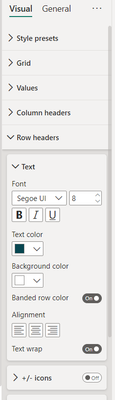
Just looking to format a matrix so all row headers also alternate colours, however I only seem to be able to manage to get one header to alternate (the discipline as below). Any suggestions on a fix for this?

nickclarke1998_1-1686730395890.png


nickclarke1998_2-1686730409901.png


Thanks in advance,

Nick


3 REPLIES 3
Adescrit
Impactful Individual

Hi Nick,


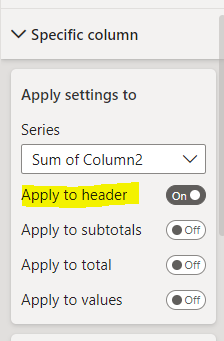
Please try using this setting option instead of row headers:


Adescrit_0-1686733198530.png


This should allow you to apply specific formatting per column, and apply that only to the header if necessary.


Did I answer your question? Mark my post as a solution!
My LinkedIn

Hi,


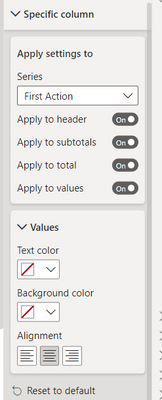
I have had a look at using this, however there is only one series to choose from which is the actions in this matrix, and it is not showing the row headers at all:

nickclarke1998_1-1686734249653.png


Do you know why it may only be showing that series?


Cheers,


Hi @nickclarke1998 


Please could I see what fields you have and in which section of the visual? i.e. what do you have in the rows, columns, values section of the visual. This might help me analyse the issue further.


Did I answer your question? Mark my post as a solution!
My LinkedIn

Helpful resources

Announcements
November Power BI Update Carousel

Power BI Monthly Update - November 2025

Check out the November 2025 Power BI update to learn about new features.

Fabric Data Days Carousel

Fabric Data Days

Advance your Data & AI career with 50 days of live learning, contests, hands-on challenges, study groups & certifications and more!

FabCon Atlanta 2026 carousel

FabCon Atlanta 2026

Join us at FabCon Atlanta, March 16-20, for the ultimate Fabric, Power BI, AI and SQL community-led event. Save $200 with code FABCOMM.

Top Solution Authors
Top Kudoed Authors