Join us at FabCon Atlanta from March 16 - 20, 2026, for the ultimate Fabric, Power BI, AI and SQL community-led event. Save $200 with code FABCOMM.
Register now!Learn from the best! Meet the four finalists headed to the FINALS of the Power BI Dataviz World Championships! Register now
Hey,
I have published a report and i click on the 3 dots -> Export data. It only gives me the option to export the summarized data and not the underlying one.
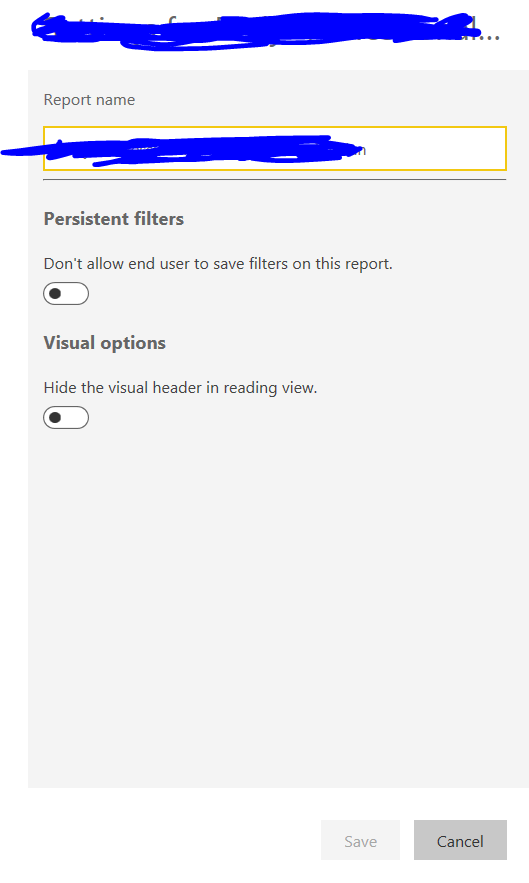
I went to check under Reports -> Settings button corresponding it . I do not see any option called "Export" to check if "underlying data" has been disabled. All I see under settings is as follows:
Any suggestions as to why this is not working? Thank you!
Solved! Go to Solution.
I noticed recently that the options to allow what data is downloadable has been removed from the online service. Instead, it is only available in the desktop version by going to File > Options and setting > Options > Report settings (bottom option on the left menu).
The restrictions on downloading underlying data can be set there and when it is republished, should take effect.
I noticed recently that the options to allow what data is downloadable has been removed from the online service. Instead, it is only available in the desktop version by going to File > Options and setting > Options > Report settings (bottom option on the left menu).
The restrictions on downloading underlying data can be set there and when it is republished, should take effect.
This worked. Thank you!
Share feedback directly with Fabric product managers, participate in targeted research studies and influence the Fabric roadmap.
Check out the February 2026 Power BI update to learn about new features.
| User | Count |
|---|---|
| 69 | |
| 60 | |
| 47 | |
| 20 | |
| 16 |