Don't miss your chance to take exam DP-600 or DP-700 on us!
Request nowLearn from the best! Meet the four finalists headed to the FINALS of the Power BI Dataviz World Championships! Register now
hi Team,
We are trying to analyze a data for a given report and want to download/export the data for a specific table but it does not allow to do so. We are facing this with certain reports even though we are admin user on those.
Solved! Go to Solution.
the problem is we are not seeing ... in those visuals, otherwise it would have worked. anything changed in the latest update for powerbi?
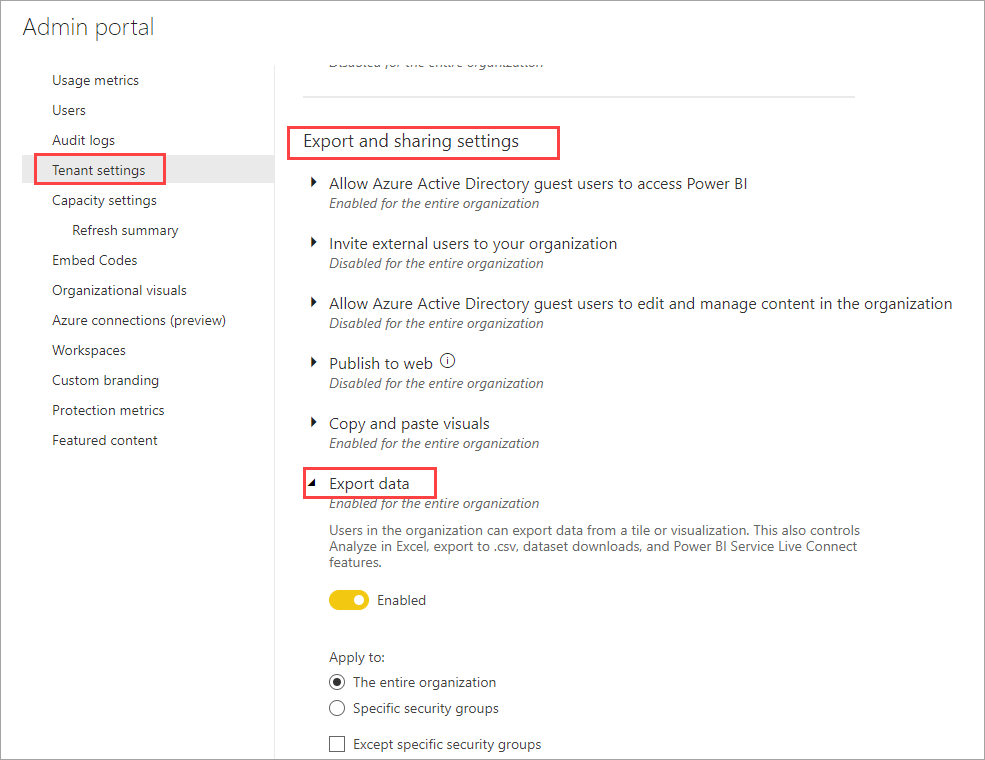
If you are not able to export data from any visual it may be the Tenant setting is disabled.
@Anonymous
You have to have the Visual Header set to On in order to see the 'More Options' menu. Could that be it?
just found and fixed it.
thank you
Hi @Anonymous , as this is solved, can you please accept the appropriate post as the solution to close this topic? This will help others find the solution quickly. Thank you.
Best Regards,
Community Support Team _ Jing Zhang
@Anonymous , You need a visual table then in three dots, you have the option to export.
https://docs.microsoft.com/en-us/power-bi/visuals/power-bi-visualization-export-data
Data table, you can right and copy and paste in excel : https://www.youtube.com/watch?v=1_XlyzV-PcY
Or analyze in excel: https://docs.microsoft.com/en-us/power-bi/collaborate-share/service-analyze-in-excel
Share feedback directly with Fabric product managers, participate in targeted research studies and influence the Fabric roadmap.
Check out the February 2026 Power BI update to learn about new features.
| User | Count |
|---|---|
| 49 | |
| 40 | |
| 37 | |
| 14 | |
| 14 |
| User | Count |
|---|---|
| 86 | |
| 69 | |
| 37 | |
| 29 | |
| 26 |