cancel
Showing results for 
Search instead for 
Did you mean: 

The Power BI Data Visualization World Championships is back! Get ahead of the game and start preparing now! Learn more

Reply
rajulshah
Resident Rockstar
Resident Rockstar

Not able to change the Power BI Dataset after it gets deleted

Hello everyone,


We have 10 reports which point to a single Power BI Dataset.

We accidentally deleted the main dataset from Power BI Service, and obviously, it deleted all the 10 reports that pointed to this Power BI Dataset. 

But, when we try to open them in Power BI Desktop, it shows an error and asks us to either Retry or Edit. When we click on "Edit",

we are getting a blank screen. Can anyone please help us to solve this issue? Or maybe how to change to new dataset when the old dataset is deleted?

Please help us as it is very urgent and critical.


Any help/suggestions would be appreciated.


Thanks in advance.

1 ACCEPTED SOLUTION
Anonymous
Not applicable

Hi @rajulshah ,


Let's suppose the original file is "pbix1", You could try to follow these steps:

1. Re-published the report

2. Get data from Power BI Datasets again ,then named the pbix "pbix2"

3. Change the pbix1 and pbix2 's extension to ".zip"

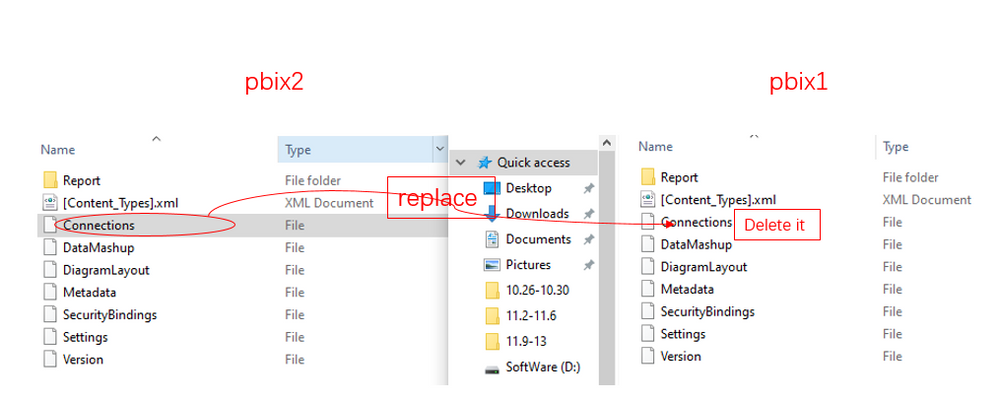
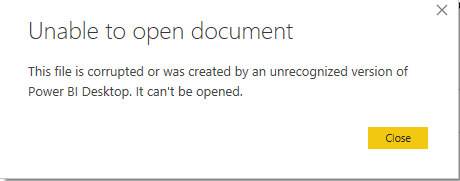
4. Replace the Connection file in pbix1 with the Connection file in pbix2, you would  get this error message shown below:

11.9.2.3.PNG


11.9.2.1.PNG


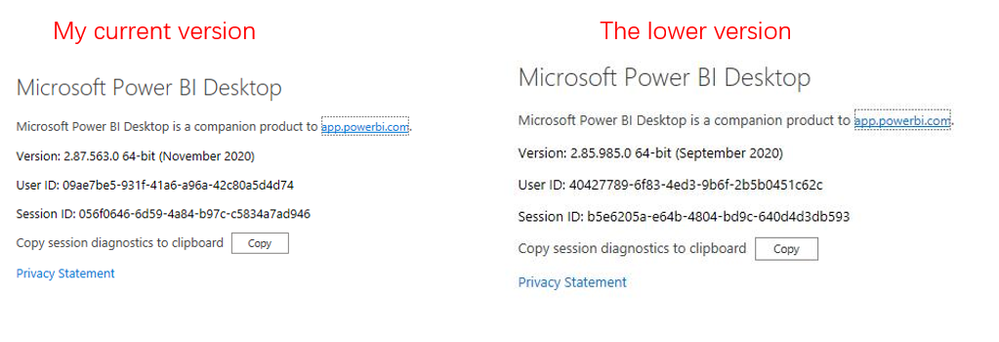
5.At last ,according to my test, it could be opened with a lower version of Power BI Desktop

11.9.2.2.PNG

Did I answer your question ? Please mark my reply as solution. Thank you very much.
If not, please upload some insensitive data samples and expected output.


Best Regards,
Eyelyn Qin

View solution in original post

4 REPLIES 4
Anonymous
Not applicable

Hi @rajulshah ,


Could you tell me if your problem has been solved? If it is, kindly Accept it as the solution. More people will benefit from it. Or you are still confused about it, please provide me with more details about your table and your problem or share me with your pbix file from your Onedrive for Business.


Best Regards,
Eyelyn Qin

Anonymous
Not applicable

Hi @rajulshah ,


Let's suppose the original file is "pbix1", You could try to follow these steps:

1. Re-published the report

2. Get data from Power BI Datasets again ,then named the pbix "pbix2"

3. Change the pbix1 and pbix2 's extension to ".zip"

4. Replace the Connection file in pbix1 with the Connection file in pbix2, you would  get this error message shown below:

11.9.2.3.PNG


11.9.2.1.PNG


5.At last ,according to my test, it could be opened with a lower version of Power BI Desktop

11.9.2.2.PNG

Did I answer your question ? Please mark my reply as solution. Thank you very much.
If not, please upload some insensitive data samples and expected output.


Best Regards,
Eyelyn Qin

amitchandak
Super User
Super User

As far as I know, you can recover the workspace. http://dataap.org/blog/2019/06/05/recover-restore-deleted-power-bi-workspace-step-by-step/

Contact Support if needed -https://powerbi.microsoft.com/en-us/support/


Share with Power BI Enthusiasts: Full Power BI Video (20 Hours) YouTube
Microsoft Fabric Series 60+ Videos YouTube
Microsoft Fabric Hindi End to End YouTube

This is not relevant to our issue. Power BI workspace is not deleted in our case.

Helpful resources

Announcements
Power BI DataViz World Championships

Power BI Dataviz World Championships

The Power BI Data Visualization World Championships is back! Get ahead of the game and start preparing now!

December 2025 Power BI Update Carousel

Power BI Monthly Update - December 2025

Check out the December 2025 Power BI Holiday Recap!

FabCon Atlanta 2026 carousel

FabCon Atlanta 2026

Join us at FabCon Atlanta, March 16-20, for the ultimate Fabric, Power BI, AI and SQL community-led event. Save $200 with code FABCOMM.