cancel
Showing results for 
Search instead for 
Did you mean: 

The Power BI Data Visualization World Championships is back! Get ahead of the game and start preparing now! Learn more

Reply
JakeandSnake
Frequent Visitor

Not a valid Win32 FileTime.

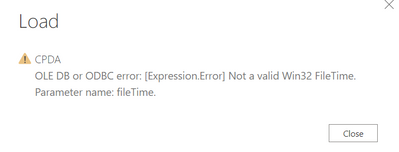
Hi All. I have a PBI report link to a sharedrive with gateway setup. It has been refreshed successfully for two months, however, started from this month, I've encountered the below error. The current workaround is I need to remove the files in the sharedrive folder and recreated them. Wondering is there any possibility we can handle it from Power BI side? Thanks in advance.
JakeandSnake_0-1625643640976.png


6 REPLIES 6
v-deddai1-msft
Community Support
Community Support

Hi @JakeandSnake ,


It could be issue in the data source. Is the latest version of power bi desktop working?


If this post helps, then please consider Accept it as the solution to help the other members find it more quickly.


Best Regards,

Dedmon Dai

Hi @v-deddai1-msft ,


I've updated to the latest version of PBI, but still encounter the same issue.

I believe you are right, issues may from the data source. I actually spent 2 hours recreating those files and managed to solve them. Just wondering anything can be done from Power BI side so that in the future I do not have take time to locate those problematic files and recreate them. 

Hi @JakeandSnake ,


You may need to get support from the sharedrive you used to store data source file. I didn't find any solution in power bi side.


If this post helps, then please consider Accept it as the solution to help the other members find it more quickly.


Best Regards,

Dedmon Dai


It turned out we have some issues related to the "Date Accessed" attributes under properties for certain files.

I'm using Folder.Files to get the list of files, and by default, it will also get "Date Accessed" attributes for me, is there any way I can get the list of files from a folder without getting "Date Accessed" attribute? However, I still need the "Date created" and file size info.

Hi @JakeandSnake ,


The column is created by default when you import data source from folders. I didn't find any solution that you can removed the column before you load the data source to power bi.


If this post helps, then please consider Accept it as the solution to help the other members find it more quickly.


Best Regards,

Dedmon Dai


Alright. Thanks as well!

Helpful resources

Announcements
Power BI DataViz World Championships

Power BI Dataviz World Championships

The Power BI Data Visualization World Championships is back! Get ahead of the game and start preparing now!

December 2025 Power BI Update Carousel

Power BI Monthly Update - December 2025

Check out the December 2025 Power BI Holiday Recap!

FabCon Atlanta 2026 carousel

FabCon Atlanta 2026

Join us at FabCon Atlanta, March 16-20, for the ultimate Fabric, Power BI, AI and SQL community-led event. Save $200 with code FABCOMM.