Join us at FabCon Atlanta from March 16 - 20, 2026, for the ultimate Fabric, Power BI, AI and SQL community-led event. Save $200 with code FABCOMM.
Register now!Vote for your favorite vizzies from the Power BI Dataviz World Championship submissions. Vote now!
Hi,
here is my problem :
let's say i have :
- 1 Dimension table with 10 users --> DIM_USERS
- 1 Dimension table with 50 reports --> DIM_REPORTS
- 1 Fact table with logs --> TAB_LOGS
If i select one report, let's say "Report A", i can easily display users that did access the report.
But if i wanna display the lads who did NOT...
I would like those lazy users to be listed in a dynamic table.
That means that the solution consisting of a CONCATENATEX measure with the list "lazyguy1, lazyguy2, ..." isn't ok.
I really need to have those guys listed in a table.
I tried to play with the EXCEPT function. I guess this is the good path to the solution. But i can't figure out how to set my "right" table.
EXCEPT(Table_left;Table_right)
--> EXCEPT(SELECTCOLUMNS(DIM_USERS;"LazyLads";DIMUSERS[UserID]); ??? )
Thanks for you help
A lazy guy
Solved! Go to Solution.
Hi @Anonymous ,
Here is the calculated measure you can create for that:
Lazy User =
var selectedReport = SELECTEDVALUE(DIM_REPORTS[Reports])
VAR selectedUser = SELECTEDVALUE(DIM_USERS[Users])
VAR selectedUserUseSelectedReport = IF(
COUNT('TAB_LOGS'[Date])>=1
,TRUE,FALSE)
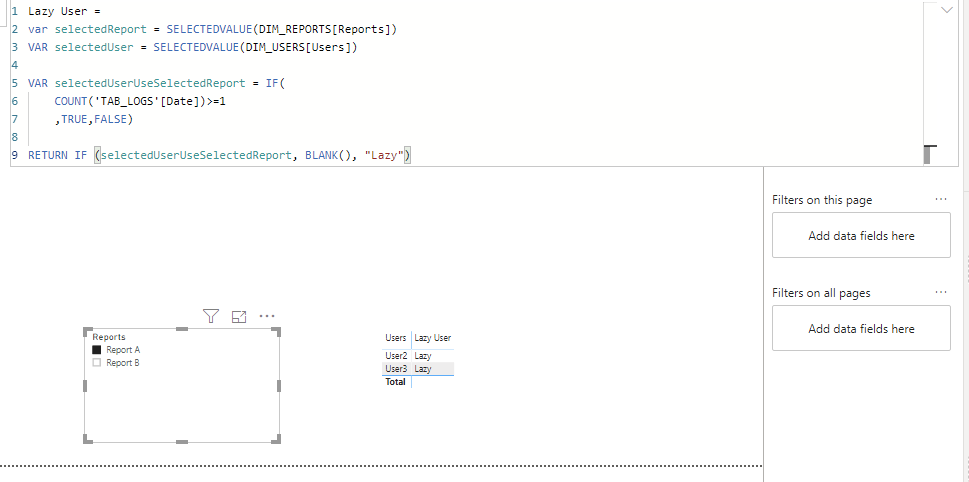
RETURN IF (selectedUserUseSelectedReport, BLANK(), "Lazy")Here is a screenshot of what it will look like:
And finally, here you can download the Power BI template.
Let me know if this works for you,
LC
Interested in Power BI templates? Check out my blog at www.finance-bi.com
Hi @Anonymous ,
Here is the calculated measure you can create for that:
Lazy User =
var selectedReport = SELECTEDVALUE(DIM_REPORTS[Reports])
VAR selectedUser = SELECTEDVALUE(DIM_USERS[Users])
VAR selectedUserUseSelectedReport = IF(
COUNT('TAB_LOGS'[Date])>=1
,TRUE,FALSE)
RETURN IF (selectedUserUseSelectedReport, BLANK(), "Lazy")Here is a screenshot of what it will look like:
And finally, here you can download the Power BI template.
Let me know if this works for you,
LC
Interested in Power BI templates? Check out my blog at www.finance-bi.com
Vote for your favorite vizzies from the Power BI World Championship submissions!
If you love stickers, then you will definitely want to check out our Community Sticker Challenge!
Check out the January 2026 Power BI update to learn about new features.
| User | Count |
|---|---|
| 66 | |
| 51 | |
| 42 | |
| 25 | |
| 22 |
| User | Count |
|---|---|
| 139 | |
| 116 | |
| 54 | |
| 37 | |
| 31 |