cancel
Showing results for 
Search instead for 
Did you mean: 

The Power BI Data Visualization World Championships is back! Get ahead of the game and start preparing now! Learn more

Reply
zivhimmel
Resolver I
Resolver I

Normalize values based on the first one

Hi,

I'm trying to display a graph that shows the performance of a portfolio. Currently it looks like this :

Capture.PNG

As you can see, the first value displayed is 101.63, because this is the value of the portfolio at the begining

of the selected date range.

I would like to dynamically set the first value to a 100 and adjust all values accordingly. For example, if the values

in the date range are as follows :

day 1 : 110

day 2 : 115

day 3 : 105

I would like then to be : 

day 1: 100

day2 : 104.54

day3 : 95.45


The calculation is done by dividing each of the values by the value of the first day(110), and maltiplying by 100.

I don't know how to do it in DAX.

You help is appreciated, thanks !


1 ACCEPTED SOLUTION
OwenAuger
Super User
Super User

Hi @zivhimmel


I would do something like this:


(I'm calling your fact table Data and assuming you have a related calendar table called Calendar with the relationship on the Date column, and a base measure called [Value] )


  1. Define a measure [Value First Date]
    Value First Date =
    /* Optional check: Only return Value First Date up to the max date that actually appears in the fact table */
    IF (
        MIN ( 'Calendar'[Date] ) <= CALCULATE ( MAX ( Data[Date] ), ALL ( Data ) ),
        CALCULATE (
            [Value],
            CALCULATETABLE ( FIRSTDATE ( 'Calendar'[Date] ), ALLSELECTED ( 'Calendar' ) )
        )
    )
  2. Define a [Value Normalized] measure:
    Value Normalized =
    DIVIDE ( [Value], [Value First Date] ) * 100

Owen Auger
Did I answer your question? Mark my post as a solution!
Blog
LinkedIn

View solution in original post

4 REPLIES 4
OwenAuger
Super User
Super User

Hi @zivhimmel


I would do something like this:


(I'm calling your fact table Data and assuming you have a related calendar table called Calendar with the relationship on the Date column, and a base measure called [Value] )


  1. Define a measure [Value First Date]
    Value First Date =
    /* Optional check: Only return Value First Date up to the max date that actually appears in the fact table */
    IF (
        MIN ( 'Calendar'[Date] ) <= CALCULATE ( MAX ( Data[Date] ), ALL ( Data ) ),
        CALCULATE (
            [Value],
            CALCULATETABLE ( FIRSTDATE ( 'Calendar'[Date] ), ALLSELECTED ( 'Calendar' ) )
        )
    )
  2. Define a [Value Normalized] measure:
    Value Normalized =
    DIVIDE ( [Value], [Value First Date] ) * 100

Owen Auger
Did I answer your question? Mark my post as a solution!
Blog
LinkedIn

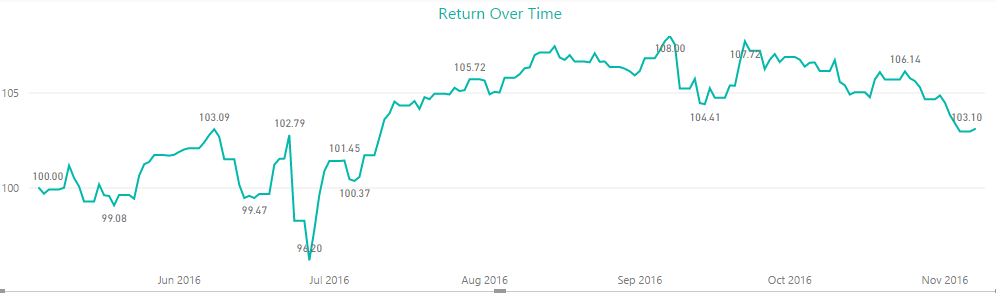
@OwenAuger, thank you so much. Awesome solution !


Capture.PNG


Excellent!

I would nee to set the value to 100 to ANY first date taken into account for analysis and then normalize subsequent values accordingly.

Is this possible in DAX?

Very Nice Example!
I would need as similar method that calculatyes 100 as ANY first date taken in to account as starting date, and then normalize values accordingly. Is it possible with DAX ?

Helpful resources

Announcements
Power BI DataViz World Championships

Power BI Dataviz World Championships

The Power BI Data Visualization World Championships is back! Get ahead of the game and start preparing now!

December 2025 Power BI Update Carousel

Power BI Monthly Update - December 2025

Check out the December 2025 Power BI Holiday Recap!

FabCon Atlanta 2026 carousel

FabCon Atlanta 2026

Join us at FabCon Atlanta, March 16-20, for the ultimate Fabric, Power BI, AI and SQL community-led event. Save $200 with code FABCOMM.