Don't miss your chance to take the Fabric Data Engineer (DP-700) exam on us!
Learn moreNext up in the FabCon + SQLCon recap series: The roadmap for Microsoft SQL and Maximizing Developer experiences in Fabric. All sessions are available on-demand after the live show. Register now
Hello Everyone,
I am working on a dataset. When I choose a date range through a filter, I am seeing filtered data which is ok. But I need to see data which is not filtered.
Example: There are 5 Users, A,B,C,D,E. When I choose date range(or any filter), I am seeing A, B,C. But I want to see D and E also. How can I see that? Is there any way of seeing non-filtered data also? Kindly help.
Regards,
Piyush
Solved! Go to Solution.
Hi Piyush,
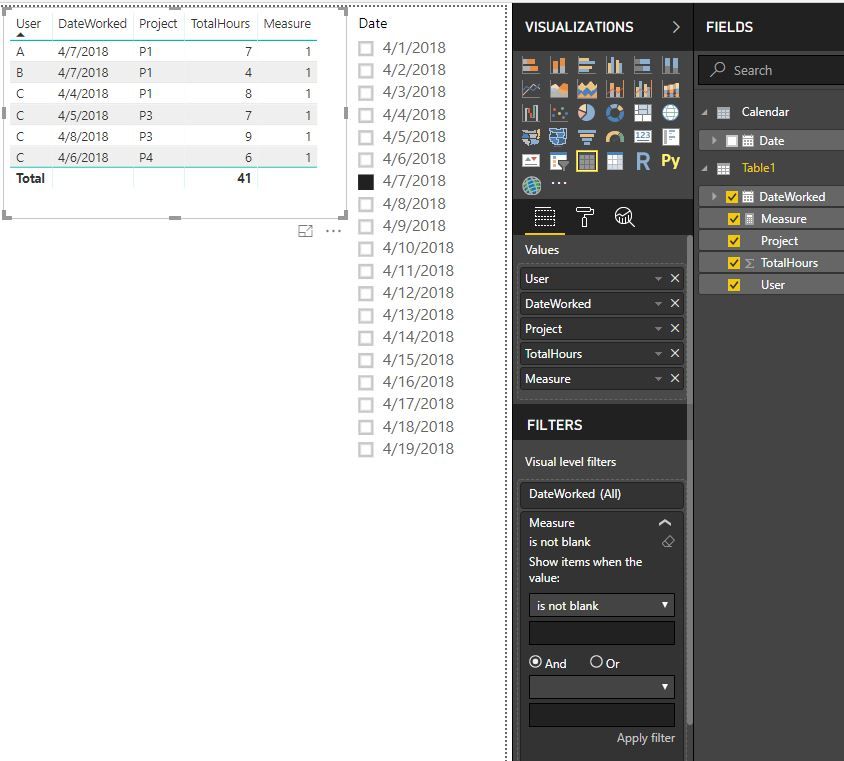
We need a new independent date table in this scenario. Please check out the demo in the attachment.
1. A date table. No relationship with other tables.
Calendar = CALENDAR(date(2018,4,1),date(2018,4,30))
2. A measure.
Measure =
VAR selectedUsers =
CALCULATETABLE (
VALUES ( Table1[User] ),
FILTER (
ALL ( Table1 ),
Table1[DateWorked] = SELECTEDVALUE ( 'Calendar'[Date] )
)
)
RETURN
IF (
MIN ( Table1[User] ) IN selectedUsers
&& MIN ( Table1[DateWorked] ) = SELECTEDVALUE ( 'Calendar'[Date] ),
1,
IF ( NOT MIN ( Table1[User] ) IN selectedUsers, 1, BLANK () )
)
3. Filter out the blanks.
Best Regards,
Dale
Hi Piyush,
We can achieve a similar result. But it depends on your data structure. Can you share a sample of your data, please?
Best Regards,
Dale
Hey Dale,
Thanks for replying. Here's my sample data:
Now in visualisation when I filter date 07-Apr-18, I will be seeing users 'A' and 'B' details. But I want details of 'C' also.
Object : 'C' didn't worked on 7-April-18 .
Let me know if you need more details.
Thanks and Regards,
Piyush
Hi Piyush,
We need a new independent date table in this scenario. Please check out the demo in the attachment.
1. A date table. No relationship with other tables.
Calendar = CALENDAR(date(2018,4,1),date(2018,4,30))
2. A measure.
Measure =
VAR selectedUsers =
CALCULATETABLE (
VALUES ( Table1[User] ),
FILTER (
ALL ( Table1 ),
Table1[DateWorked] = SELECTEDVALUE ( 'Calendar'[Date] )
)
)
RETURN
IF (
MIN ( Table1[User] ) IN selectedUsers
&& MIN ( Table1[DateWorked] ) = SELECTEDVALUE ( 'Calendar'[Date] ),
1,
IF ( NOT MIN ( Table1[User] ) IN selectedUsers, 1, BLANK () )
)
3. Filter out the blanks.
Best Regards,
Dale
If you have recently started exploring Fabric, we'd love to hear how it's going. Your feedback can help with product improvements.
A new Power BI DataViz World Championship is coming this June! Don't miss out on submitting your entry.
Share feedback directly with Fabric product managers, participate in targeted research studies and influence the Fabric roadmap.
| User | Count |
|---|---|
| 48 | |
| 45 | |
| 41 | |
| 20 | |
| 18 |
| User | Count |
|---|---|
| 68 | |
| 67 | |
| 33 | |
| 31 | |
| 29 |