Join us at FabCon Atlanta from March 16 - 20, 2026, for the ultimate Fabric, Power BI, AI and SQL community-led event. Save $200 with code FABCOMM.
Register now!The Power BI Data Visualization World Championships is back! Get ahead of the game and start preparing now! Learn more
Hello Everyone,
I am working on a dataset. When I choose a date range through a filter, I am seeing filtered data which is ok. But I need to see data which is not filtered.
Example: There are 5 Users, A,B,C,D,E. When I choose date range(or any filter), I am seeing A, B,C. But I want to see D and E also. How can I see that? Is there any way of seeing non-filtered data also? Kindly help.
Regards,
Piyush
Solved! Go to Solution.
Hi Piyush,
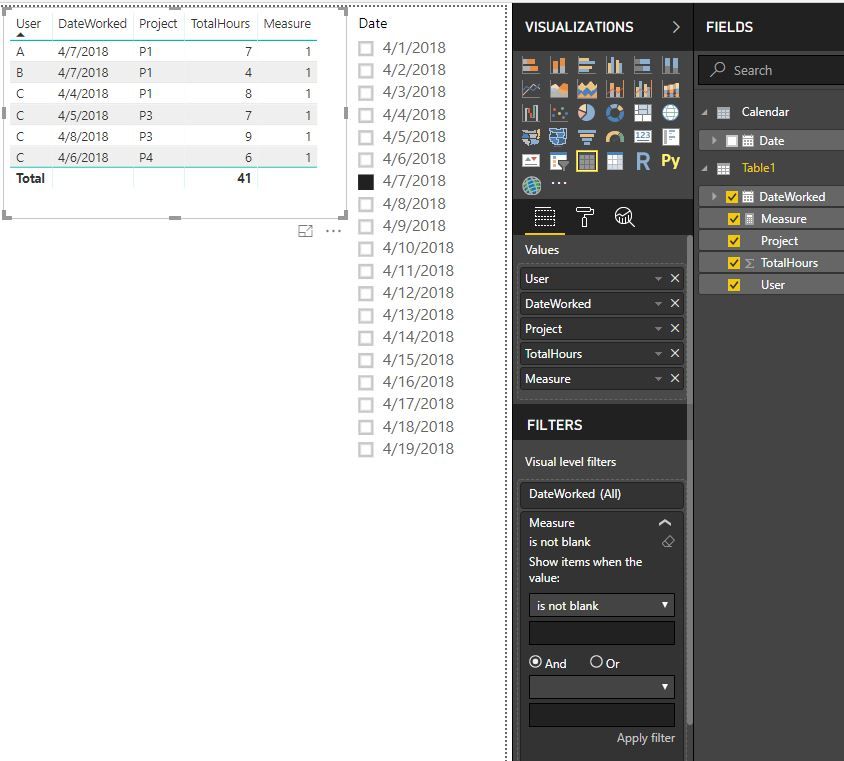
We need a new independent date table in this scenario. Please check out the demo in the attachment.
1. A date table. No relationship with other tables.
Calendar = CALENDAR(date(2018,4,1),date(2018,4,30))
2. A measure.
Measure =
VAR selectedUsers =
CALCULATETABLE (
VALUES ( Table1[User] ),
FILTER (
ALL ( Table1 ),
Table1[DateWorked] = SELECTEDVALUE ( 'Calendar'[Date] )
)
)
RETURN
IF (
MIN ( Table1[User] ) IN selectedUsers
&& MIN ( Table1[DateWorked] ) = SELECTEDVALUE ( 'Calendar'[Date] ),
1,
IF ( NOT MIN ( Table1[User] ) IN selectedUsers, 1, BLANK () )
)
3. Filter out the blanks.
Best Regards,
Dale
Hi Piyush,
We can achieve a similar result. But it depends on your data structure. Can you share a sample of your data, please?
Best Regards,
Dale
Hey Dale,
Thanks for replying. Here's my sample data:
Now in visualisation when I filter date 07-Apr-18, I will be seeing users 'A' and 'B' details. But I want details of 'C' also.
Object : 'C' didn't worked on 7-April-18 .
Let me know if you need more details.
Thanks and Regards,
Piyush
Hi Piyush,
We need a new independent date table in this scenario. Please check out the demo in the attachment.
1. A date table. No relationship with other tables.
Calendar = CALENDAR(date(2018,4,1),date(2018,4,30))
2. A measure.
Measure =
VAR selectedUsers =
CALCULATETABLE (
VALUES ( Table1[User] ),
FILTER (
ALL ( Table1 ),
Table1[DateWorked] = SELECTEDVALUE ( 'Calendar'[Date] )
)
)
RETURN
IF (
MIN ( Table1[User] ) IN selectedUsers
&& MIN ( Table1[DateWorked] ) = SELECTEDVALUE ( 'Calendar'[Date] ),
1,
IF ( NOT MIN ( Table1[User] ) IN selectedUsers, 1, BLANK () )
)
3. Filter out the blanks.
Best Regards,
Dale
The Power BI Data Visualization World Championships is back! Get ahead of the game and start preparing now!
Check out the November 2025 Power BI update to learn about new features.
| User | Count |
|---|---|
| 62 | |
| 46 | |
| 42 | |
| 24 | |
| 18 |
| User | Count |
|---|---|
| 193 | |
| 124 | |
| 101 | |
| 67 | |
| 49 |